

You’ve hit your search limit
Start your free trial to keep exploring full traffic and performance insights.
Get StartedaSmart HUD app analytics for August 24

aSmart HUD
- Vitalijs Lennojs
- Apple App Store
- Paid
- Navigation
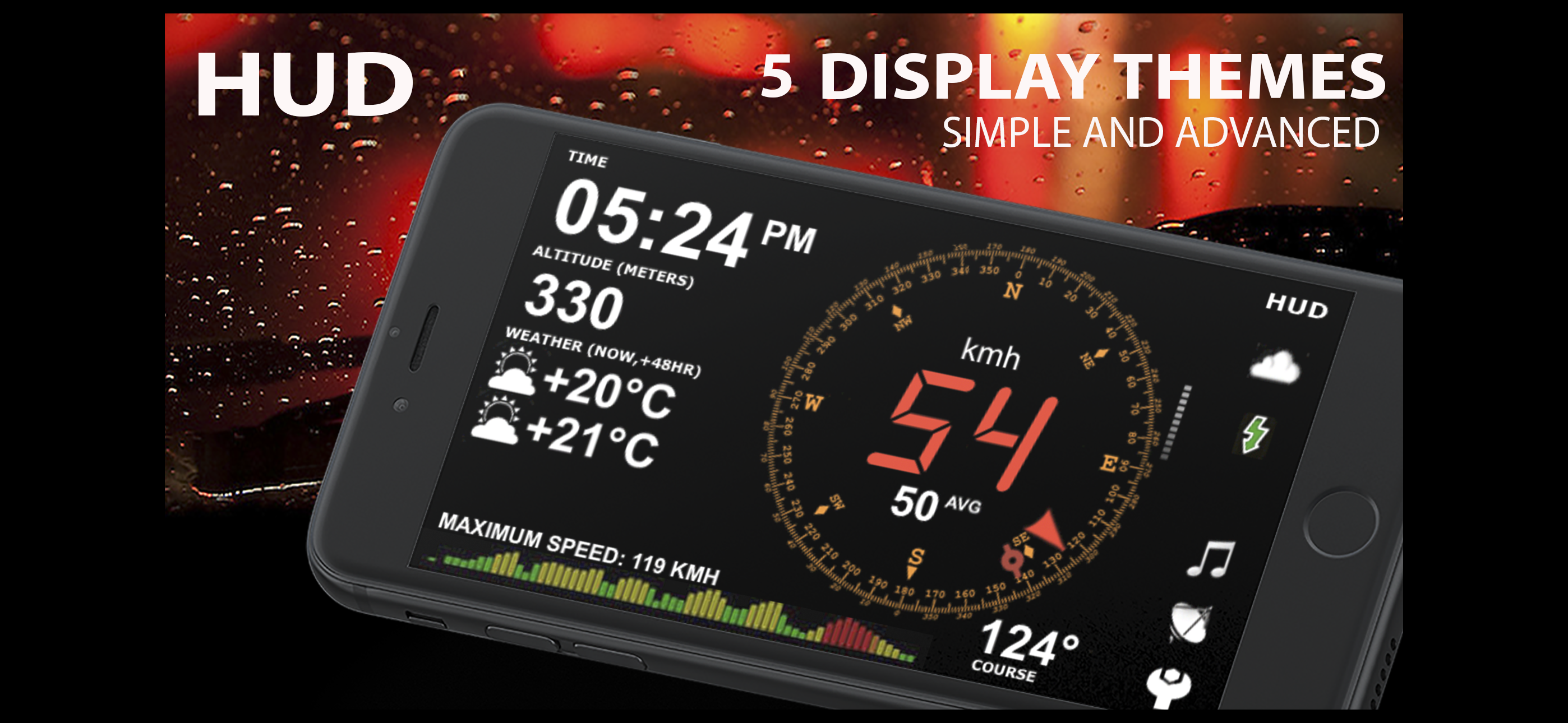
aSmartHUD is simple and clear vehicle digital dashboard featured by
- HUD mode
- SHORT-TERM WEATHER FORECAST
- IPOD MUSIC PLAYLIST CONTROL
- PHOTO CAMERA WITH IMAGE MARKING
- ADJUSTABLE TRANSPARENCY APPLE MAPS SCREEN
It visualizes your
- current speed,
- average speed,
- current time,
- elapsed trip time,
- heading,
- altitude,
- trip elapsed time,
- distance/time/direction to home location,
- weather forecast for nearest 48 hours the with 3-hour time interval,
- direct distance (kilometers, miles, nautical miles supported) to the starting point of your trip.
- maximum reached speed, altitude and distance to start point, for the current trip and all the trips your ever did.
Comparing with others HUD displays on the market - better look and more features for no price.
Tapping the "HUD" icon mirrors all the text, so if you position the iPhone horizontally under your car's windscreen you can see perfectly readable half-transparent reflection of the picture displayed. We love this mode! We found it much more convenient compared to traditional car dashboards (especially on the roads of Western Europe, which are full of speed cameras and where you need to watch your speedometer all the time). And last but not the least - it just looks cool.
Note: this mode works pretty well at night time and twilight, but on direct sunlight the screen brightness can be insufficient.
- "aSmart HUD" can keep track on 4 speed limits, giving a warning (sound and visual) each time you crossing it. Normally, it's legal speed limits within cities, local roads and high-speed motorways. "Never exceed speed" is the speed you should not exceed under any conditions. For example, it can be a technical limit of your vehicle or the point where government can arrest your driving license.
- You can skip/rewind/play/pause your current iPod music track, select the playlist or set the Shuffle or Repeat iPod mode.
- Weather forecast time intervals and temperature units (C, F) are selectable in Preferences.
- You can quickly take a photo of what's going on the road. Photo will be automatically saved into the Photos Album. The speedometer image, map and a some of other useful information will be placed over your photo.
- Landscape and Portrait screen layouts support.
- Three different compass styles, sound themes, colors, etc.
- 4 functionally different display themes.
- Speed history log chart.
- "Location Info" - longitude and latitude, GPS measurement precision and some more data.
- "Records" screen (left upper button on the "Location Info" screen), where you can see your maximum reached speed (during the current trip or all of your trips), maximum altitude and maximum distance from start.
- Tap the speed indicator to switch into speed fullscreen mode.
IMPORTANT: for more screenshots and details visit the http://atoll-ordenadores.com website
Limitations
- The precision is affected by the satellite signal quality. If unsure, use the program only for reference, don't rely on it for 100%. Application requires real A-GPS chip - so, no iPod and not-3G iPad supported. On iPad 3G application function only in "double pixel" mode.
Thanks to everyone for your suggestions about additional functionality! THE BEST AND FASTEST WAY TO CONTACT US IS SENDING YOUR REQUESTS AND BUG REPORTS to support@atoll-ordenadores.com. WE ARE REALLY INTERESTED IN DIALOG, what is not possible when you leaving the bug-report as AppStore review.
Store Rank
The Store Rank is based on multiple parameters set by Google and Apple.
All Categories in
United States--
Navigation in
United States#109
Top Competitors & Alternative Apps
Apps with a high probability of being used by the same users, from the same store.

GOVA Driver Transportation
Speedy - beautiful speedometer

simpleHUD

GPS Speedometer MPH - Speedify
 aSmart HUD VS.
 August 24, 2026