

You’ve hit your search limit
Start your free trial to keep exploring full traffic and performance insights.
Get StartedEasyHealth Track app analytics for September 15

EasyHealth Track
- Kenichi Horiuchi
- Apple App Store
- Paid
- Health & Fitness
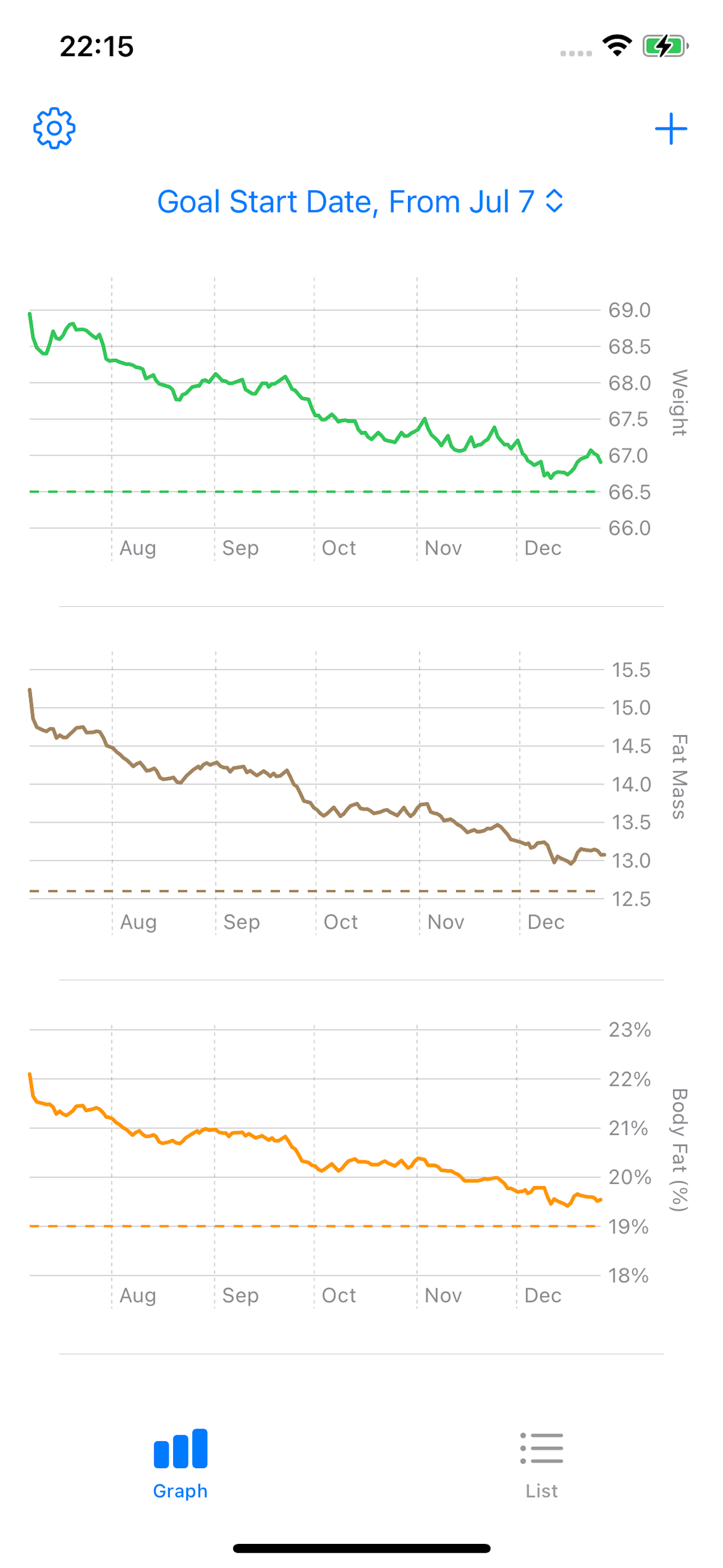
"EasyHealth Track” is a healthcare app that makes it simple to input and manage your weight, body fat percentage, and fat mass. Designed to help you stay on track with your health goals, whether it's dieting or building muscle, it integrates with the Apple Health app to ensure privacy while recording your data.
With a one-time purchase, you get access to all features—no additional charges or subscription fees. The app is free of ads and pop-ups, offering a stress-free user experience.
Key Features
- Track Three Metrics at Once
View graphs for weight, body fat percentage, and fat mass to better understand changes in your body, such as muscle growth or fat loss.
- Visualize Goal Progress
Display your goal line on the graph for easy monitoring of daily changes and a sense of achievement as you get closer to your target.
- Step Count Graph
Easily check your daily step count and track your activity trends with a graph designed for monitoring diet and exercise habits.
- Graph Color Customization
Personalize graph colors for weight, body fat percentage, fat mass, and step count. Tailor the display to enhance readability and motivation.
- Simple Input & Intuitive UI
Quick daily data entry and an intuitive display make tracking stress-free and easy to continue.
- Notifications to Keep You on Track
For those who often forget to record, reminders help you build a habit of consistent input.
Recommended For:
- Anyone from beginners to advanced users looking to manage their body changes effectively.
- Those focusing on muscle gain and body shaping, wanting to monitor both fat loss and muscle increase.
- Users who prefer simple app operations for better adherence.
Features List:
1. Graph Visualization: Clearly display trends for weight, body fat percentage, and fat mass.
2. Goal Line Display: Compare your current numbers with your targets to understand your progress.
3. Easy Input & Reminders: Notifications encourage daily recording, enabling more accurate data analysis over time.
4. Review Data: Conveniently review past data to evaluate your dieting or training results.
5. Step Count Graph: Visualize daily steps and track your exercise habits with ease.
6. Graph Color Customization: Adjust graph colors to suit your preferences for an optimized display.
How to Use
1. Open the app and input your weight and body fat percentage.
2. Fat mass is automatically calculated and displayed.
3. Check daily changes through the graph.
4. Adjust your diet or training based on the gap between your current data and goals.
5. Use reminders to continue inputting data and establish healthy habits.
Development Background
- Inspired by feedback like, "I'm only tracking my weight, and even though I'm gaining muscle, my weight isn't dropping, which is demotivating."
- By providing insights into fat mass alongside weight, users can recognize subtle changes, such as "fat decreased, but muscle increased," fostering motivation to keep going.
Notes
- This app is intended to support daily health management and goal achievement. It is not designed for medical purposes or diagnosis.
- If you feel unwell, please consult a medical professional.
Store Rank
The Store Rank is based on multiple parameters set by Google and Apple.
All Categories in
United States--
Health & Fitness in
United States--
EasyHealth TrackSeptember 15, 2026