




by Darrell Mordecai4 Min.
Oct 21, 2026

H1 tags are crucial for SEO. They help users and search engines understand your content’s topic.
In this post, you’ll learn what H1 tags are, why they are essential, and how to use them to structure your content and maximize your SEO. By mastering H1 tags, you’ll be able to assist search engines in understanding the focus of your content while also helping the users navigate your site.
Summarize with ChatGPT | Google AI | Perplexity | Grok
The H1 tag is an HTML element that defines the main heading of a webpage. It plays a crucial role in on-page SEO by clearly indicating the primary topic of your page’s content. This helps both visitors and search engine crawlers understand what the page is about. Using H1 tags effectively can improve your content’s visibility in search results and enhance readability for users.
This is why learning how to use your H1 tags best is an important part of your SEO strategy.
The structure of an H1 tag is simple and is comprised of the following:
For example:
<h1>Example Heading</h1>
This structure is easy to implement. In most Content Management Systems (CMS), you won’t need to write the HTML code yourself unless your site is custom-built. The CMS usually provides a designated field for entering the title, automatically generating the appropriate H1 tag behind the scenes.
Now that you understand the H1 tag’s basic structure, it’s important to see how it fits into the overall heading hierarchy. The H1 defines the main heading and central topic of your content, but it’s just one part of a system of headings (H1, H2, H3, etc.) that improve readability and SEO. HTML headings provide a framework that guides both search engines and users, indicating the relationships between sections. This helps search engines rank your content and makes it easier for readers to follow.
The example below shows how to organize your content using multiple heading levels. A clear hierarchy allows search engines to interpret the importance of different sections and makes your content easier for users to navigate:
<h1>Main Topic</h1>

<h2>Subtopic one</h2>

<h3>Detail one of subtopic one</h3>

<h3>Detail two of subtopic one</h3>

<h2>Subtopic two</h2>

<h3>Detail one of subtopic two</h3>
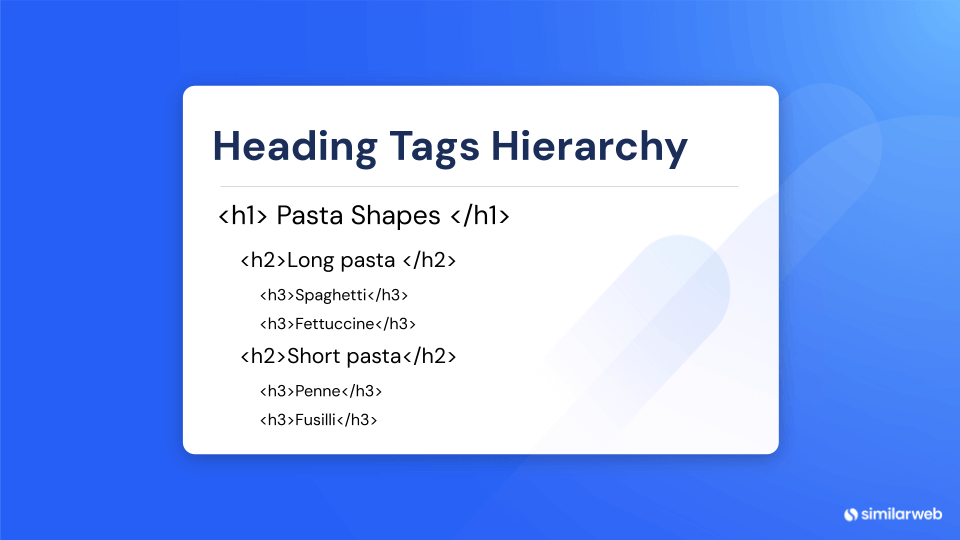
This structure not only streamlines content but also helps search engines understand the relevance of each section, improving your rankings and the user experience. Keeping your heading hierarchy in order is a technical SEO best practice.
The H1 tag and the title tag are often confused, but they actually serve different purposes.
The title tag is a meta tag that appears in search engine results and browser tabs, providing users with a general understanding of the page’s content before they click. It’s not visible on the actual webpage. In contrast, the H1 tag is an on-page element that serves as the main visible heading of your page. Once users have accessed the page, it informs both users and search engines about the primary topic.
This is a source of much confusion for beginners, but mastering the difference will help you get much more out of your SEO efforts. Realizing the difference can help you tailor each tag for its role in search and on the page.
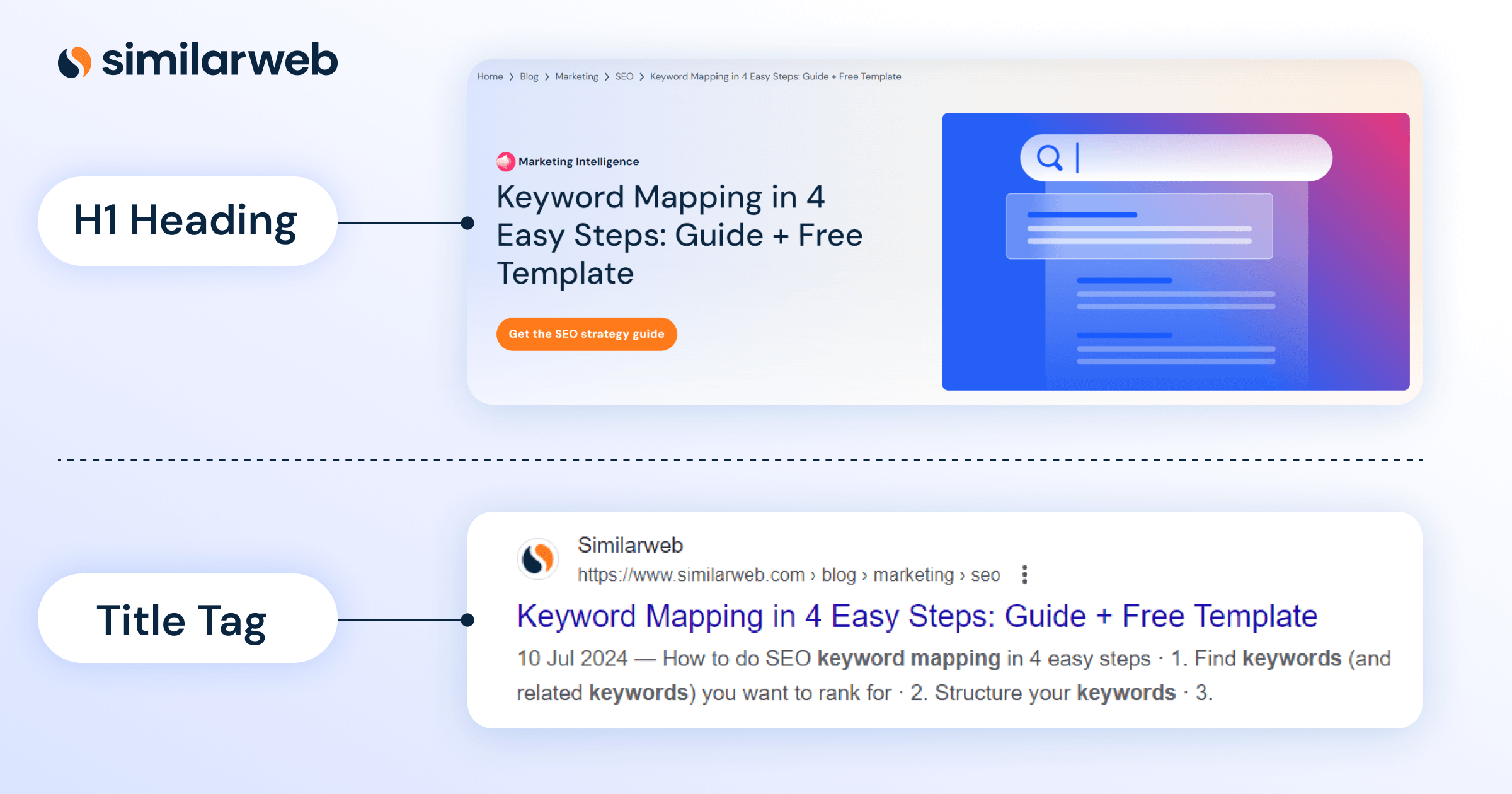
Properly using the H1 HTML tag is crucial for your SEO. This distinctive header establishes the main topic of your webpage, signaling its focus to both search engines and users from the outset.
Search engines use the H1 tag to determine what the page is about and then index it in order to rank it for the topic. If your HTML H1 tag is well-built and includes your target keyword, search engines should easily understand what the page is about.
This makes your content easier for search engines to crawl but, more importantly, will generally result in more accurate results for searchers, which will then bring the right people to your page.
H1 tags help users understand the main point of your article right away. That means that visitors will find the answer to their query quickly and easily, which will eliminate the bounce rates and improve engagement. Having a clear and relevant H1 will tell your visitors that they are on the right page, which will keep them on your page longer and make them more likely to visit more pages of your site.
A well-crafted H1 tag helps users quickly grasp the main point of your article. This has several benefits:
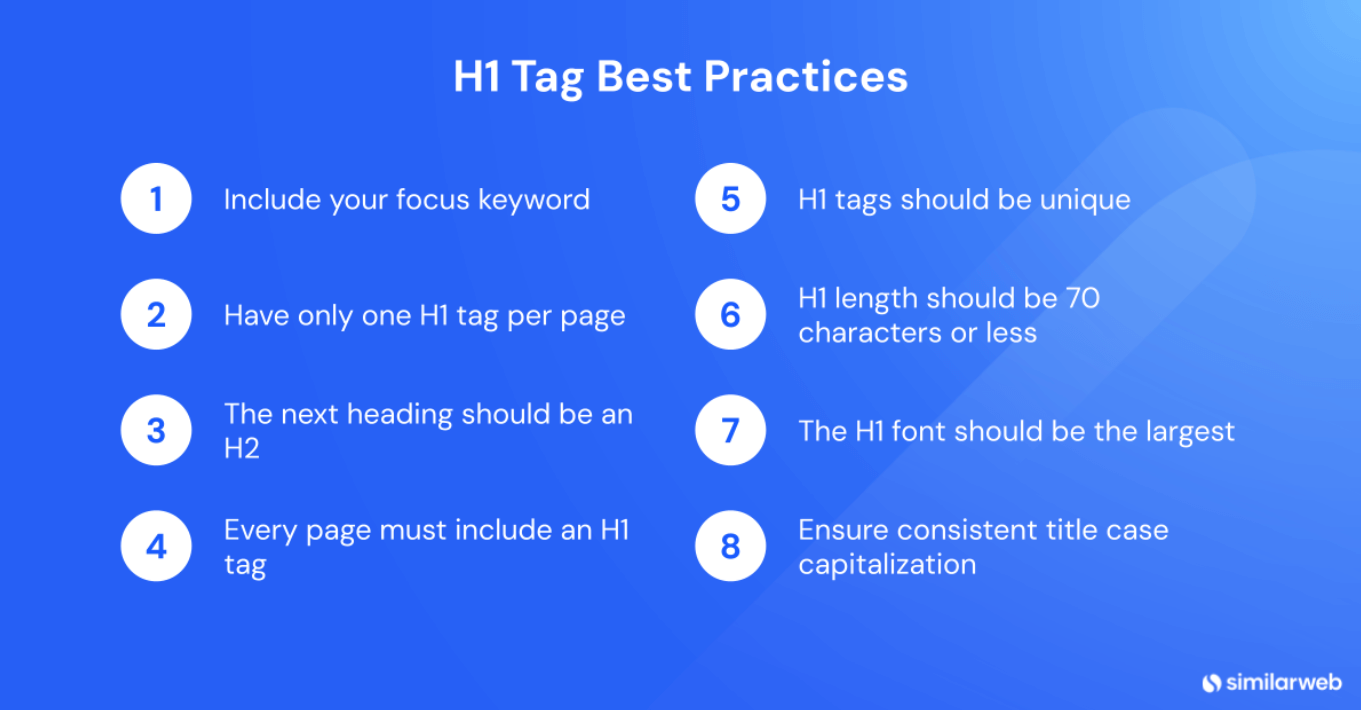
Inserting your main keyword in your H1 tag helps the page be seen more favorably by the search engines as relevant. Do insert the term, but if it doesn’t sound natural, don’t do it. The consistency between the searcher and the content topic is foundational to SEO.
Including your primary keyword in the H1 tag can improve your page’s relevance in search engine rankings. However, keep these points in mind:
The main heading of the page should be your H1 heading, followed by H2 subheadings for subsequent sections. This structured hierarchy organizes the content clearly, making it easier for both users and search engines to navigate. Proper headings guide users and search engines through the content logically.
You know what each page on your site is about, and so should Google and your users. Every page deserves an H1 heading – no page is too unimportant for this. Omitting an H1 tag can make your pages harder to understand, potentially harming their ranking. Make sure every page has a clear and relevant H1 tag to enhance both user experience and SEO.
H1 tags must be unique. Avoid repeating H1 tags across multiple pages on your site. Each page should provide unique value to visitors, with an H1 that clearly defines its specific topic. Ensure that every H1 on your site is distinctive, establishing both a clear purpose and perspective for each page.
Keep your H1 length to 70 characters or fewer to ensure it remains concise and effective. A well-crafted H1 tag provides a clear understanding of the page’s main topic for both users and search engines. In my experience, shorter H1 tags tend to have a greater impact on both user experience and search results.
The H1 tag should be large enough to visually signal to users that they are looking at something important. When an H1 heading stands out with a larger font than the rest of the text, it grabs the user’s attention and emphasizes its significance. Page design and UX are integral to a user-friendly SEO approach, and using font size as a visual differentiator helps establish a clear content hierarchy.
Title case capitalization makes your writing easier to read and keeps things professional. Keeping consistently styled headings adds to the impression of neatness and overall user experience. Headers consistently show commitment to attention to detail in creating their site and overall user experience.
Find errors in your H1 tags with the help of our Site Audit tool. The tool will help you identify H1 tags that should be optimized and fixed to improve the site’s performance and deliver higher SEO results. The intuitiveness of the tool, which helps with all the key things such as H1 tags, allows you to take care of the health of your website. Here’s how to use this feature:
This process helps identify missing, duplicate, or improperly formatted H1 tags, so you can make necessary adjustments for optimal SEO performance. Regular site audits using Similarweb’s tool to check that your H1 tags are always in top shape.
When it comes to H1 tags, there are a handful of common errors that need to be addressed from an SEO perspective. Knowing how to identify and fix these errors can make all the difference between a page that ranks well, and a page that just doesn’t.
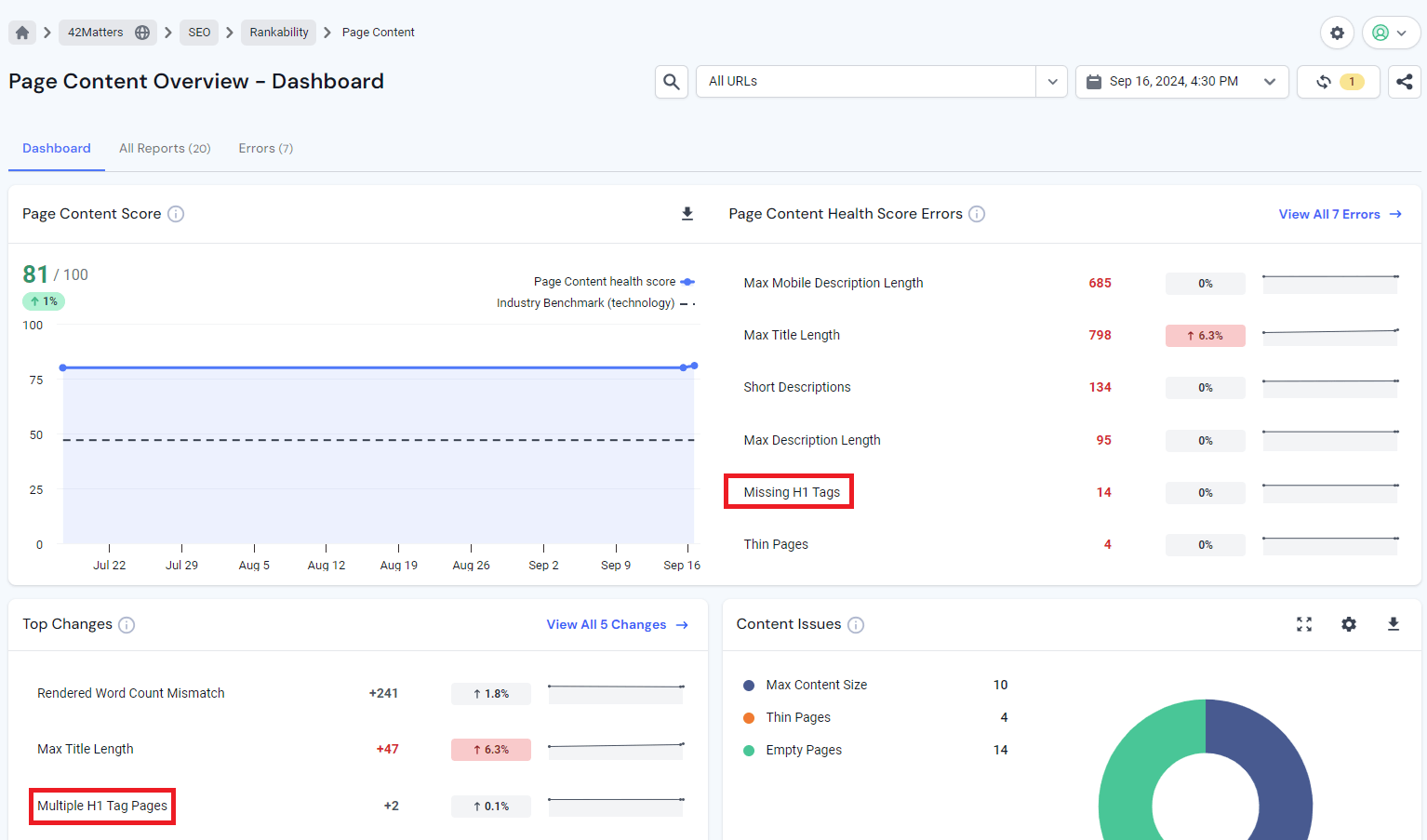
A lack of an H1 tag literally means that the webpage does not have a heading, hence it becomes difficult for search engines to determine what the page is ultimately about, and as a result, more difficult for users to figure it out, too. The page’s lack of a primary heading may hinder users from exploring the site further and it will be ranked lower by search engines.
Add an H1 tag that succinctly and accurately describes the focus of the page. This helps not just users, but also search engines to grasp the topic at hand. Without a proper H1, no one is quite sure what the page is about, and people won’t bother to visit.
Duplicate H1 tags are created when two (or more) pages each have the same H1 tag, creating duplicate headlines (and content).
This confuses search engines and readers by watering down each page’s authority and originality. Every page on the site should always have a unique H1 tag. That way, each page can have its unique focus without confusing the robots.
Use different H1 tags for every page, giving each a meaningful and unique heading that describes it. This does not just give a better picture of what the page is about in itself; it also helps to cluster and weight the various pages on your site more accurately. If each page has a unique H1 tag, then search engines know which page is about what.
If you use more than one H1 tag on a page, it’s confusing – it’s not clear what the main keyword is on the page. It could have a strange hierarchical structure to the content, and it’s not clear to the user or the search engine what the page is all about.
With two (or more) H1 tags on a page, we can confuse search engines and readers, create an uneven experience for content, and use a less cohesive approach to communicating the maximum intended message of the page.
Set each page to one H1 tag with H2, H3, etc., to break up content and make it easier for users to follow – and easier for search engines to index. A single H1 tag will help readers make sense of a page’s content, ensuring that they can assimilate it properly.
This is not an “error” per se, but it’s a recommendation. Keeping your H1 tags clear and short helps users quickly understand the page’s content.
Longer headings can be harder to read, potentially reducing their effectiveness in conveying key information. Shorter, focused H1 tags make it easier for both users and search engines to grasp the main topic of the page.
Try to keep it short and around 70 characters so it doesn’t lose meaning and still makes sense when people scan through the contents of your page. This will make sure it shows up correctly in the search results, but it will also make it clear at a glance what the main topic of your post is. If it’s too long and rambling, it just won’t be read at all.
Getting your H1 tags right is a crucial part of effective SEO. Clear, concise, and well-structured H1 tags help search engines and users easily understand your content. With Similarweb’s Site Audit tool, you can routinely review and refine your H1 tags to stay ahead, ensuring both your website and audience consistently benefit from improved SEO performance.
Ready to boost your H1 strategy?
What is the H1 used for?
The H1 tag is an HTML heading tag that’s typically used to define the main title or highlight the primary topic of a page to users and search engines. It is considered the most important heading on the page, mainly for SEO.
Where should H1 tags be placed?
The H1 tag should be at the top of the page content, since it indicates the entire page’s topic. In the HTML code, it should be placed above any other heading tags.
Is the H1 tag necessary?
Yes, the H1 tag is essential. It acts as the main headline of your page, helping both users and search engines quickly understand the core topic. Whether it’s the title of a blog post or the primary heading of a product page, a well-written, keyword-optimized H1 tag can make a huge difference in your page’s performance.
How long should an H1 tag be?
It’s recommended to keep H1 tags under 70 characters for clarity and optimal search engine visibility.

by Lior Shapira
SEO Manager
Lior is an SEO Manager at Similarweb. She who is passionate about content creation and learning new tools. Outside Similarweb, she manages a few blogs and writes for a newspaper.

What Is Retail Intelligence? How It Works and Why It's Essential to Digital Commerce
Most Searched Things on Google in 2026
Give it a try or talk to our marketing team - it’s free!
