






Muse app breakdown: what Meta's AI agent means for brands
by Noam Kadyshevitch5 Min.
Oct 29, 2026
 Marketing Intelligence
AI Overviews now appear in a growing share of Google searches, and when they do, organic click-through rates drop sharply. That means the same page-optimization work you’ve always done now needs to serve two masters, Google’s traditional ranking algorithm and the AI systems that decide whether your content gets surfaced in an answer before a user ever scrolls to your listing.
On-page SEO hasn’t become less important. It’s become more precise. The 12 steps below are what that looks like in practice.
On-page SEO is the process of optimizing the content and HTML elements of individual web pages to improve their visibility in search results and deliver a better experience to readers. Unlike off-page SEO, which covers signals that live outside your site, like backlinks and brand mentions, on-page SEO is entirely within your control.
What makes on-page SEO different in 2026 is that the audience has expanded. You’re no longer optimizing only for Google’s traditional crawler. AI engines like ChatGPT, Perplexity, and Google’s AI Mode all parse on-page signals to determine whether your content is trustworthy, clear, and extractable. Clear formatting, structured headings, and answer-first writing now influence your visibility in AI-generated answers, not just your position on the SERP.
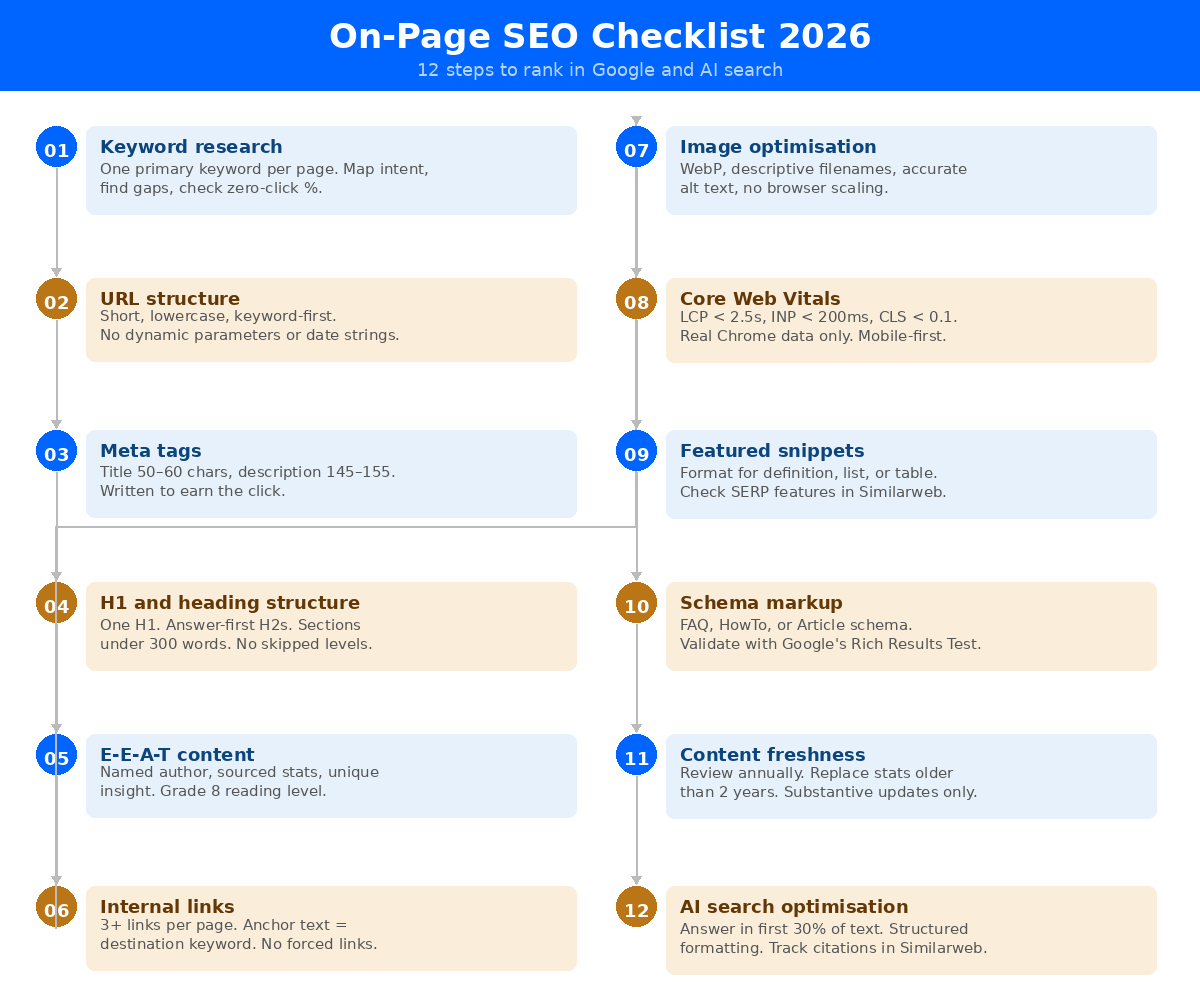
Every page should be built around a specific keyword target that reflects how real people search. Keyword research means finding the right primary keyword for each page, identifying 3–5 related supporting terms, and understanding the intent behind the query, whether someone wants to buy, learn, or navigate.
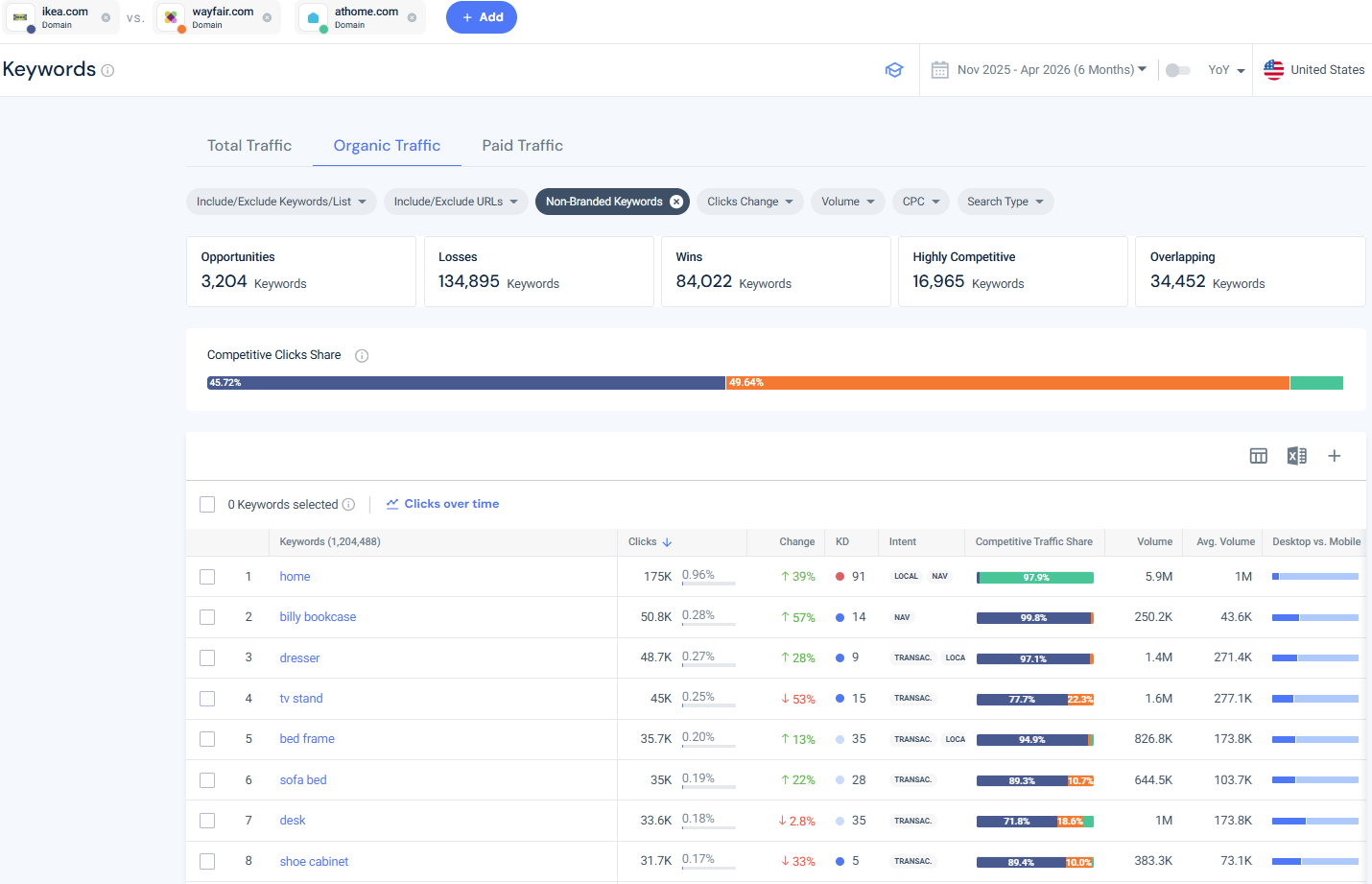
Start with a competitive keyword analysis using Similarweb’s Keyword Research tool. Enter your domain alongside your top competitors to see which keywords each site ranks for and where your gaps are. Take IKEA as an example. Comparing ikea.com against wayfair.com and athome.com in the Keywords view immediately breaks down the competitive picture: 3,204 keyword opportunities (terms competitors rank for that IKEA doesn’t), 84,022 wins where IKEA already leads, and a competitive clicks share bar showing exactly how organic traffic is split across all three domains. That single view tells you where you’re losing ground and where you’re already strong, before you’ve written a single word.
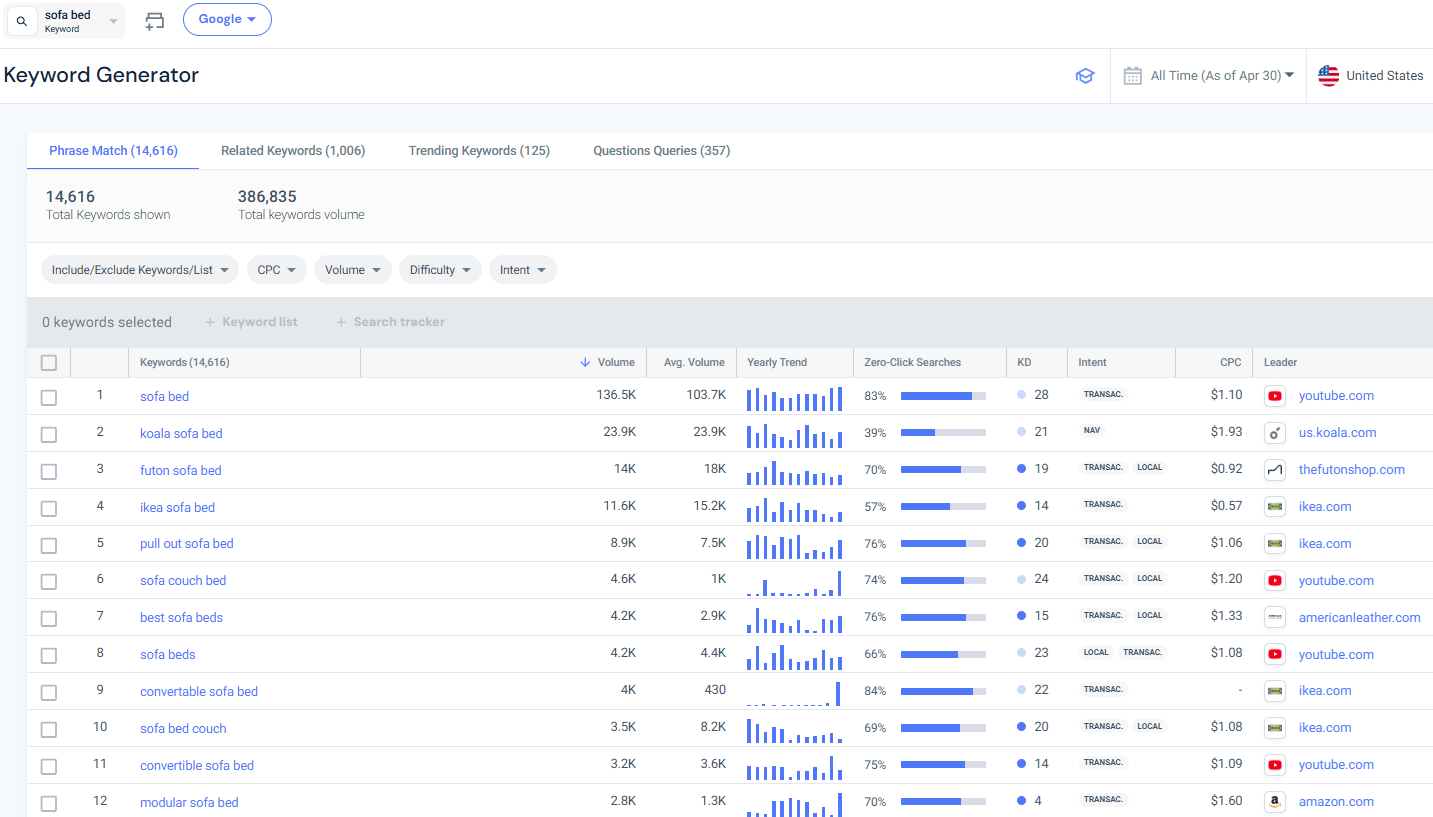
From there, use the Keyword Generator to expand around any seed term. Entering “sofa bed,” for instance, returns 14,616 phrase-match variations sorted by volume, with columns for yearly trend, zero-click search percentage, keyword difficulty, and intent. The zero-click column is worth special attention: “sofa bed” shows 83% zero-click, meaning most searches for that term are answered without a page click, important context for deciding whether to target it directly or shift focus to longer-tail variants with lower zero-click rates.
A few practical rules for keyword placement once you’ve done the research:
URL structure is a basic on-page element many guides treat as an afterthought. It shouldn’t be. A clean, descriptive URL helps both users and search engines understand the page’s topic at a glance.
Best practices for SEO-friendly URLs:
Changing a URL on a live page carries risk, always set up proper 301 redirects. For new pages, establish the clean URL structure from day one.
Meta tags are how you communicate your page’s topic to both search engines and the people deciding whether to click on your result. The two that matter most are the meta title and the meta description.
Meta title: This is what appears as the clickable headline in Google’s results. It’s one of the most direct on-page ranking signals. Keep it at 50–60 characters, lead with the primary keyword, and write it to earn the click, not just to rank. Look at the titles currently ranking for your target keyword and write something different and more specific.
Meta description: Google doesn’t use the meta description as a direct ranking factor, but searchers use it to decide whether to click. Aim for 145–155 characters. Include the primary keyword, a secondary benefit, and a reason to click through. If your description is left blank, Google will auto-generate one from your body text, usually poorly.
Common meta mistakes to avoid: keyword-stuffing the title, using vague phrases, and letting important pages go without a meta description at all.
Your H1 is the editorial headline of your page, the single most prominent signal telling Google (and readers) what the page is about. Every page should have exactly one H1, it should include the primary keyword, and it should be written for the reader first.
The rest of your heading hierarchy (H2, H3, H4) organizes supporting content. Think of headings as the outline of an article made visible. A well-structured page makes it easy for both scanners and search engine crawlers to understand the logical flow of your content.
Here’s how the hierarchy works in practice:
Headings do more than organize content for human readers, they’re also how AI engines parse and extract your page. Research consistently shows that structured formatting, hierarchical headings, bullet points, and numbered lists, significantly increases the likelihood your content gets cited in AI-generated answers. Two things make the biggest difference: answer-first headings, where the first sentence of each section directly answers the question implied by the heading, and short sections that stay under 300 words. If a reader has to scroll through a wall of text to find the answer, an AI engine will likely skip it too.
Content quality is where on-page SEO either earns or loses its ranking. Google’s quality guidelines center on E-E-A-T: Experience, Expertise, Authoritativeness, and Trustworthiness. These four signals are how Google distinguishes content written by someone who actually knows what they’re talking about from content generated to fill a page.
What E-E-A-T looks like in practice:
Every stat and data point in your content should cite a source and include the year. Nothing signals low quality faster than “studies show” with no reference. Use primary sources where possible, research firms, government data, Similarweb’s own platform data, rather than blogs summarizing a study.
Content that performs in 2026 does something Tier 1 content doesn’t: it challenges an assumption, presents a framework, or surfaces an insight the reader didn’t have before they arrived.
Internal links are how you distribute authority across your site and guide readers deeper into your content. Every page should include meaningful internal links, and every internal link should use descriptive anchor text, not “click here.”
The SEO principle at work: Google treats internal links as endorsements. When you link from a high-authority page to a newer page using relevant anchor text, you’re passing signals that tell Google the destination page is topically related and worth crawling and indexing.
Practical rules:
Internal linking also contributes to topical authority. A topic cluster, you decidewhere a pillar page links to multiple supporting articles and they link back, signals to Google that your site covers a topic comprehensively, which improves rankings across the cluster.
Every image you publish should be:
Alt text serves two purposes: it tells screen readers what’s in the image (a real accessibility requirement) and it gives search engines another keyword signal. It shouldn’t be a list of keywords, it should be a genuine description.
For image optimization at scale, check that your CMS isn’t generating multiple copies of the same image at different sizes without proper management. Image bloat is one of the most common causes of slow page load times.
Page speed is a confirmed Google ranking factor. More precisely, Google measures it through three Core Web Vitals metrics that together assess how pages feel to real users:
Core Web Vitals act as a tie-breaker in competitive SERPs: where content quality is equal between two pages, the faster, more stable page wins. Note that only real user data from Chrome affects rankings, not your PageSpeed Insights score or Lighthouse audit.
You can monitor your Core Web Vitals in Google Search Console and use Similarweb’s Site Audit tool to surface technical issues affecting page performance.
Fix issues in priority order: LCP problems are usually caused by slow server response or unoptimized hero images; CLS problems typically stem from images or embeds without defined dimensions.
Alongside Core Web Vitals, make sure your site is mobile-friendly. Google uses mobile-first indexing, meaning the mobile version of your page is what Google indexes and ranks, even for desktop searches.
Featured snippets are the highlighted answer boxes that appear at the top of many Google searches. They can appear as definitions, ordered lists, unordered lists, or tables. Winning a featured snippet can significantly lift click-through rate for a given keyword, and snippet content is frequently used in AI Overview answers.
Optimizing for featured snippets means writing content in the format Google extracts for them:
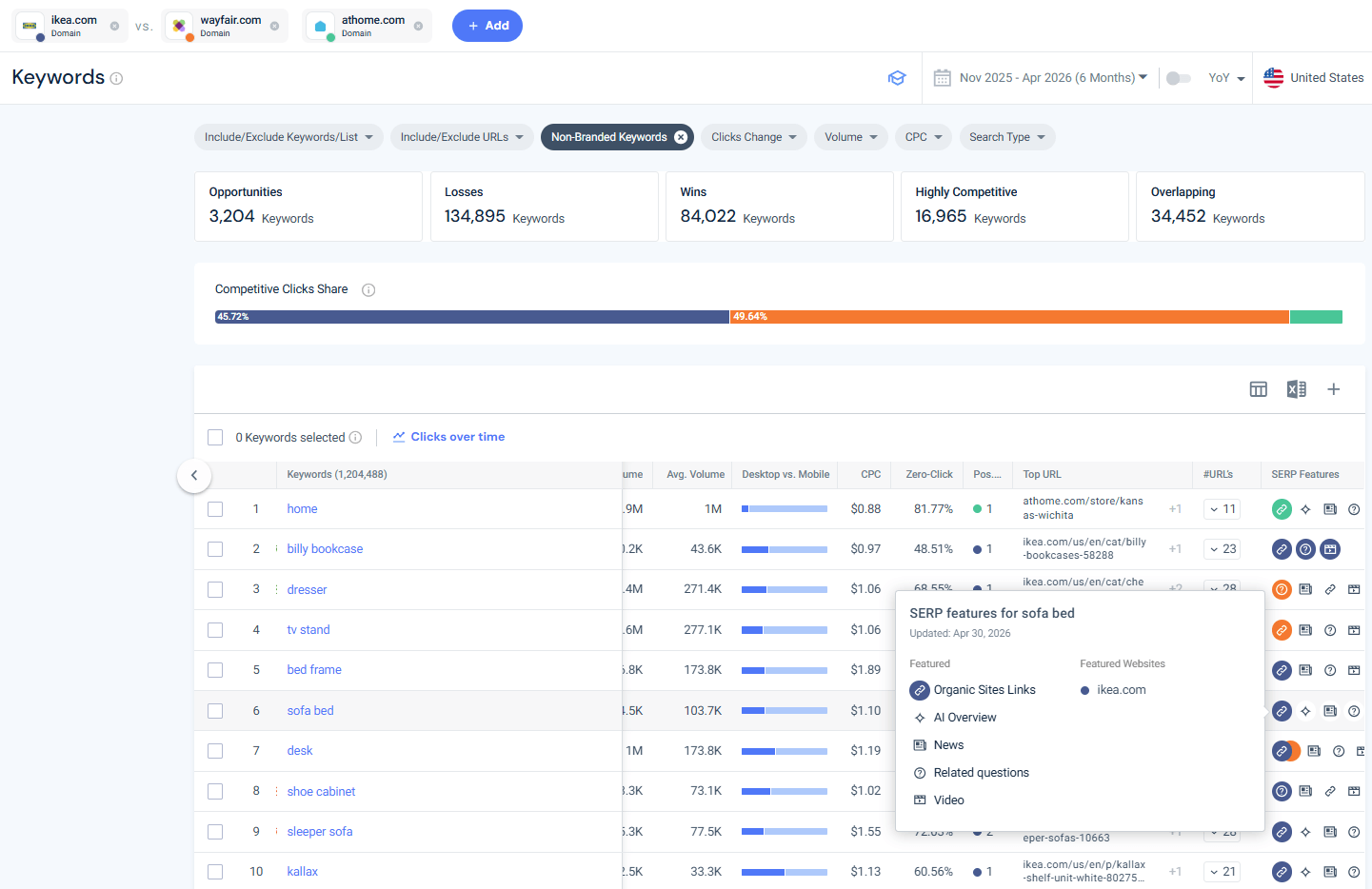
To find which of your target keywords are eligible for featured snippets, use Similarweb’s SEO Tools. In the Keywords view, scroll right to the SERP Features column and hover over any keyword’s icon set to see exactly which features are active for that query. For IKEA’s keyword “sofa bed,” the SERP features tooltip shows an AI Overview, Organic Sites Links, News, Related questions, and Video are all present, meaning this keyword is highly contested across multiple SERP formats, and an AI Overview is already absorbing clicks before organic results even appear. Knowing this upfront shapes whether you optimize for the snippet, the AI Overview, or shift focus to longer-tail queries with less SERP crowding.
Schema markup is structured data added to your page’s HTML to help search engines categorize and display your content more richly in results. Common schema types include Article, FAQ, HowTo, Product, and Review.
For SEO-focused content like guides and checklists, the most useful schema types are:
Validate your schema using Google’s Rich Results Test before publishing.
Search engines favor optimized content that stays relevant, especially for topics where the right answer changes over time. A 2021 guide to on-page SEO is not the same as a 2026 guide, because the landscape has shifted: AI search has emerged, Core Web Vitals thresholds have been updated, E-E-A-T guidance has been refined, and Google has rolled out multiple core updates that changed what quality content looks like.
AI platforms have an even stronger freshness preference: content cited by AI engines is fresher than content that ranks only in traditional search results.
Practical freshness signals you can control:
Freshness isn’t about cosmetic date changes, Google can assess whether content has substantively changed. Update the actual content.
This is the newest and most misunderstood step on the checklist. AI Overviews, ChatGPT Search, Google AI Mode, and Perplexity all parse pages to extract answers. Your on-page content determines whether your page gets cited, and what gets pulled.
A few signals that correlate strongly with AI citation:
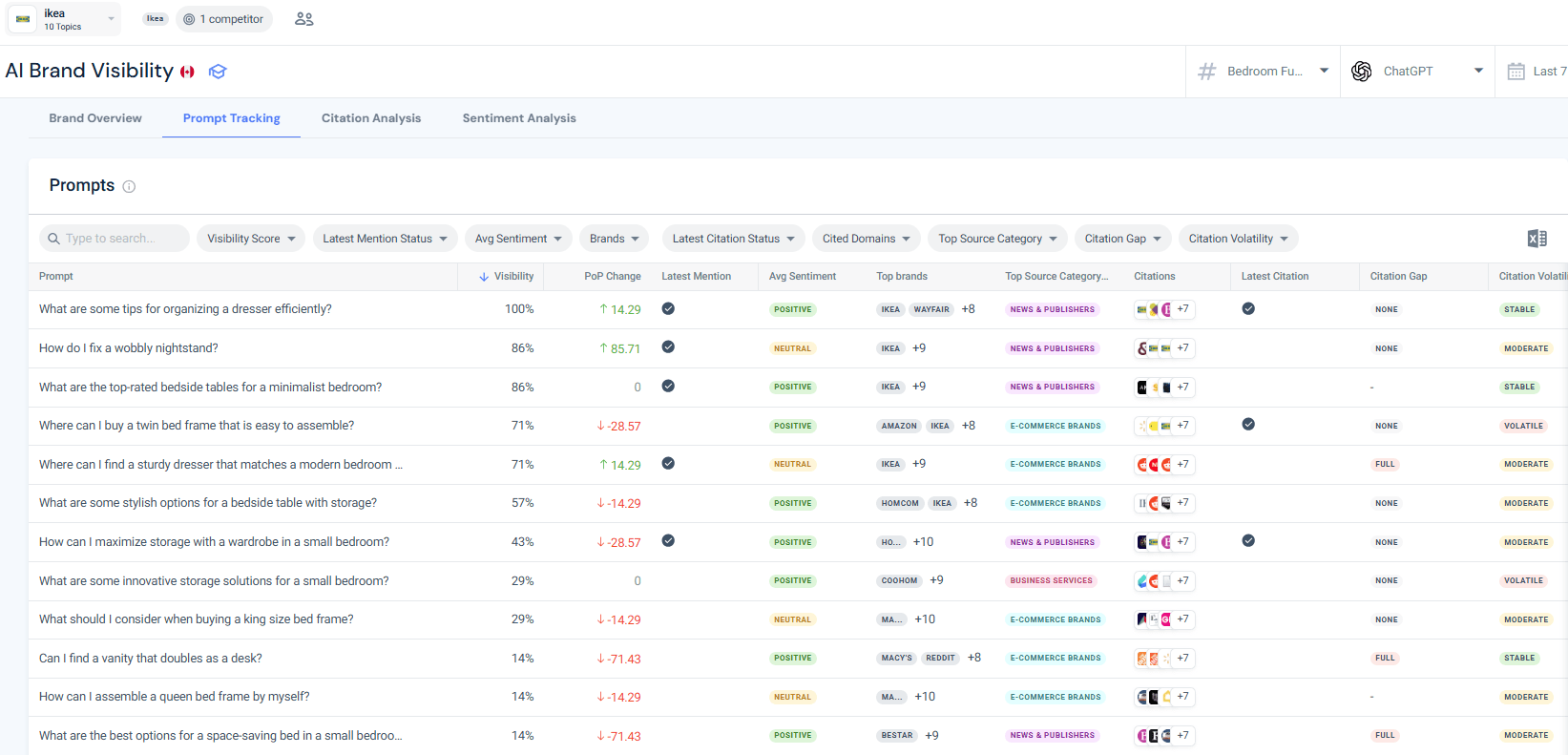
Once your on-page content is structured for AI extractability, you need to track whether it’s actually being cited. Similarweb’s AI Brand Visibility tool shows exactly this at the prompt level. In the Prompt Tracking view, you can see which natural-language queries your brand appears in, your visibility score for each, how that score has shifted week-over-week, the sentiment of the AI response, which competitor brands appear in the same answers, and whether you hold a citation or have a citation gap.
For IKEA’s Bedroom Furniture topic tracked against ChatGPT, the view shows prompt-level detail: “What are some tips for organizing a dresser efficiently?” returns 100% visibility with a positive sentiment signal, while “Where can I find a sturdy dresser that matches a modern bedroom?” shows a full citation gap, a direct signal of which content areas need stronger on-page authority signals to close the gap.
On-page SEO is a system, not a one-time task. The 12 steps above apply differently depending on whether you’re launching a new page from scratch, updating an existing one, or auditing your entire site. For a new page, keyword research, URL structure, and content quality deserve the most upfront investment. For existing pages, freshness updates, Core Web Vitals, and AI search optimization are where you’ll find the highest-leverage gains.
Use Similarweb’s Search Intelligence to track which keywords trigger AI Overviews and featured snippets, the Keyword Research tool to surface new opportunities before competitors do, and AI Brand Visibility to monitor your prompt-level citation gaps as AI search continues to grow.
Work through all 12 steps page by page with the printable On-Page SEO Checklist 2026. Each step includes the specific items to tick off before marking a page as done, covering keyword placement, meta tags, Core Web Vitals, schema, and AI citation tracking in one document.
Download the On-Page SEO Checklist →
What is the difference between on-page SEO and off-page SEO?
On-page SEO refers to the elements within your own web pages that you can directly control — including content, headings, meta tags, URL structure, internal links, and page speed. Off-page SEO covers signals outside your site that influence rankings, such as backlinks from other domains, brand mentions, and social signals. A complete SEO strategy requires both, but on-page optimization is where you start because it’s fully within your control.
How many on-page SEO elements should I optimize on a single page?
Every page should cover the core elements: a well-researched primary keyword, a clear URL, optimized meta title and description, a single H1 with proper heading hierarchy, high-quality E-E-A-T content, internal links, and optimized images. Core Web Vitals and schema markup apply at the site and template level rather than page by page. The AI search optimization step, structured formatting, answer-first writing — should inform how you write every new piece of content going forward.
Does on-page SEO still matter with AI search growing?
Yes, and in some ways it matters more. AI engines like Google’s AI Overviews and ChatGPT Search parse on-page signals to decide what content to cite in generated answers. Clear headings, structured formatting, accurate sourcing, and answer-first writing all increase the likelihood that your content gets extracted and surfaced by AI platforms. Traditional ranking position and AI visibility are now related but distinct goals that on-page SEO serves simultaneously.
How do Core Web Vitals affect on-page SEO?
Core Web Vitals (LCP, INP, and CLS) are part of Google’s Page Experience signal and act as a ranking tie-breaker in competitive SERPs. Passing all three metrics is a pass/fail threshold, there is no partial credit. They primarily matter when content quality between competing pages is similar.
How often should I update my on-page content for SEO?
For evergreen topics, like on-page SEO itself, a thorough review once per year is a minimum. After any significant Google core update, audit your highest-traffic pages against the updated quality guidance. For data-heavy content (statistics guides, benchmarks, industry reports), review every 6 months and replace figures that are more than 2 years old. AI platforms show a strong preference for recently updated content: pages cited by LLMs are fresher than those ranked only in traditional search.

Senior SEO Specialist at Similarweb
Maayan is a senior SEO specialist with 7+ years of experience in SEO. She loves complex research projects, creating SEO strategies and performing technical audits.
Muse app breakdown: what Meta's AI agent means for brands


What Is Retail Intelligence? How It Works and Why It's Essential to Digital Commerce
Give it a try or talk to our marketing team - it’s free!
