

How to Run a Black Friday Competitor Analysis in One Conversation
by Alina Miron5 Min.
Nov 02, 2026

A potential affiliate partner looks legitimate on the surface: polished design, compelling messaging, a professional domain. Then you run their domain through Similarweb. Traffic spiked 900% in one month. Direct traffic accounts for 85% of all visits. Their top referral sources are unrelated forum networks you’ve never heard of. Suddenly, the picture looks very different.
Fraudulent and misleading websites have become increasingly difficult to identify through visual inspection alone. Scammers have access to professional design tools, fast domain registration, and SEO techniques that can manufacture a veneer of credibility. The FBI’s Internet Crime Complaint Center recorded losses exceeding $16.6 billion in internet-enabled crime in 2024, a 33% increase over 2023, with phishing and website-based schemes among the top reported categories.
The answer isn’t more sophisticated visual checks. It’s behavioral analysis. Real websites get traffic in ways that reflect genuine audience behavior. Fraudulent ones often don’t. This article shows you how to use Similarweb to spot the patterns that surface when something doesn’t add up.
Fraudulent sites pose direct business risk when your team encounters them in partnership evaluation, vendor due diligence, media buying, or competitive research. A publisher inflating its traffic numbers, a comparison site gaming referral flows, or a fake review platform faking engagement metrics, each of these creates a different category of exposure.
The risks break into three buckets:
Financial loss is the most direct: paying for partnerships, placements, or integrations that deliver fabricated engagement.
Brand damage follows when your brand appears alongside low-quality or fraudulent traffic networks.
Data exposure comes when integrations or partnerships involve systems that harvest or misuse user data.
Businesses that need to detect fraud systematically, not just on a case-by-case basis, require a behavioral intelligence layer that scales.
Early detection, before a deal is signed, is the leverage point. Similarweb’s traffic signals give teams a way to validate a site’s legitimacy before money changes hands.
Similarweb is not a fraud detection system. It doesn’t label sites as fraudulent, issue trust scores, or flag domains against a blacklist. What it does is surface behavioral and traffic patterns that reveal whether a site’s claimed identity matches its actual digital footprint.
The distinction matters. A single anomalous metric doesn’t prove anything. But when multiple indicators are misaligned, unusual channel distribution, mismatched geography, abnormal engagement, suspicious referral networks, the cumulative signal is worth investigating further. Patterns matter more than individual data points.
Think of Similarweb as a behavioral audit layer. Use it to validate legitimacy, identify inconsistencies, and decide when a deeper investigation is warranted before committing to a relationship.
The following signals to look for when checking website traffic on a site you’re evaluating.
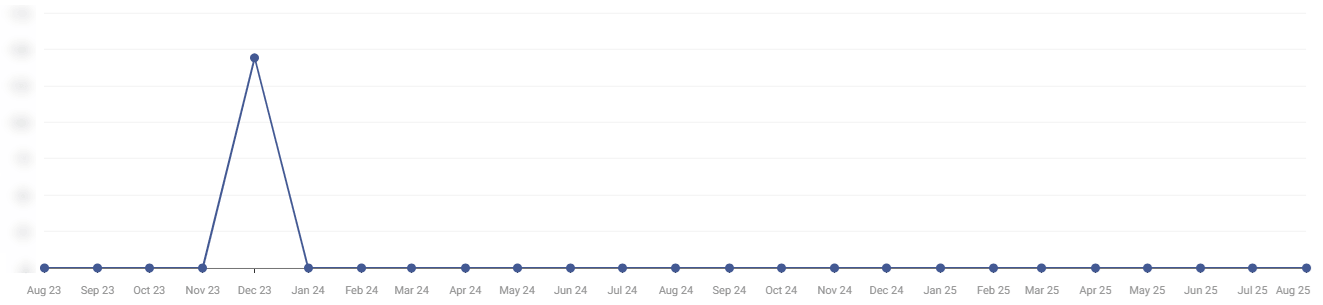
What to look for: A sharp, dramatic increase in monthly visits that doesn’t align with any identifiable business trigger, no product launch, no media coverage, no seasonal pattern.
What’s normal: Legitimate sites grow gradually, with traffic increases that correlate to campaigns, press coverage, product updates, or seasonal demand.
Why it’s a red flag: Sudden, unexplained spikes are a hallmark of fake web traffic, whether from bot networks, click farms, or paid traffic inflation schemes. They can also indicate referral-spam attacks, in which automated crawlers artificially inflate visit counts.
How to check: One of Similarweb’s Web Intelligence’s most important reports is the Traffic & Engagement Report, which shows how a site’s traffic evolves over time, helping you identify sudden spikes and unexpected fluctuations with no corresponding campaign trigger.
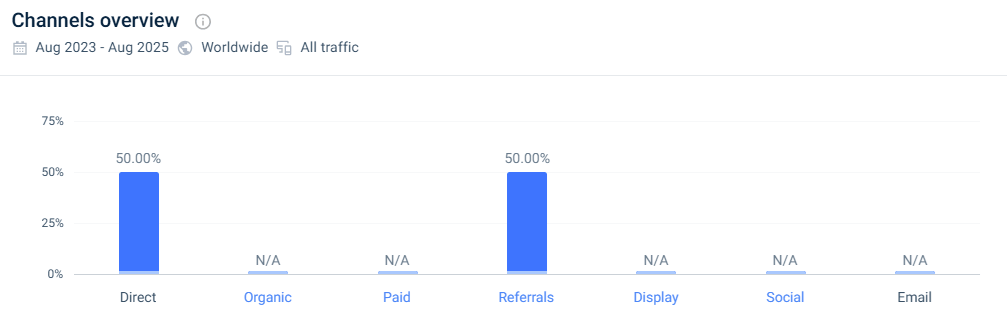
What to look for: An over-reliance on a single marketing channel, particularly Direct or Referral, that’s disproportionate to the site’s apparent maturity and brand visibility.
What’s normal: Established sites typically have a balanced mix across organic search, direct, social, referral, and sometimes paid, reflecting genuine multi-channel audience development.
Why it’s a red flag: When Direct traffic dominates, say, 70–80% of total visits, it may indicate type-in traffic manipulation or a channel masking problem, where bot traffic is misattributed. Overdependence on referral with no clear legitimate referral ecosystem suggests traffic-swapping or redirect schemes.
How to check: Similarweb’s Marketing Channels report reveals a site’s full traffic mix, allowing you to quickly spot potential manipulation. Channel mix varies by industry, so always benchmark against comparable sites rather than applying a universal threshold.
What to look for: Referral domains that are unrelated to the site’s topic, unknown spammy link networks, or domains that appear in large clusters across multiple suspicious sites. Also, watch for a significant portion of traffic exiting to shady affiliate networks or unrelated download sites.
What’s normal: Legitimate referral traffic comes from media coverage, industry communities, partner sites, and relevant directories. Outbound traffic flows to internal pages, trusted partner sites, or relevant resources.
Why it’s a red flag (incoming): Traffic-swapping networks are coordinated ecosystems of low-quality sites that exchange visits with each other. Each site sends automated or low-intent traffic to the others, inflating everyone’s referral counts without delivering real users. If the top referral sources for a finance site are random forum networks or generic link farms, the referral metric is likely inflated rather than earned.
Why it’s a red flag (outgoing): Suspicious outgoing flows can indicate that the site functions primarily as a traffic funnel for monetization schemes. The primary business model here is affiliate commission fraud: generating click-through revenue by routing traffic to affiliate offers regardless of user intent or consent.
How to check: Similarweb’s affiliate and referral research tool shows which sources drive referral traffic to a website and where users go next, helping you identify high-volume, low-quality referral patterns in both directions. You can also use Similarweb’s affiliate research tools to map a site’s full referral ecosystem and surface partner networks that don’t hold up to scrutiny.

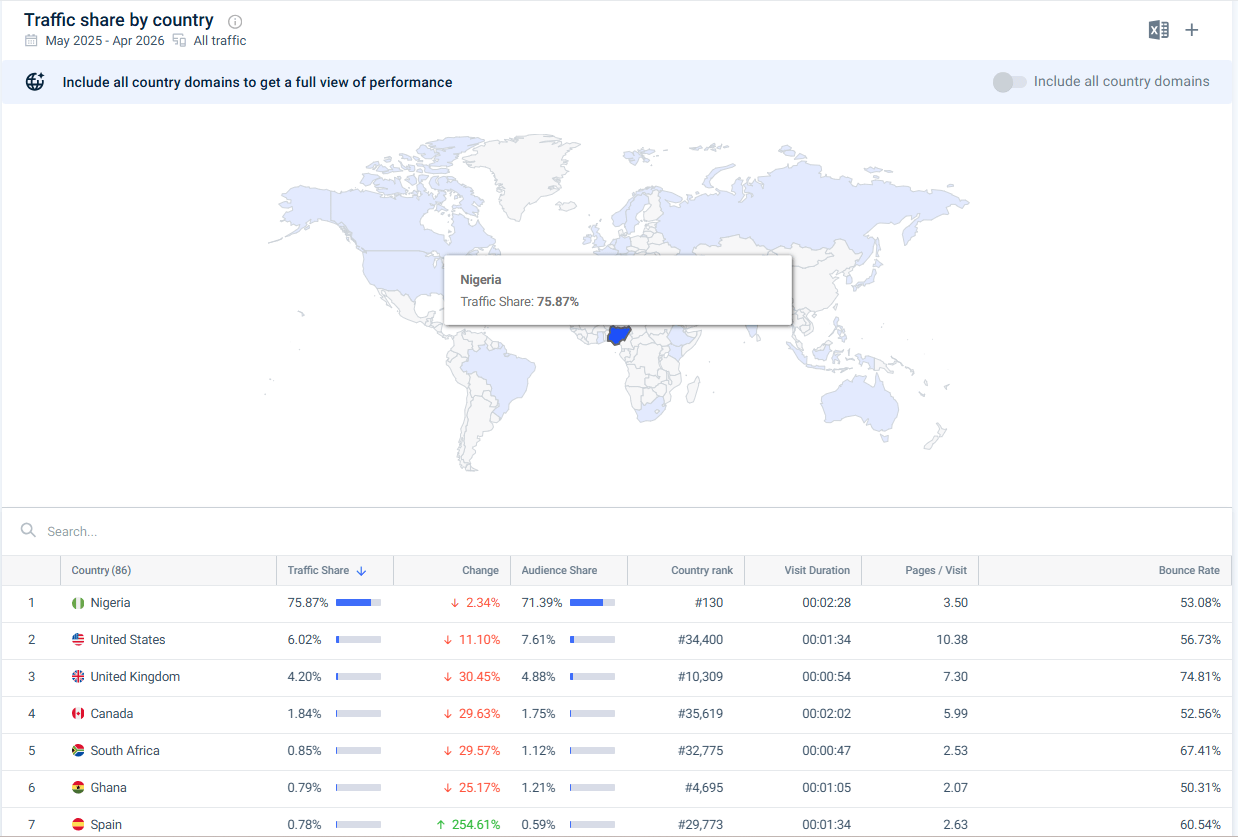
What to look for: Traffic geography that doesn’t match the site’s stated audience, product availability, or content language.
What’s normal: A US-focused SaaS platform should see the majority of its traffic from North America. A UK-based retailer should see concentrated traffic from the UK and surrounding markets.
Why it’s a red flag: When a site claims to serve a specific market, but the majority of its traffic originates from regions with no plausible connection to that audience, the mismatch suggests proxy-routed bot traffic, outsourced traffic generation, or purchased visits from regions where click costs are cheapest. The issue isn’t that certain geographies are inherently suspicious, it’s the misalignment between the claimed audience and actual traffic origin.
How to check: Similarweb’s Geography report shows the share of traffic from each country, allowing you to quickly flag traffic from unrelated or unexpected regions.
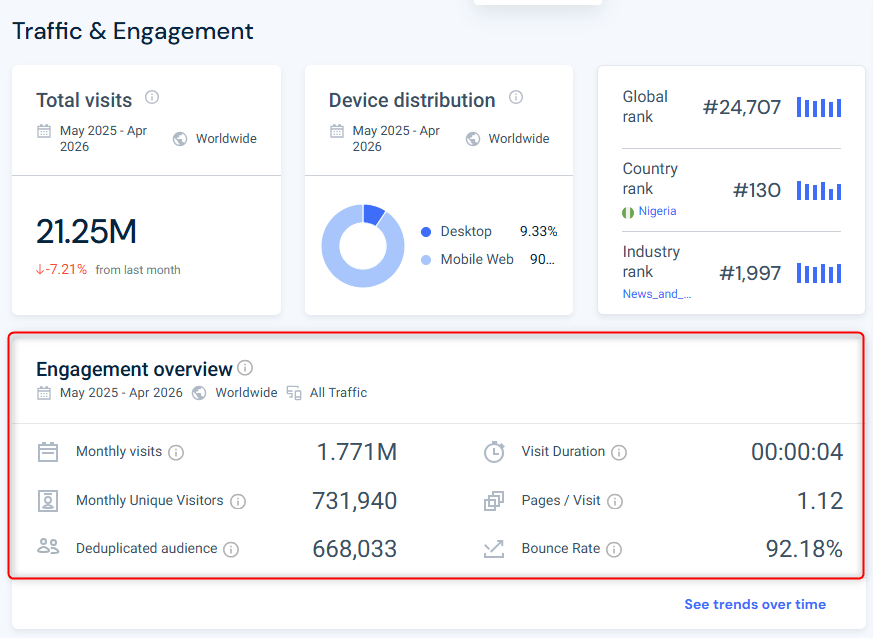
What to look for: Extremely high bounce rates, unusually short average session durations (under 10–15 seconds), or pages-per-visit that are implausibly low for the type of content being served.
What’s normal: Engagement metrics benchmarks vary by site type, but real audiences, even those landing on pages that don’t match their intent, spend some time on site and exhibit measurable interaction patterns. Healthy websites typically show moderate bounce rates (40–70%) and meaningful time on site (ranging from around 20 seconds to several minutes).
Why it’s a red flag: Automated traffic interacts with pages differently than humans. Bots typically register a visit without the dwell time, scroll behavior, or link clicks that human sessions produce. According to the 2025 Imperva Bad Bot Report, bad bots now account for 37% of all internet traffic, up from 32% in 2023, and they consistently distort engagement metrics because they don’t browse like people. Bot sessions typically register near-zero engagement time, often under one second, while genuine human sessions average 43 seconds or more, even on low-intent visits. Extremely high bounce rates paired with near-zero session durations are one of the clearest combined signals of artificial traffic inflation.
How to check: Similarweb’s Traffic & Engagement report compares key metrics such as visits, bounce rate, pages per visit, and visit duration across sites, helping to identify signs of automated traffic or deceptive content.
What to look for: Traffic and engagement figures that deviate significantly from what verified, comparable sites in the same category show.
What’s normal: Sites operating in the same category, with similar audience sizes and content models, generally display similar traffic patterns. Outliers, both unusually high and unusually low, warrant scrutiny.
Why it’s a red flag: Isolated analysis is easy to manipulate. A site can always argue that its numbers are exceptional. Competitor benchmarking makes manipulation harder to justify: if every legitimate site in a category shows 40% organic search traffic and one site shows 5%, that divergence needs an explanation.
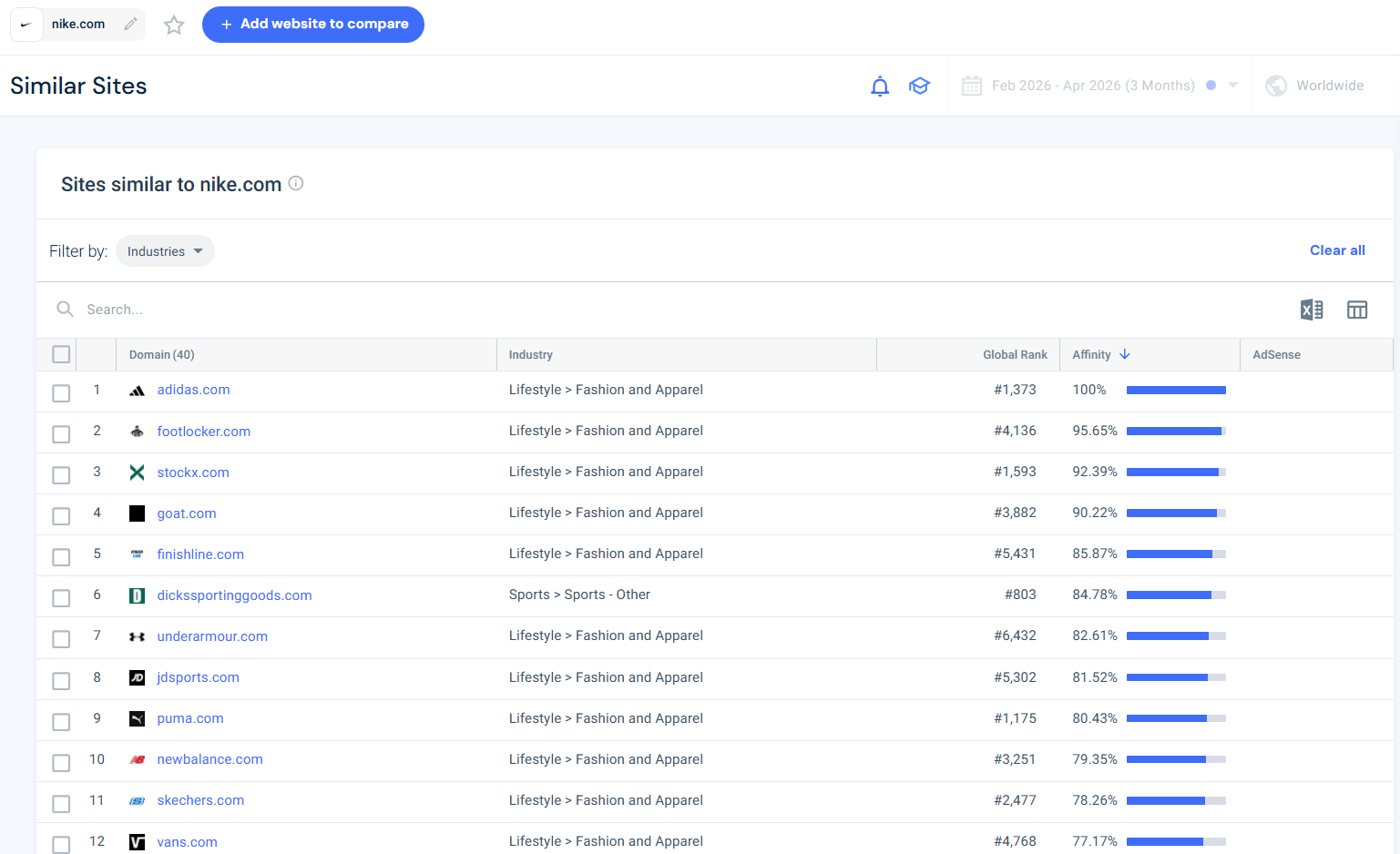
How to check: Use Similarweb’s Similar Sites report to identify websites with comparable content, audiences, keywords, and referral sources. Pull benchmarks from 2–3 known legitimate players in the same vertical and compare traffic trends, channel distribution, and engagement side by side before evaluating an unfamiliar site.
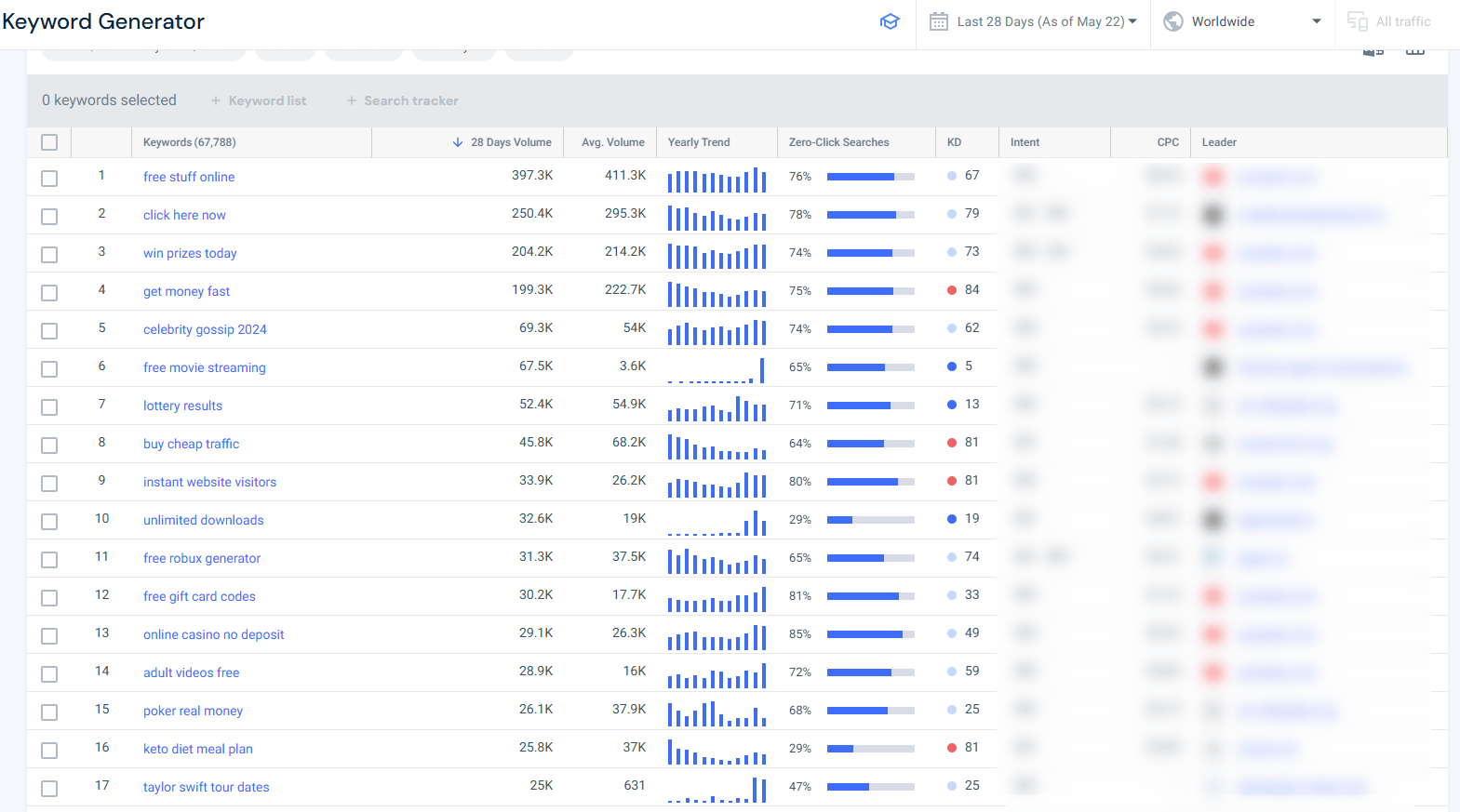
What to look for: Keywords driving the majority of organic search traffic to the site, and whether those keywords match what the site actually does.
What’s normal: Legitimate sites are primarily found via branded queries (their own name) and industry-relevant terms that reflect genuine search demand for their services.
Why it’s a red flag: When a site claims to be a B2B SaaS platform, but its top organic keywords are generic consumer queries, unrelated product terms, or unusually broad head terms with no clear connection to its services, it may be gaming SEO to manufacture traffic volume. This tactic inflates visit counts without building a real audience. Heavy reliance on non-specific keywords, unrelated terms, or sudden spikes in irrelevant searches can also indicate SEO manipulation or low-trust traffic generation.
How to check: Similarweb’s SEO tools let you analyze a competitor’s keyword profile, making it easier to assess whether organic traffic reflects genuine search demand or manufactured volume.
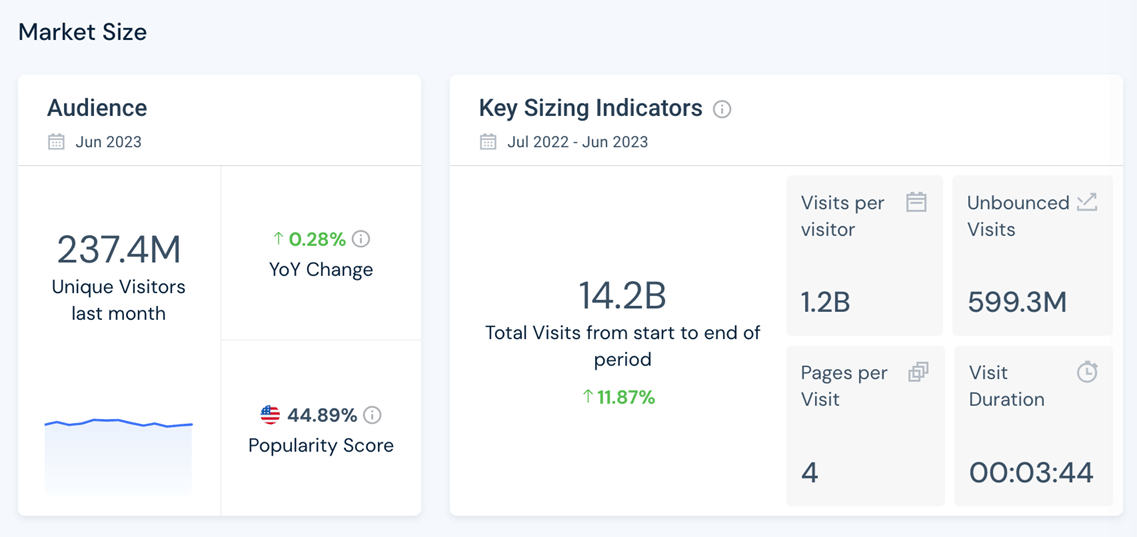
What to look for: Whether the site category that Similarweb assigns matches what the site claims to be.
What’s normal: Legitimate sites are consistently categorized within their actual industry vertical, a cybersecurity firm shows up in technology/security, and a travel comparison site appears in travel.
Why it’s a red flag: Misclassification often reflects identity misrepresentation. A site operating as a low-quality content farm but claiming to be a financial advisory platform will reveal the discrepancy through category assignment, traffic sources, and keyword patterns simultaneously. This misclassification typically occurs through structured data manipulation or content layering, publishing a thin veneer of on-topic content to appear credible in a more authoritative vertical, while the actual traffic profile tells a different story. Category mismatch rarely stands alone, but it adds weight when combined with other signals.
How to check: Similarweb’s Market Analysis tool shows how sites are categorized by industry. Cross-reference the assigned category against the site’s stated business, content, and traffic profile.
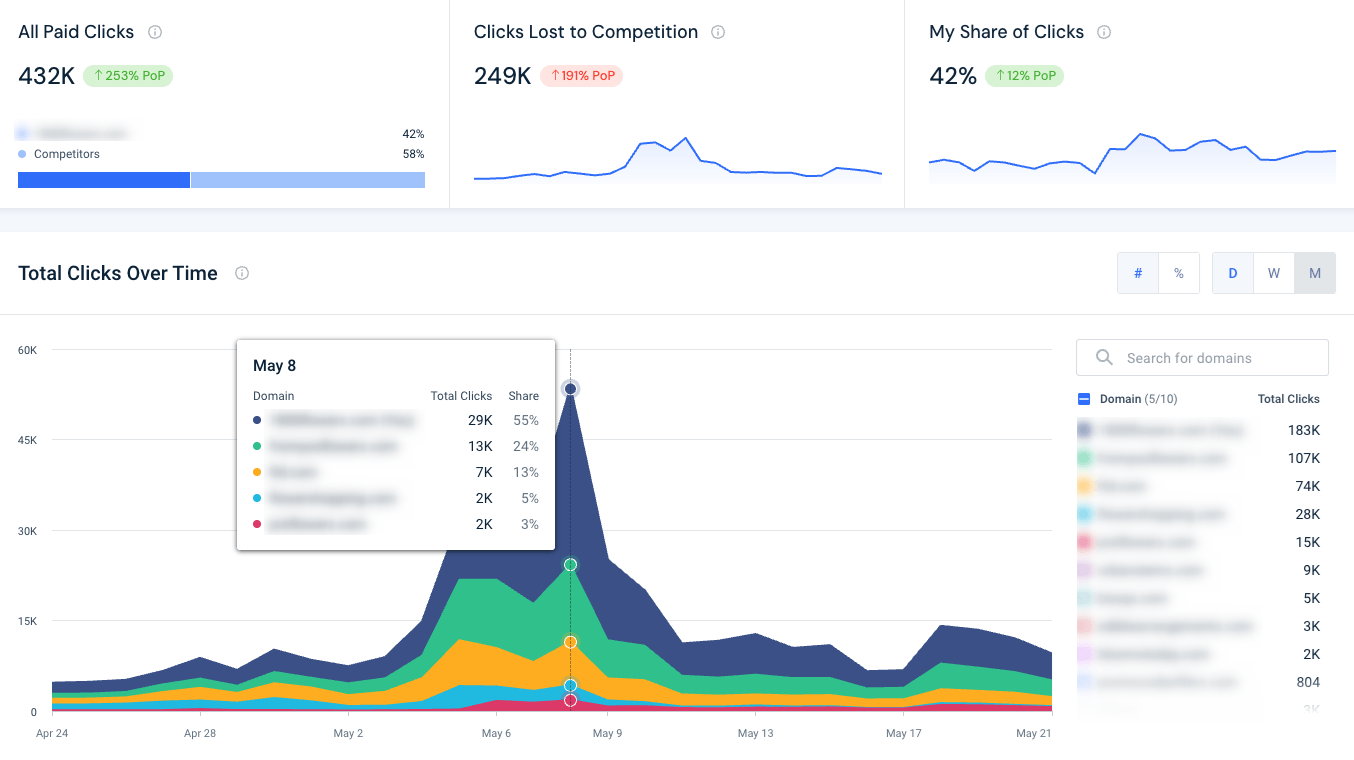
What to look for: Competitors, affiliates, or resellers bidding on your branded keywords in paid search, and how much of your click share they’re capturing.
What’s normal: Your brand should dominate click share on its own branded terms. Any partner activity in paid search should stay within agreed boundaries and be clearly declared in ad copy.
Why it’s a red flag: Competitors capturing a growing share of your branded paid clicks, affiliates impersonating your brand to collect commissions, or your trademark appearing in unauthorized ad copy are all signs of active brand abuse. Without a detection system in place, these violations go unreported and unresolved, quietly siphoning traffic and spending that should belong to you. Unlike the behavioral signals above that help you vet third-party sites, this signal applies when you need to protect your own brand’s paid search presence.
How to check: Similarweb’s brand protection tools track who’s bidding on your branded keywords, surface trademark violations, and show how your click share shifts over time, so you can detect paid search abuse before it costs you traffic, spend, or reputation.
A single unusual metric doesn’t automatically mean a site is risky. Some businesses naturally have odd-looking traffic patterns. For example, a niche B2B company may attract visitors from all over the world, a publisher may have high bounce rates on certain articles, and a startup may rely heavily on direct traffic before building organic visibility.
What matters is the bigger picture. When several warning signs appear together, the risk becomes much harder to ignore. One unusual signal may just be worth noting. Three or four should raise questions. But when five or more signals line up across areas like traffic sources, engagement, geography, referrals, keywords, and category trends, it’s usually a sign that the site deserves much closer scrutiny before moving forward.
That’s where Similarweb is useful. Instead of looking at isolated metrics, you can compare traffic, channels, engagement, geography, referrals, keywords, paid search activity, and category data all in one place. The real value isn’t any single chart, it’s being able to see whether the site’s overall behavior makes sense when all the signals are viewed together.
Fraudulent and suspicious websites are harder to spot visually than ever, but they’re not harder to spot behaviorally. Artificial traffic, manipulated channels, misaligned geographies, fabricated engagement, and unauthorized paid search activity each leave a distinctive pattern that doesn’t survive comparison against how real sites actually operate.
Similarweb gives teams the intelligence layer to catch those patterns early. Before you enter a partnership, evaluate a publisher, vet an affiliate, or make an investment decision based on a site’s claimed reach, run the traffic profile. The behavioral footprint will tell you whether what’s being claimed holds up.
Use Similarweb’s Web Intelligence platform to start validating sites against the signals outlined here, before the decision is made, not after.
What’s the difference between suspicious traffic and normal traffic fluctuations?
Not every unusual metric is a sign of fraud. Legitimate websites can experience traffic spikes from viral content, PR campaigns, seasonal demand, or product launches. The key is context. Suspicious activity typically involves multiple signals appearing together, such as unexplained traffic growth combined with poor engagement, irrelevant referral sources, and mismatched geography.
Can bot traffic affect website analytics and business decisions?
Yes. Artificial traffic can distort metrics like monthly visits, bounce rate, session duration, and referral performance, making a website appear larger or more influential than it really is. This can impact advertising decisions, affiliate partnerships, publisher evaluations, and competitive analysis if the traffic quality isn’t validated.
How can you tell if referral traffic is legitimate?
Legitimate referral traffic usually comes from relevant publishers, communities, search engines, or partner websites connected to the site’s niche or audience. Suspicious referral traffic often comes from unrelated domains, low-quality directories, spam networks, or clusters of sites that appear to exchange traffic artificially.
Are high bounce rates always a warning sign?
No. Bounce rate depends heavily on the type of website and user intent. Informational content, news articles, or single-page resources can naturally have high bounce rates. The concern arises when extremely high bounce rates are paired with very short session durations and low pages-per-visit, which together can indicate non-human traffic behavior.
Can Similarweb help detect affiliate fraud?
Yes. Similarweb can help uncover patterns commonly associated with affiliate abuse, including suspicious referral ecosystems, inflated traffic from low-quality sources, and unauthorized paid search activity targeting branded keywords. These insights can help businesses identify potentially risky affiliate partners before entering agreements.
How often should businesses monitor suspicious traffic patterns?
Website evaluations shouldn’t be treated as one-time checks. Traffic manipulation patterns can change quickly, especially in affiliate networks or paid acquisition campaigns. Ongoing monitoring helps businesses detect emerging risks before they impact partnerships, advertising spend, or brand reputation.

by Roie Gortler
Senior Product Marketing Manager
With 15+ years in product marketing, strategy, branding, and PR, Roie has driven growth at top agencies and tech firms through product launches and go-to-market strategies.
Contact us to set up a call with a market research specialist