

You’ve hit your search limit
Start your free trial to keep exploring full traffic and performance insights.
Get StartedDistancive - Walk & Run Stats app analytics for October 10

Distancive - Walk & Run Stats
- Tomasz Korolko
- Apple App Store
- Paid
- Health & Fitness
Distancive turns your Apple Health distance data into a clear, motivating view of how far you walk and run - on iPhone, your Home Screen, Lock Screen and Apple Watch. Choose kilometers or miles.
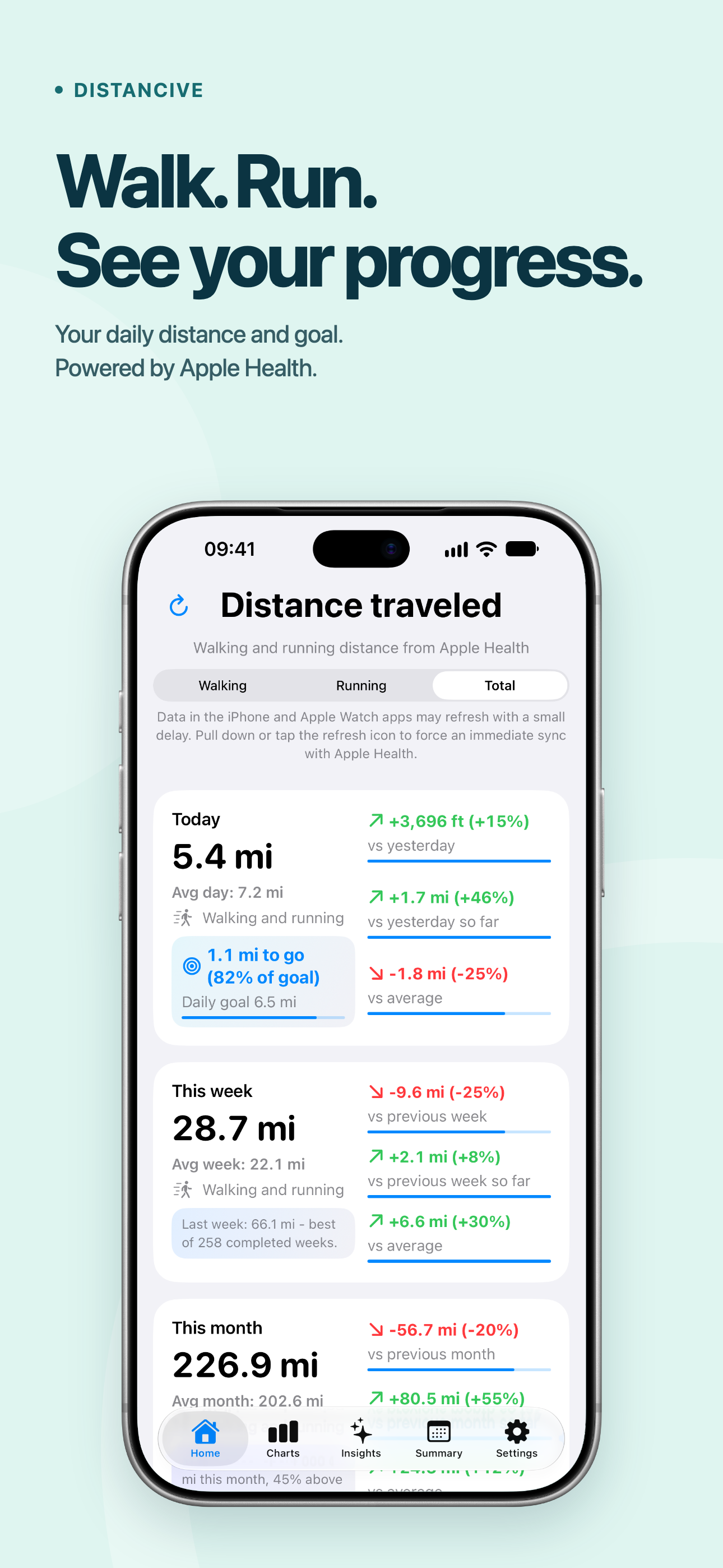
See your distance for today, this week, this month, this year and all time. Switch between walking, running and total distance. Compare with the previous period, the same point in the previous period or your average.
Make today’s goal happen
Set a daily total distance goal, shared between iPhone and Apple Watch and adjustable on either device. Track your progress, see the distance remaining and compare today’s distance with your goal. Today widgets and complications can measure progress against your goal too.
Enable adaptive reminders on Apple Watch. Timing adjusts to your activity on weekdays and weekends, leaving time to achieve your distance goal in the evening. Enable a separate notification when you reach your goal.
Understand your progress
Compare this morning with yesterday morning, or this week so far with the same point last week. Progress bars make comparisons easy to see. Short insights on iPhone Home period cards highlight what stands out.
Explore daily, weekly, monthly and yearly charts, swipe through your distance history and use the moving average line to spot longer-term trends. For each current period, the charts also show your projected distance by the end of the period - giving you a visual of where you’re on track to finish based on your pace and recent history.
Discover meaningful insights
Insights highlights trends and consistency across walking, running and total distance, with insights for days, weeks, months and years. The Records tile brings your best days, weeks, months and years together, showing the distance and when each record was set. Put your all-time distance into perspective with visualizations showing your progress around Earth and towards the Moon.
Your week at a glance
Weekly Summary brings your week into one recap. Review daily distances, average distance, best day, running frequency, running share and other highlights. Enable a notification when a new summary is ready.
Your distance, always visible
Add customizable Home Screen widgets for individual periods or several periods together. The Insights widget brings activity insights to your Home Screen. Lock Screen widgets let you check your distance without opening the app.
Choose previous-period, same-point or average comparisons. Circular Lock Screen widgets offer optional progress rings and can display percentage changes or distance units.
Built for Apple Watch
Distancive works independently on Apple Watch, even without your iPhone nearby. Check walking, running or total distance in kilometers or miles, with every period, comparisons and progress bars.
Add complications for today, this week, this month, this year or all time. Optional rings in circular complications show progress and wrap around beyond 100%.
Manage complication settings directly from your iPhone, with syncing to your watch.
A clearer start
Expanded onboarding introduces key features with separate setup steps. It helps you configure all app settings, step by step.
Features:
- Walking, running and total distance
- Daily goal with progress and distance remaining
- Adaptive goal reminders and goal-reached notifications on Apple Watch
- Previous-period, same-point and average comparisons
- Distance charts, history and moving average trends
- Insights, personal records and weekly summaries
- Earth and Moon distance visualizations
- Home Screen distance and Insights widgets
- Lock Screen widgets and Apple Watch complications
- Standalone Apple Watch app
- Kilometers and miles
- Light, Dark and System appearance
Distancive does not record routes, workouts or GPS activity. It presents your existing walking and running distance data from Apple Health. Apple Health access is required to display your distance data.
One purchase. No subscriptions or in-app purchases.
Store Rank
The Store Rank is based on multiple parameters set by Google and Apple.
All Categories in
United States--
Health & Fitness in
United States--
Top Competitors & Alternative Apps
Apps with a high probability of being used by the same users, from the same store.

Runtile: Running Stats & Log

Health Stats: Data & Charts

MovinRings

ShoeMile
 Distancive - Walk & Run Stats VS.
 October 10, 2026