

Talking Reminder 앱 분석 (10월 6일)
Talking Reminder
- 方 沈
- Apple App Store
- 유료
- 라이프스타일
Main Features:
1. Run the reminder at the indicted time
2 When the App is launched, the reminder could talk the text in more than 20 international languages at the indicted time.
3 When the device is locked or the user is using other App, the App could remind the user by playing more than 200 talking in English and also display the message in the notification bar.
4 The App includes the following five standard time reminder:One Time reminder, every hour reminder, every day reminder, every week reminder, every month reminder,interval reminder.
Detail features:
1 import the text from the paste board, soft keyboard or text file.
2 In the main list, each table cell contains one cycle button at the right side, after tapping the right button,the user could change that status from active to sleep. In the sleep status, the reminder will be ignored.
3 When the reminder record is running, the right button will be stop button. So tap the stop button could stop the current reminder job.
4 The user could select the talking speed from setting view.
5 The user could control the talking volume from setting view.
6 In the main list view, at tool bar, the right one is the wizard button. Tap the wizard button, users could select the every day template, every week template or every month template.
7 In the main list view, at the tool bar, the left one is the clear button. Tap the clear button, users could delete all the reminder records from the database and notification list.
8 Play the sound file after launching the notification when the app is running. If this app is not running, when the banner of the notification is displayed, please tap the banner immediately, the app will be launched, then the sound file will be played. The duration of the sound could be more than one minute.
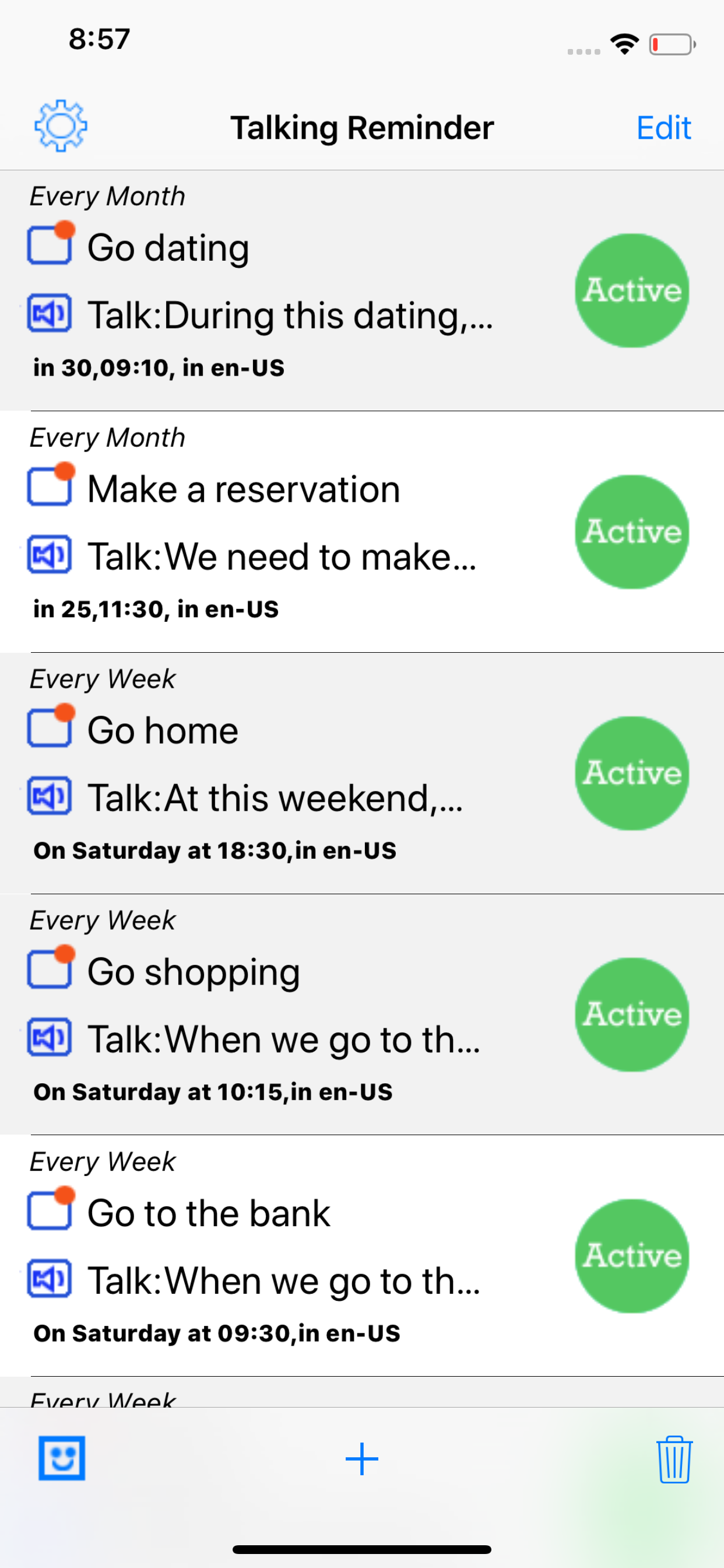
Screenshot: In the main list view, if using the default iOS sound, only the talking text is displayed. If not, one line is for the talking notification sound and the other line is for the talking text. Tap the + button at the tool bar, the menu list is displayed. So the user could select the reminder type. In the main view list, we tap the active button, the status of reminder event will be changed to sleep.
This edition includes iOS default notification sound and 228 talking sound in English.
Below is the notification sounds list: 0 - 80
0 iOS default Sound
1 Go home
2 Go to school
3 Go to work
4 Go to the cafeteria
5 Do some exercise
6 Get up
7 Go to bed
8 Set out
9 Go back
10 Take a break
11 Make a reservation
12 Go dating
13 Call up
14 Send an Email
15 Go to the bank
16 Go to the hospital
17 Attend a meeting
18 Go to the grocery
19 Check out the internet
20 Check the email box
21 Play the sound
22 Play music
23 listen the talking
24 Have an afternoon Tea
25 Go to a party
26 Go shopping
27 Have the breakfast
28 Make an appointment
29 Take a photo
30 Make a deposit
31 Withdraw some cash
32 Go on a trip
33 Send a fax
34 Check out
35 Check in
36 Place an order
37 File the paper
38 Check the calendar
39 Take the wallet
40 Take the mobile phone
41 Meet the client
42 Submit the request
43 Finish the report
44 Turn on the computer
45 Turn off the computer
46 Turn on TV
47 Turn off TV
48 Turn on the security system
49 Turn off the security system
50 Turn off light
51 Turn on light
52 Send the short message
53 Water the flower
54 Take pills
55 Look at the pet
56 One Apple a day
57 A friend indeed
58 Lock the door
59 Apologize for mistakes
60 Hurry up
61 Be there on time
62 Make progress
63 Make effort
64 Make some changes
65 Make money
66 Make a compliant
67 Make some notes
68 Make the arrangement
69 Air the room
70 Ask for a help
71 Call back
72 Remit Money
73 Cancel the reservation
74 Check the schedule
75 Check the balance
76 Clean up the room
77 Comb Hair
78 Drink Something
79 Contact our friend
80 Donot let me down
81 - 228 please read the note about V5.2.1 What's new.
스토어 순위
스토어 순위는 Google과 Apple이 설정한 여러 매개변수를 기반으로 합니다.
모든 카테고리 ·
미국--
라이프스타일 ·
미국--



 Talking Reminder VS.
 10월 6, 2026