


8月30日 的 Fokus: Text Highlighting 應用程式分析

Fokus: Text Highlighting
- Aaron Raimist
- Apple App Store
- 免費版
- 公共設施
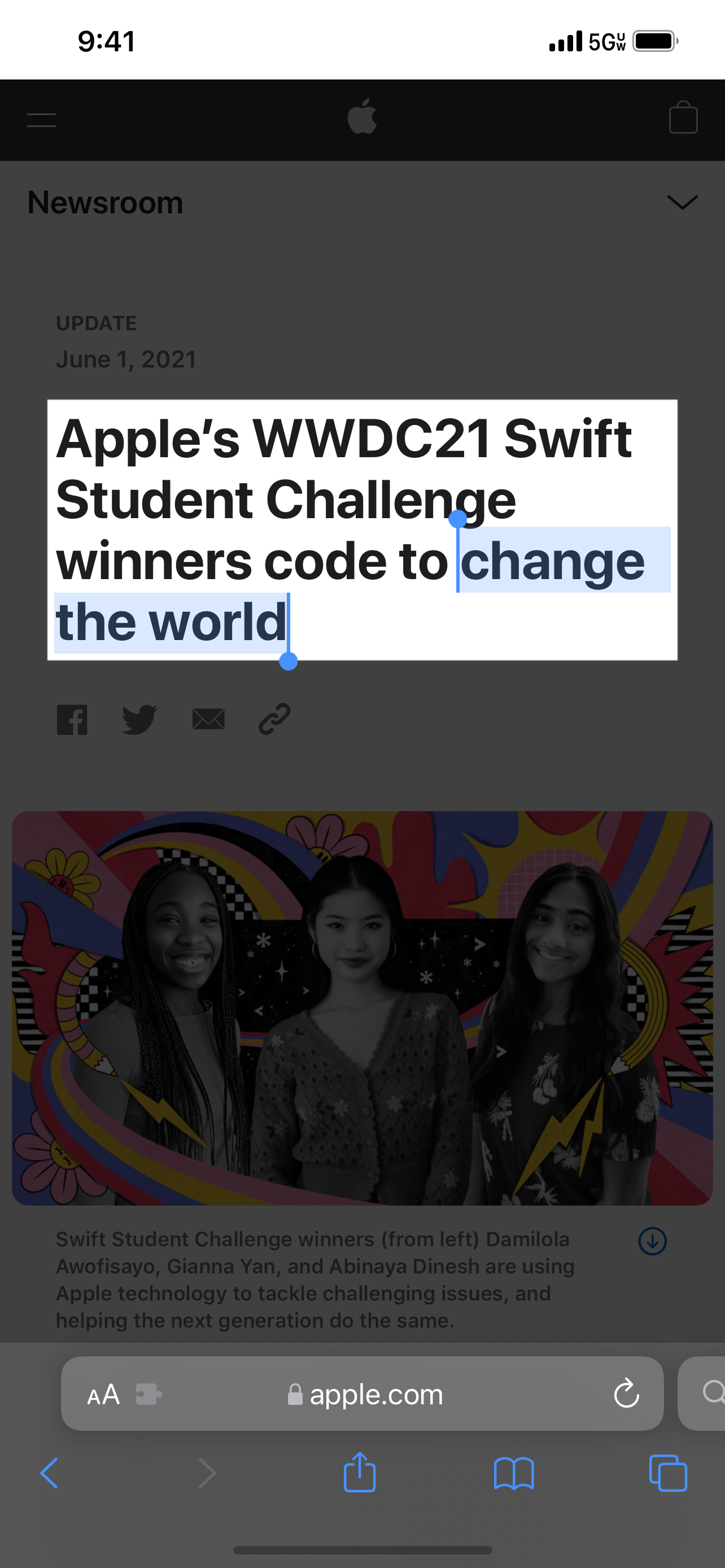
Fokus is a Safari extension that emphasizes anything you select on the web by covering the rest of the page with a semi-transparent black overlay.
This allows you to focus on what you are reading or to emphasize part of a web page during a presentation.
Fokus has options to:
- Adjust the overlay opacity
- Specify a modifier key such as Shift, Control, Option, or Command which must be held down to active the overlay
- Adjust the padding around selection
To use:
1. Open Settings
2. Scroll down to Safari and tap on it
3. Scroll down to Extensions and tap on it
4. Enable Fokus
5. Open the Safari app and go to a website
6. Tap the "aA" button
7. Tap Manage Extensions
8. Enable Fokus
9. Tap Fokus
10. Allow Fokus to access the website
商店排名
商店排名基於Google和Apple設定的多個參數。
所有類別 在
美國--
公共設施 在
美國--



 Fokus: Text Highlighting VS.
 8月 30, 2026