

You’ve hit your search limit
Start your free trial to keep exploring full traffic and performance insights.
Get StartedCELEST5459 Analog Watch app analytics for August 31

CELEST5459 Analog Watch
- CELEST Watches
- Google Play Store
- Paid
- Personalization
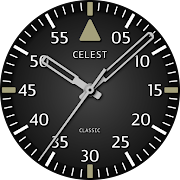
This modern analog watch face has a special trick up it’s sleeve. It has an extra hand that always shows the current GMT time, which stands for Greenwich Mean Time. It is a time standard used as a reference point for timekeeping around the world. GMT is based on the mean solar time at the Prime Meridian, which passes through Greenwich, London, England. It serves as the baseline for coordinating time zones worldwide.
Furthermore, the GMT hand operates on a 24-hour scale, completing a full rotation around the dial once per day. This particularity adds to its intrigue, making it our inaugural GMT watch face available in four distinct color variations.
INSTALLATION GUIDE ↴
When attempting to install a watch face from the official Google Play Android app, you may encounter several issues.
In cases where the watch face is installed on your phone but not on your watch, the developer has included a companion app to enhance visibility on the Play Store. You can uninstall the companion app from your phone and look for a triangular symbol next to the Install button in the Play Store app (https://i.imgur.com/OqWHNYf.png). This symbol indicates a dropdown menu, where you can pick your watch as the target for installation.
Alternatively you can try to open the Play Store in a web browser on your laptop, Mac or PC. This will enable you to visually select the correct device for installation (https://i.imgur.com/Rq6NGAC.png).
[Samsung] If you followed the aforementioned instructions and the watch face still doesn't appear on your watch, open the Galaxy Wearable app. Navigate to the Downloaded section within the app, and you'll find the watch face there (https://i.imgur.com/mmNusLy.png). Simply click on it to initiate the installation.
WATCH FACE DETAILS ↴
Complications:
- Date window
- GMT hand
Color variants:
- Dark
- Black
- Blue
- Light
CATALOG & DISCOUNTS↴
Our online catalog: https://celest-watches.com/product-category/compatibility/wear-os/
Wear OS discounts: https://celest-watches.com/product-category/availability/on-sale-on-google-play/
FOLLOW US ↴
Instagram: https://www.instagram.com/celestwatches/
Facebook: https://www.facebook.com/celeswatchfaces
Twitter: https://twitter.com/CelestWatches
Telegram: https://t.me/celestwatcheswearos

CELEST5459 Analog Watch Usage Rank
The usage rank is based on Similarweb's algorithm that calculates current installs and active users over a 28-day period.
All Categories in
United States--
Personalization in
United States--
Top Competitors & Alternative Apps
Apps with a high probability of being used by the same users, from the same store.

CELEST5450 Smart Analog Watch

CELEST5478 Aviator Watch

CELEST5405 Mirrored Watch
CELEST1810 Aviator Watch
 CELEST5459 Analog Watch VS.
 August 31, 2026