

Battery Percentage Widget app analytics for December 23

Battery Percentage Widget
- HobbySoft
- Google Play Store
- Free
- Tools
Modern smartphones have small, barely visible battery charge indicators. Meanwhile, a mobile phone has the annoying property of quietly running out of charge at the most undesirable moment.
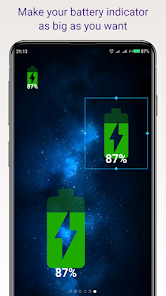
This app provides you with a simple and visible indicator of your phone's battery charge.
And the size of this indicator can be as large as you want.
Install this application on your phone and tap on any free space on the phone screen until the “Widgets” menu button appears at the bottom of the screen. In the list of widgets, select the widget named “Battery”. Drag the Battery widget to a convenient location on your phone screen and stretch it to the desired size.
The Battery widget shows the current charge level of the phone and displays the charging mode when the charger is connected. If the charge level drops below 30%, it changes color from green to orange, and then to red. You can choose any color for different battery levels in the app settings.
Tap on the widget to see more detailed information about the battery status. If possible, a prediction of the time when the battery will reach 100% charge is calculated and displayed. There is also a button in the top menu for setting the colors and orientation of the widget.
Important! To ensure that the Battery widget can respond promptly to changes in battery level, disable power optimization for this application in your phone settings:
"Settings" -> "Applications" -> "All applications" (select by name "Battery") -> "Activity control" -> "No restrictions"
The widget consumes a minimum of energy and does not require any additional permissions on the phone. Its only function is to accurately and clearly show the charge level of your phone.
Battery Percentage Widget Usage Rank
The usage rank is based on Similarweb's algorithm that calculates current installs and active users over a 28-day period.
All Categories in
United States--
Tools in
United States--
Top Competitors & Alternative Apps
Apps with a high probability of being used by the same users, from the same store.

iStatus: Video Saver Reposter

Foxcolab - Built for Privacy

Saldo • Charge Anywhere

Vittae
 Battery Percentage Widget VS.
 December 23, 2025