

You’ve hit your search limit
Start your free trial to keep exploring full traffic and performance insights.
Get StartedPdf Merger & Splitter app analytics for January 8

Pdf Merger & Splitter
- Appwallet Technologies
- Google Play Store
- Free
- Productivity
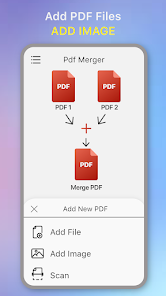
PDF Merger is an advanced PDF tools for free to merge pdf files of multiple into a single pdf file and convert photo to pdf files along with password protection and rename and organize pdf page documents.
(i)Merge PDF Files:-
If you want to merge multiple pdf files and make them one pdf file by merging them all then this best all in one pdf editor app .
PDF Pages Merge app is an advanced pdf tool app which makes the complex task to merge multiple pdf files simple, effective and quick. Multi Merge PDF and combine pdf files into one compact PDF that’s easy to share, archive, or send out for review.
PDF Pages Merge App Features:-
1. Merge Multiple PDF Files into a single PDF.
2. Easy PDF that suits to the merge option.
3. Encrypt PDF file with password, rename files, app to combine PDF files.
4. Create PDF files free from this all in one pdf editor app.
Image to PDF Files:-
If you have photos and want to convert them into PDF, you can use the convert picture to pdf functionality. It will convert one picture to pdf (or) multiple image files into one single pdf file.
This is the best jpg to pdf converter app when you want to send a large number of photo to other into one file. Convert the multiple images into a single PDF files. Easy PDF merge conversation is done with this app to get merge pdf and combine pdf files.
Image to PDF file Converter Features:-
1.Convert picture to pdf file into a single PDF.
2.Easy PDF conversation app to combine pdf files easily.
3.Encrypt PDF image with password protection, rename and organize pdf pages.
4.Combine Images into one pdf files with this jpg to pdf converter app.
HTML to PDF Converter:-
This html to pdf converter app is used by many professionals who need to save the web page content for future reading. You can save the PDF file and keep in records and use it offline any day.
Convert the webpage to pdf converter access at any time any where even if you have not internet. You can save these webpage to pdf converter notes easily into the PDF formats.
Scan to PDF File:-
Easily scan & convert all kinds of documents to PDF format in a simple tap - receipts, invoices, notes, documents, photos, business cards, certificates, whiteboards, etc... The scan to pdf files results can be printed out instantly and send email, then save and view the scanned files anytime, anywhere.
(ii)Spilt PDF:-
This pdf page splitter is the best app to split pdf which have the four features to split pdf documents easily.
Spilt PDF Pages Free:-
It will the spilt pdf pages free as you entered number of the pages in the box, for(e.g) if the pdf file contains the ten pages you enter two in the box then 10/2 =5 then 5 files will be generated each will contains the 2 pages.
Split PDF Files:-
It will spilt pdf files which you entered in the box, for(e.g) if the pdf file contains the 30 pages you enter 10 in the box, then 10 pdf file will be generated and 30/10 =3 then it will contain the 3 pages per file.
Specific Range:-
Enter the specific range in the boxes. for(e.g) if the pdf files contains the 30 pages if you entered the range from 5 to 10, the 3 pdf files will be generated(1 to 4pages, 5 to 10 pages, 11 to 50 page split pdf documents).
Custom Range:-
Use this pdf page splitter app to split pdf and enter the custom number range in the boxes,(e.g) if the pdf files contains the 30 pages and the page range is 3 to 10,then the pdf files of 3 to 10 pages will be generated.
(iii)Extract PDF Pages:
Extract All Pages:-
This PDF editor-extract pages app will extract all pages to the pdf files(e.g) if PDF files contains the 5 pages, if you extract all then the 5 single pdf files will be generated.
Extract Custom Pages:-
It will extract pdf pages of the custom number you entered in the box (e.g) if the pdf files contains 5 pages, if you enter 2 and 4 and you select the check box it will merge 2 and 4 pages in one pdf file (or) if you uncheck box the 2 and 4 will be generated into two files.
Pdf Merger & Splitter Usage Rank
The usage rank is based on Similarweb's algorithm that calculates current installs and active users over a 28-day period.
All Categories in
United States--
Productivity in
United States--
Top Competitors & Alternative Apps
Apps with a high probability of being used by the same users, from the same store.

DrNutrition
PDF Merge: Scan, Sign & Edit

Smallpdf: Scanner & PDF Editor

Ultimate Plant Identifier 2026
 Pdf Merger & Splitter VS.
 January 8, 2026