

You’ve hit your search limit
Start your free trial to keep exploring full traffic and performance insights.
Get StartedWear Flashlight app analytics for January 14

Wear Flashlight
- CodVerter
- Google Play Store
- Free
- Tools
Description:
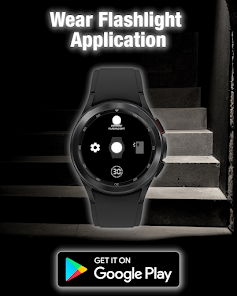
Wear Flashlight Widget (Tile) gives an instant light using the wear OS watch screen.
Users with Android smartphones can enjoy a companion mobile app to enhance the experience and capabilities.
Features:
• The flashlight will stay on during hand moving gestures
• When the flashlight is on, the watch brightness is auto set to maximum and returns to the original user setting brightness after
• Controls phone flashlight (for users with the companion Android smartphone app)
FAQ:
How to launch the flashlight window:
Navigate to Wearflashlight tile>>Click on the watch icon on the center of the screen and the flashlight window will be launched.
How to control your mobile torch (flashlight) remotely:
Navigate to Wear flashlight tile>>click on the smartphone icon on the right side>> the remote control screen will be displayed and your mobile flashlight will be turned on automatically, you can make use of the ON/OFF button in order to control you mobile flashlight.
How to display user settings via Wear OS watch:
Navigate to Wear flashlight tile>> click on the gear icon on the left and the user settings screen will be displayed.
How to display user settings via Android smartphone companion app:
Launch the companion application on your mobile phone >> click on the gear icon on the top and the user settings screen will be displayed.
User Settings:
After displaying the settings menu as described above
you can configure your preferences and options:
User settings preferences and options:
• Different modes: always-on or flicker
• Set a timer to display the flashlight (the app will close automatically after time elapsed to prevent battery drain). Including a shortcut button to start the flashlight for 30 seconds
• Select and set your preferred flashlight color (White, Red, Green, Violet)
• All settings are adjustable via the watch or the companion Android app
** Please note: When configuring the settings via mobile companion app you need to click the save button on the top of the settings screen in order to send the new settings to your watch.
Wear Flashlight Usage Rank
The usage rank is based on Similarweb's algorithm that calculates current installs and active users over a 28-day period.
All Categories in
Germany--
Tools in
Germany--
Users Interests & Top Categories
Top categories and apps used by Wear Flashlight users
Top categories
Affinity
Top apps within the category
More apps
22%


13%


12%


9%


Top Competitors & Alternative Apps
Apps with a high probability of being used by the same users, from the same store.

G Band

Rivercast - River Levels App

Oura

ZenAlarm: Smart Wake Up
Wear Flashlight VS. January 14, 2026