

MePlayer Pro Learning English app analytics for December 25

MePlayer Pro Learning English
- 미소프트
- Google Play Store
- Paid
- Education
Learn English while Watching Movies!
Playing movies in vertical view – watch a movie and read subtitle script at once!
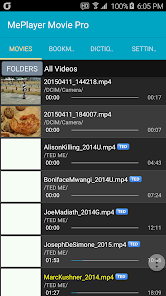
MePlayer Movie is a movie player for studying language/English that supports SMI and SRT subtitles.
The whole subtitle script can be read by scrolling so that you can study English while watching a movie. Words can be found on a dictionary just by clicking at them.
You can study English easily while watching movie with automatic intelligent replay and repeat.
Just like ordinary video players, you can use this program to watch movies conveniently.
==== Before-Playing Settings ====
Put a movie file and its subtitle file in a same folder of the device.
It generally provides MP4 and AVI. The file should have the format that is played in the phone itself.
For flawless playing, we recommend you to encode files to MP4. Subtitles should be in SMI or SRT file formats.
==== Directions for Use ====
1. Start MePlayer Movie and select the item to play from the playlist.
2. Rewind, Pause/Play and Fast Forward functions: Play the buttons on the displayed movie.
- Rewind: Goes back to the last subtitle starting point.
- Pause/Play: Displays control menu.
- Fast Forward: Goes to the next subtitle starting point.
3. Scroll and find the part you want to see from the subtitle script. Playing will start from that point by touching the part.
4. Replay: Replays the sentence automatically as many times as you chose.
- Intelligent Replay: Automatically decides number of replays considering difficulty of the sentence.
- Section Replay: Provides convenient section replays by sentences.
5. Repeat: Automatically pauses after playing one sentence before playing the next sentence. During the pause, you can read out the subtitle or practice speaking. If the device is set to TTS (Text To Speech), the subtitle will be read by TTS.
6. Subtitle Selection: Korean/English/All subtitles can be selected.
7. Horizontal View <-> Vertical View: The movie can be played in full page by selecting Horizontal View.
8. Sound Play: When you quit movie playing (by clicking Back button), only the sound of the movie can be played like using a MP3 player.
9. Dictionary: By touching the subtitle lightly from the movie image or by long clicking the subtitle from the lower script, the word list will be displayed. When you select a word to search, the word will be shown in the dictionary.
- The list of searched words can be used as the vocabulary list.
- Delete searched words: Long click words to delete.
- TTS pronunciation support: If you can’t hear the sound, set from the phone options.
10. Setting: Resume Play, Dictionary Selection, Horizontal View/Vertical View and other details can be set.
11. Control playback speed : above Android6.0, MP4 format
==== Supported Functions ====
. View SMI or SRT subtitles: Automatically scrolled as the movie is played.
. One-touch navigation: Rewind, Play/Pause and Fast Forward by touching movie display area.
. Subtitle Navigation
. Sentence Replay/Intelligent Sentence Replay/Section Replay
. Repeat
. Dictionary function (Provides various languages in the world with Google dictionary.)
. TTS Pronunciation support for subtitle sentences and dictionary
. Searched Word List (Vocabulary List)
. Movies in Horizontal View/Vertical View (Play in Vertical View)
. Play movie in MP3
. Continued Play from the last play stopped point
. Continued Play
. Adjust Subtitle Sync
. Listen to subtitles with TTS
. Section Replay for selected subtitle units
. Supports ColorDict
** This app does NOT have any videos.
MePlayer Pro Learning English Usage Rank
The usage rank is based on Similarweb's algorithm that calculates current installs and active users over a 28-day period.
All Categories in
United States--
Education in
United States--
Top Competitors & Alternative Apps
Apps with a high probability of being used by the same users, from the same store.

Idioms Dictionary

Chaos Audio

RosettaMind
 MePlayer Pro Learning English VS.
 December 25, 2025