

PDF Reader Plus-Viewer&Editor app analytics for December 2

PDF Reader Plus-Viewer&Editor
- PDF Reader Plus Team
- Google Play Store
- Free
- Productivity
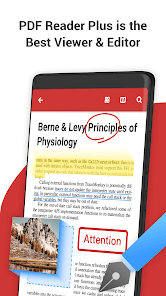
PDF Reader Plus is the best PDF manager, reader and editor app for viewing, commenting, editing, filling out forms, signing and sharing on your Android.
With the fast, robust and powerful PDF Editor, PDF Reader Plus enables you to freely markup professional PDF documents with highlights, underline, strikeout, squiggly, handwriting, shapes, anchored notes, text box, signatures, stamps, images, links and much more.
PDF Viewer
- Quick display: PDF Reader Plus uses the most advanced technology available today to speed the loading and display of PDF files quickly even with large PDF files
- Display mode: Choose single page, two page, book mode or full-screen reading mode to view PDF
- PDF orientation: Vertical and horizontal views provide the most convenient experience for you
- Flatten copy: Support the creation of a flattened copy, so that the contents remain static
- PDF search: Enable full text search, scroll, zoom in and out
- Quick page moving: Go to a specific page number, fast page navigation return, lector PDF
- Bookmarks: Make Bookmarks when it comes to intuitive navigation through PDF files
- Outline: PDF Reader will list the chapters of the PDF file. You can easily move to that chapter
- Change screen brightness: Adjust the brightness of the screen to suit different lighting conditions
- Theme color: Customize themes by choosing from 4 different colors.
- HD Printer: Support HD printing to make the file clearer; support printing together with annotations to easily share comments
- Open password-protected PDF files and remove password from PDF
Annotate PDF
- Mark important information in books, journals or documents with the first class annotation tools: highlight, underline, strikeout, squiggly, freehand, shapes, anchored note, text box and more
- Add text comments on the annotations like highlight, underline, strikeout, freehand, shapes, etc.
- Create multiple signatures with handwritten and image signatures. Use signatures to sign contracts and agreements on the go.
- Now linking any part of the text to a different page or even a website is fast. (URL, Email & Pages)
- Insert predesigned stamps or customize text and image stamps
- Insert images on the PDF files and place where you want it to be
- Remove all annotations with just one click
Fill Forms
- Work with static PDF forms created in Adobe Acrobat
- Fill out any PDF forms with interactive fields such as text fields, checkboxes and etc
PDF Editor
- Organize Pages: Reorder PDF pages easily by drag and drop
- Insert: Insert a blank/ruled/music/squared page in the existing PDF
- Rotate: Rotate one or more pages casually
- Split / Extract: Smoothly extract pages from the PDF document and automatically save in a new folder
PDF Watermark
- Add watermark to PDF files with texts or images on any position and adjust the size, color, transparency, orientation, etc.
PDF Merger
- Combine and merge 2 or more PDFs into a new single, searchable PDF.
PDF Manager
- Rename, copy, move, share or delete files and folders with PDF Reader’s built-in file manager
- Enable to read the Adobe & Foxit PDF files, documents, and books stored in your SD card and USB flash disk
PDF Converter & Scanner
- Image to PDF: Use free PDF scanner to turn images, receipts, notes and more into PDFs
- PDF to JPG: Convert PDF to images with annotations for better sharing
- PDF Creator: Create a PDF file from multiple images (PNG, JPG, TIFF, GIF).
Share
- Take advantage of WiFi Transfer tools to share files across devices
- Easily share files via skype, bluetooth, email and other apps
Support multiple formats
- Office Reader: PDF Reader Plus enables you to view Word, Excel, PowerPoint
- EPUB book reader, free to read comic books and other e-books
- Other formats: text (TXT), pictures (PNG, JPG), etc.
Have any feedback, comments or suggestions? please feel free to drop a line at pdfreaderplus@gmail.com
PDF Reader Plus-Viewer&Editor Usage Rank
The usage rank is based on Similarweb's algorithm that calculates current installs and active users over a 28-day period.
All Categories in
United States--
Productivity in
United States#1,838
Users Interests & Top Categories
Top categories and apps used by PDF Reader Plus-Viewer&Editor users
Top categories
Affinity
Top apps within the category
More apps
42%





22%





13%




7%


Top Competitors & Alternative Apps
Apps with a high probability of being used by the same users, from the same store.

PDF viewer lite
PDF Merge: Combine PDF
Web to PDF Converter PRO

Foxit PDF Editor
PDF Reader Plus-Viewer&Editor VS. December 2, 2025