

You’ve hit your search limit
Start your free trial to keep exploring full traffic and performance insights.
Get StartedAR.Pro 3 for Parrot Drones app analytics for February 13
AR.Pro 3 for Parrot Drones
- Shell M. Shrader
- Google Play Store
- Paid
- Entertainment
The Parrot Disco and Mambo+MiniCam are fully supported in addition to the Parrot Bebop V1 and V2 dronesl!
AR.Pro 3 provides for remote control capabilities of Parrot Bebop V1, V2, and numerous other Parrot drones. It exposes many of the same functions as Parrot’s own Freeflight application but implements a unique user experience and allows further customization of your drone.
Key Features (this list is always expanding):
* Parrot Flypad / PS3 / PS4 / NVidia Shield / iPega / MOGA gamepad support
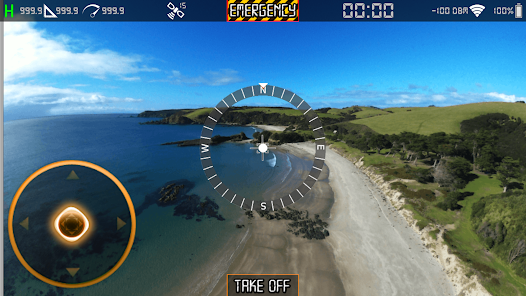
* Intuitive Piloting HUD
* Customized Wi-Fi settings including MAC filtering, WPA2 and hidden SSID
* Input Device Deadzone / Sensitivity tuning
* Combined Yaw / Roll Mixing
* Google / Bing / Here / arcGIS / etc Map Management
* Directed Flight plans
* Track Me Mode
* Waypoint Assisted flight plans
* MAVLINK TM Autonomous Flight Planner and Monitor
* Firmware Management for Bebop and Disco drones
* Full Sky Controller V1 and V2 Integration
* Remote Media Management (includes Flight Data and PNG files)
* Google Cardboard (VR) Mode
* Head Controlled Camera Panning
* Manual Connection options
* Minidrone including Mambo+MiniCam support
* Mambo accessories (claw + gun) support
* Full Parrot Disco support including Flight Plan
INSTRUCTIONS FOR CONNECTING TO YOUR MAMBO+MINICAM w/ Flypad:
Start AR.Pro 3 and stay in the Discovery activity.
Power on your Flypad and wait for its light to go solid green.
If you go into the AR.Pro 3 Settings activity, you’ll find a header for managing the flypad axes and button mappings.
Return to (or stay in the Discovery activity).
Power on your Mambo+MiniCam
AR.Pro 3 may prompt you asking if you wish to connect to the Mambo via Bluetooth. Answer NO.
After 30-60 seconds the Mambo’s Wi-Fi SSID will show up in your Wi-Fi network list pulldown.
Select the Mambo Wi-Fi network from the list once it appears.
Now back at the Discovery activity, wait 15-30 seconds for AR.Pro 3 to connect to your Mambo’s Wi-Fi.
Once connected (Settings gears no longer turning) you can enter AR.Pro 3’s Piloting activity.
If the video stream doesn’t show immediately (it’s black) it is because the MiniCam went into low power mode.
Launch / Takeoff and you’ll find the video stream starts up (if it is not already visible).
I’ll be working on button / axes mappings when the Flypad is connected directly to the Mambo in the coming weeks. Documentation updates are also underway.
AR.Pro 3 will never offer in-app purchases. Once you have purchased AR.Pro 3 you will benefit from all future enhancements without ever having to buy any additional (addon) features / functions.
Portions Copyright (C) 2007-2016, PARROT SA, all rights reserved
DISCLAIMER
The APIs is provided by PARROT and contributors "AS IS" and any express or implied warranties, including, but not limited to, the implied warranties of merchantability and fitness for a particular purpose are disclaimed. In no event shall PARROT and contributors be liable for any direct, indirect, incidental, special, exemplary, or consequential damages (including, but not limited to, procurement of substitute goods or services; loss of use, data, or profits; or business interruption) however caused and on any theory of liability, whether in contract, strict liability, or tort (including negligence or otherwise) arising in any way out of the use of this software, even if advised of the possibility of such damage.
Further details about Parrot's terms and conditions can be found here: http://www.parrot.com/us/terms-conditions/
Further details about Shell M. Shrader's terms and conditions can be found in the Change Log bundled with AR.Pro 3.
AR.Pro 3 for Parrot Drones Usage Rank
The usage rank is based on Similarweb's algorithm that calculates current installs and active users over a 28-day period.
All Categories in
Germany#304
Entertainment in
Germany#7
Top Competitors & Alternative Apps
Apps with a high probability of being used by the same users, from the same store.

FLL Airport

SacramentoKings+Golden1Center

Prepware Sport Pilot

Gridio - smart charge your EV
 AR.Pro 3 for Parrot Drones VS.
 February 13, 2026