

Split Screen & Dual Window app analytics for December 3

Split Screen & Dual Window
- AbcMobile
- Google Play Store
- Free
- Productivity
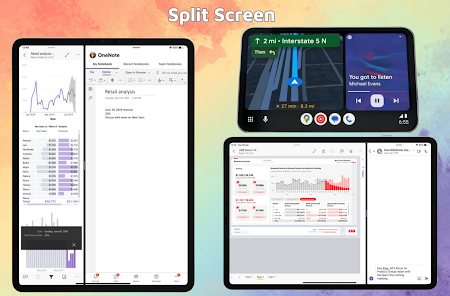
With our Split Screen & Dual Window app, you can seamlessly split your device's screen into two independent windows, allowing you to run and interact with two different apps simultaneously.
Key Features:
- Split Screen: Enjoy the convenience of using two apps side by side, allowing you to effortlessly multitask and boost your productivity. Whether you're reading an article while taking notes, chatting with friends while browsing the web, or watching a video while checking your emails, our Split Screen feature provides a seamless experience.
- Dual Window: Take multitasking to the next level with our Dual Window feature. You can open two apps in resizable windows, giving you the freedom to adjust their sizes according to your preference. This enables you to have a comprehensive view of both applications, making it easier to compare information, copy and paste content, and enhance your overall efficiency.
- Intuitive Interface: Our user-friendly interface makes it effortless to control and manage the split screen and dual window settings. You can easily drag and drop apps to switch their positions, resize windows by simply dragging the edges, and even swap the contents of the windows with a single tap. Customizing your multitasking experience has never been easier.
- Compatibility: Our app is compatible with a wide range of Android devices, ensuring that you can enjoy the benefits of split screen and dual window functionality regardless of your device's screen size or resolution. It seamlessly adapts to different screen orientations, giving you a consistent and optimized experience across various devices.
Unlock the full potential of your Android device and elevate your multitasking capabilities with our feature-rich Split Screen and Dual Window app. Enhance your productivity, streamline your workflow, and make the most out of your valuable screen real estate. Download our app now and experience a new level of multitasking convenience!
Split Screen & Dual Window Usage Rank
The usage rank is based on Similarweb's algorithm that calculates current installs and active users over a 28-day period.
All Categories in
United States--
Productivity in
United States#3,448
Users Interests & Top Categories
Top categories and apps used by Split Screen & Dual Window users
Top categories
Affinity
Top apps within the category
51%




23%


8%

7%


Top Competitors & Alternative Apps
Apps with a high probability of being used by the same users, from the same store.

Floating Apps (multitasking)

Taskbar

Multi App: Dual Space

Virtual Master - Android Clone
 Split Screen & Dual Window VS.
 December 3, 2025