

You’ve hit your search limit
Start your free trial to keep exploring full traffic and performance insights.
Get StartedSerial Number Inventory Scan app analytics for February 2

Serial Number Inventory Scan
- Dvaoru
- Google Play Store
- Free
- Tools
Hardware Inventory app is the best choice if you need to quickly create a list or Excel spreadsheet with information about your computers, printers, scanners, cash registers, spare parts or any other equipment with a serial or inventory number.
I had an idea to make a simple assistant for a census of serial numbers and inventory of computer equipment at a time when I needed to take inventory of office items at work
in several offices of my organization.
This app helped me a lot to save time on scanning serial numbers.
Hope it helps you too.
I continue to work on improving the application, and if you have any ideas and suggestions, please email me at dvaoru@gmail.com
When you scan the serial number, the app saves you time and automatically fills in the model field (if there is already a model with a similar number in the inventory database)
If the number does not have a barcode, then you can use OCR text recognition for input.
You can take an unlimited number of photos of the equipment and save them along with the rest of the information.
Also, if the serial number is in an inconvenient place, you can use this app to
take a photo of it and fill the fields manually or using OCR. (The saved photos of the equipment are displayed
at the top of the screen, in order to make it convenient to enter information from them into the app fields)
Equipment information is stored in the inventory database in the equipment cards.
You can search the database of equipment and set up filters.
The inventory database is stored only on your device and is not transferred
to third party server and services.
You can export the entire list of equipment to an Excel spreadsheet (.xls file format).
Since it is inconvenient to work with photos in an Excel spreadsheet, they are stored in a separate folder.
There are the links to the photos in the spreadsheet.
The names of photos of equipment are formed on the basis of the serial number and model of the equipment.
Therefore, it is convenient to use the database of photos of your equipment separately from the application.
It is also available to export your list of IT Equipment to a Google Spreadsheet.
To save a Google Spreadsheet, the app asks for permission to access Google Drive.
Using this permission, the application has access only to those tables that it creates itself.
The application does not have access to your other Google Docs and Google Drive files.
To scan the serial number, I used the best barcode scanner through the phone's camera.
I tried over 10 serial number scan libraries and chose the one that works amazingly!
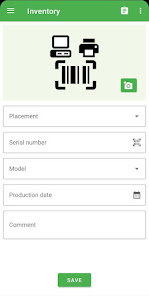
The card has the following fields:
* Photo (the number of photos is not limited)
* Placement
* Serial number (entry via barcode scanning)
* Technique model
* Production date
* Inventory number (entry via barcode scanning or OCR OCR)
* Comment field
Convenient app features:
* The equipment number is convenient to read with a barcode scanner
* Inventory number can be read using a barcode scanner or OCR
* The model of equipment is automatically substituted by serial number
* If there is no direct access to the serial number, it can be photographed directly in the app and easy written in the required field
* Each piece of equipment can be photographed and then uploaded photos (photo names will contain the number and model of equipment)
* The list of equipment can be uploaded to an Excel spreadsheet (xls)
* In the Excel spreadsheet with a list of IT equipment, you can add links to photos
* You can save the database of IT equipment in Google Spreadsheet
I tried to make this application as convenient as possible for the census of large volumes of equipment, and I hope it will help you in your work.
Serial Number Inventory Scan Usage Rank
The usage rank is based on Similarweb's algorithm that calculates current installs and active users over a 28-day period.
All Categories in
Germany--
Tools in
Germany--
Users Interests & Top Categories
Top categories and apps used by Serial Number Inventory Scan users
Top categories
Affinity
Top apps within the category
More apps
48%





12%




11%




9%




Top Competitors & Alternative Apps
Apps with a high probability of being used by the same users, from the same store.

BEEP - Expiry Date Tracking

CamCard-AI Scanner, Transcribe

ODK Collect

CalcTape Calculator with Tape
Serial Number Inventory Scan VS. February 2, 2026