




by Darrell Mordecai4 Min.
Oct 21, 2026
 Marketing Intelligence
Websites are constantly evolving to meet users’ needs and adapt to search engine requirements. One that can be used in this process is the 302 redirect.
Often misunderstood as an error, a 302 redirect is a temporary solution that maintains the original URL while seamlessly guiding users and search engines to new content.
In this guide, here’s just some of what you’ll learn:
Ready to take control of your site’s redirects and keep your SEO strategy on point? Let’s get started.
When your browser requests a web page from a site, its server sends back what is called an HTTP response. For example, a common one is a 404, which means that the page doesn’t exist on the site.
A 302 redirect, or 302 Found means that the resource the user is trying to reach has been moved temporarily to a different URL.
When web servers return this status code, they tell browsers to redirect humans to the destination URL specified in the response header.
The move is temporary, in other words, and search engines should not replace the old URLs in their indices with the new ones. This makes it useful for moving pages and content temporarily.
The word “error” can be misleading. A 302 redirect isn’t a mistake—it’s a redirect. When used correctly, it helps manage web traffic, maintain user experience, and preserve your SEO strategy during temporary changes.
It’s a deliberate and effective way to handle transitions without signaling that something has gone wrong.
A 301 redirect is permanent, while a 302 redirect is temporary. Despite their similar purpose—moving traffic from one URL to another—they should never be used interchangeably.
⚠️ Tip: Misusing redirects can harm your SEO, leading to issues like lost rankings or diluted link equity.
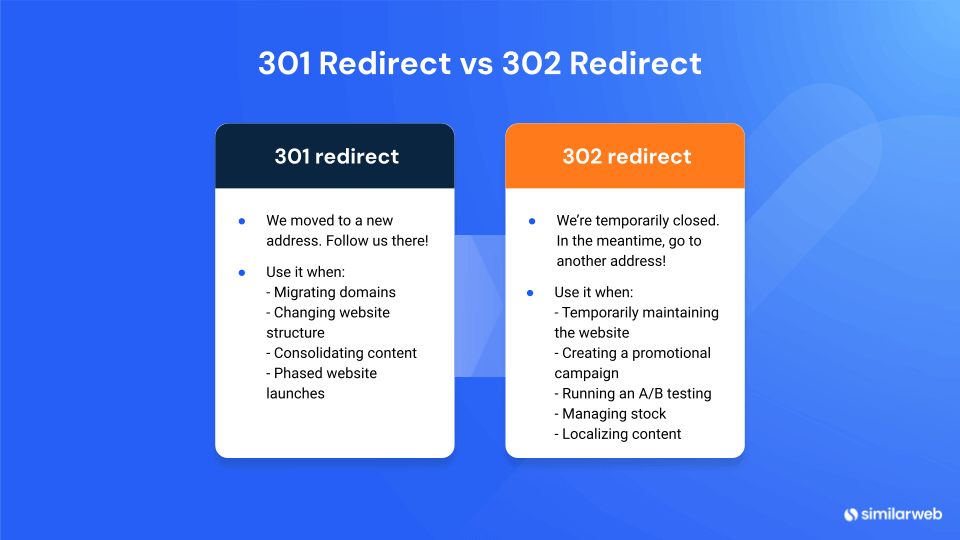
Correctly using 302 redirects is essential to maintaining your site’s search engine optimization and traffic.
Use a 302 redirect to guide users to a maintenance page while updates are underway. This prevents confusion and ensures traffic metrics remain unaffected.
302 redirects are ideal for moving users between different versions of a page. This lets you collect performance data without impacting the SEO rankings of your primary URL.
If an item is temporarily out of stock, use a 302 redirect to send users to an update or substitute page. Once the item is back, simply disable the redirect, and the original URL will function as before.
302 redirects can automatically guide users to region-specific pages. This keeps the primary URL consistent for general indexing purposes while delivering a localized experience.
A 302 redirect affects your SEO differently from a 301 redirect. A 302 redirect doesn’t ‘pass through’ the full link equity or SEO value from the old URL to the new one.
This is because search engines like Google don’t consider the move to be permanent – they leave the old URL in the index. This stops the original URL from losing its ranking but can also lead to problems if applied in error.
Here are some things to consider.
If old pages are too similar to new pages, search engines will index both, leading to duplicate content problems.
Because the SEO value stays with the original URL, the new page might not reap the full rewards of search rankings.
This inconsistency can occur when search engines are not sure which URL is the canonical version, i.e., the one it should consider as prescient.
Managing your 302 redirects effectively is essential to putting together an optimal user experience and improving your website’s SEO health. While these particular redirects are temporary, they should still be handled with the same care as permanent redirects to prevent potential disruptions.
Maintain a complete archive of all your 302 redirects. Note the old URL, the new URL, and the type of redirect (302) so that you’ll know that it’s supposed to be temporary and the reason for it. This detailed record will help you track changes and manage their long-term SEO implications.
Test your temporary redirects thoroughly before going live. Many tools—like built-in options on all-in-one platforms or WordPress plugins—offer a feature to check the 302s you’ve created through them.
You can also use your browser’s developer tools to trace the redirect paths and verify that everything works smoothly. Most importantly, double-check that all URLs are error-free. Redirect chains, broken links, or loops can disrupt the user experience and harm your site’s SEO, so it’s worth taking the time to get it right.
Routine check-ups, such as a site audit, help spot problems and resolve 302 redirect issues. The SEO audit tool by Similarweb can do this effortlessly. Log into your account, head to your crawled site under ‘SEO’ and then hit the ‘Discoverability’ tab. After that, you can go to ‘Redirections Overview – Dashboard’ to see a complete report of your 302 redirects.
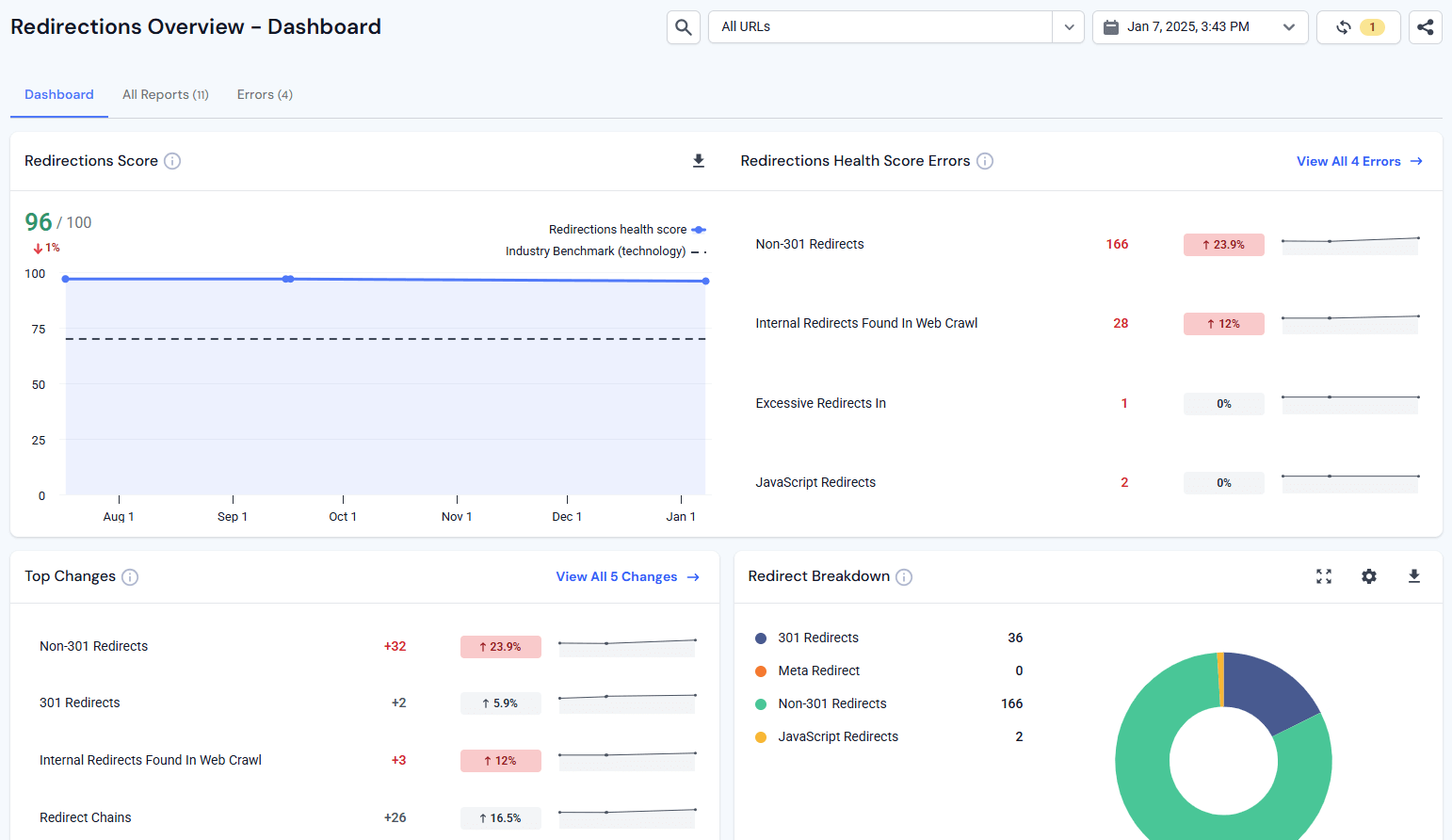
If you’re experiencing any misconfiguration, you can easily get to the bottom of it and keep your HTTP redirects under control so that they serve their purpose.
A 302 redirect has its own pitfalls that may distort traffic and lower SEO rankings. That’s why you need to fix them ASAP. Here’s how:
Ensure that you have a full backup of your site, including all site files and databases. This is especially important when working with CMS platforms such as WordPress. Undoing new changes and fixing mistakes can be as simple as restoring from a previous backup.
Old plugins, themes or CMS releases can cause conflicts and errors. Make sure everything is up-to-date. Deactivate outdated software that keeps redirecting you to other websites. You should especially look out for compatibility and security updates.
Go through your web server configuration files for errors. On an Apache server, go through the .htaccess file to confirm if rewrite rules are configured properly. For Nginx servers, examine the nginx.conf file for errors. Once misconfigured directives are found, the redirect error would be resolved.
Server error logs can give you hints as to what is causing this: review recently installed updates or changes and see if perhaps the redirect issue was initiated then. Use the hosting control panel, and turn on WP_DEBUG if you use WordPress, to identify (and resolve) errors.
Redirect loops happen when a page redirects to itself, causing the site to infinitely loop and crash. A number of tools can help you pick up on these loops. Fix them by making sure each redirect points fully to its final destination.
If things don’t work out, you can contact your web hosting company’s support. Inform them of the steps taken, including error messages and logs. They might be able to provide help based on issues specific to their server environment.
Having a basic understanding of 302 redirects, and how to use them properly, is a great way to improve the functionality and usability of your site. While still maintaining excellent SEO performance during periods of temporary page change.
For SEOs and site managers, Similarweb tools can be essential for analyzing and optimizing your redirects and the technical condition of your website. Make the right decisions about your redirects in order for your site to run smoothly. Want to get in control of your redirects? Start using Similarweb’s SEO tools today.
When to use 302 redirect?
A 302 redirect is appropriate for changes that are temporary, such as with an A/B test, for a seasonal promotion, or while a site is down for maintenance and will go back to its usual form.
Does 302 redirect affect SEO?
Yes, it can. A 302 redirect is temporary and the old URL retains its ranking in a search engine, instead of disappearing. But it can also cause problems if used incorrectly, by creating duplicate content.
How to differentiate between 301 and 302 redirects?
A 301 redirect is a permanent change, and the SEO value is taken over by the new URL, while a 302 redirect is a temporary switch, and the old URL is still kept in the index of search engines.
How to implement a 302 redirect in WordPress?
You can set up 302 redirects in WordPress with the help of plugins such as Redirection, or Yoast SEO Premium, or Rank Math. These plugins have friendly user interfaces that make it easy to manage your redirects.
Can 302 redirects lead to redirect loops?
Yes, a faulty setup of 302 redirects will create redirect loops where browsers constantly jump between two URLs and end up with ERR_TOO_MANY_REDIRECTS.

Director of SEO & AI Search at Similarweb
Limor brings 20 years of expertise in SEO and AI Search. She thrives on solving complex problems, creating scalable strategies, and building amazing dashboards.

What Is Retail Intelligence? How It Works and Why It's Essential to Digital Commerce
Most Searched Things on Google in 2026
Give it a try or talk to our marketing team - it’s free!
