

Sie haben Ihr Suchlimit erreicht
Starten Sie Ihren kostenlosen Testzugang, um weiterhin alle Traffic- und Performance-Insights zu erkunden.
Los geht'sChord Fusion - Guitar Tabs App-Analysen für 17. Januar
Chord Fusion - Guitar Tabs
- Alan Lee
- Apple App Store
- Bezahlt
- Musik
Chord Fusion is an easy to use, yet powerful application for guitarists wishing to improve their chord vocabulary and learn to play all chord voicings over the entire range of the guitar.
Features:
• Over 4,200 chords!
• All keys and chord types
• Huge selection of chord extensions
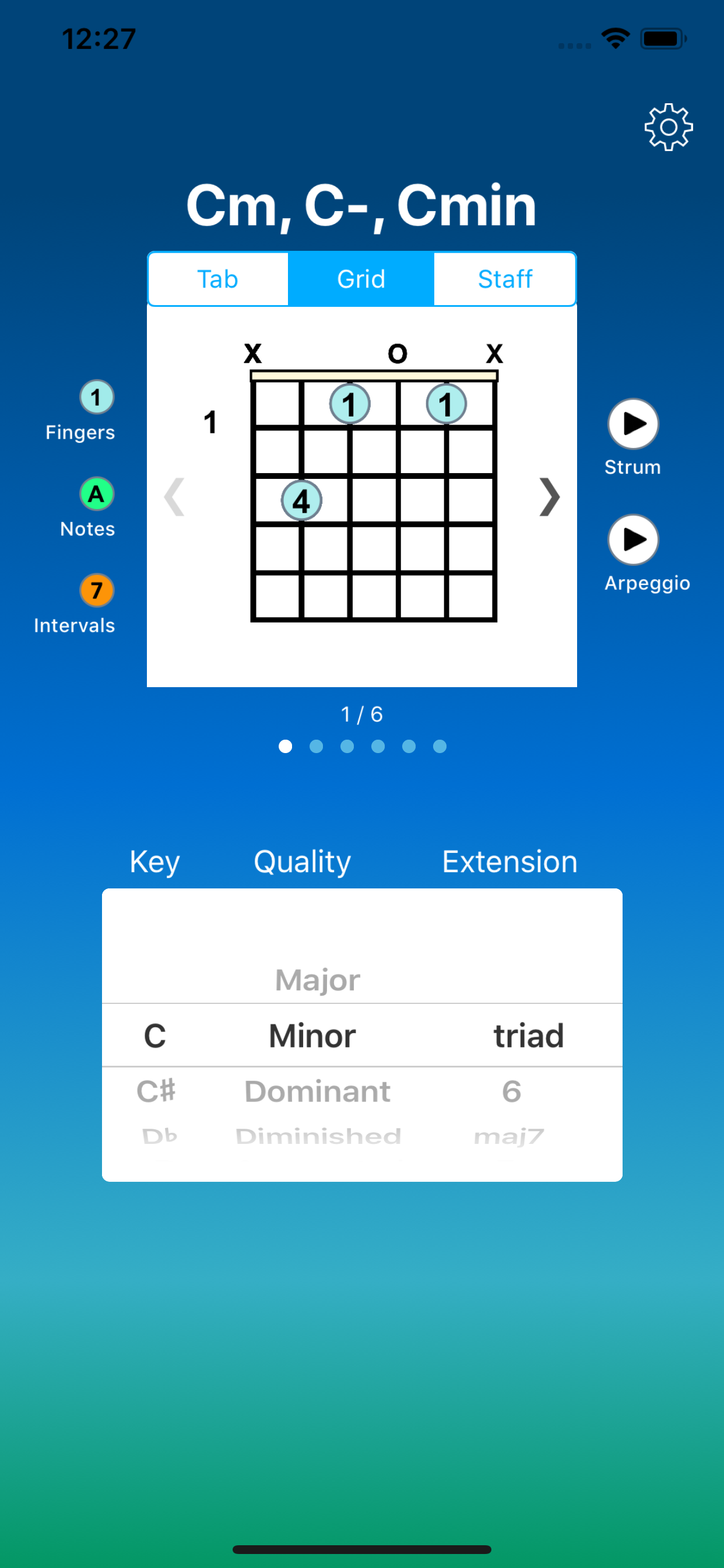
• Fingerings, note names, and scale intervals
• Grid diagrams, tabs, and staff notation
• Learn to play over the entire fretboard
• Hear how chords sound
• Select right or left handed grips
• For beginners through advanced players
Makes learning fun!
Here are just a few of the many exciting features that make Chord Fusion the ultimate guitar tool:
• ALL KEYS: Chord Fusion lets you select from diatonic keys: A, B, C, D, E, F and G and all enharmonic keys: C#,Db, D#, Eb, F#, Gb, G#, Ab, A#, and Bb. This allows you to learn songs in any key or transpose them to fit a particular arrangement or vocal range.
• SWIPE FOR CHORD VOICINGS: Swipe left or right or tap arrows to see different chord voicings across the fretboard. Sometimes you need a specific note on top or as the bass note; no problem - just select the key and swipe or tap to find alternate voicings and grips that sound better.
• GRID DIAGRAMS, TAB, AND STAFF NOTATION: With Chord Fusion, you can easily switch between grid diagrams, tabs, or standard staff notation. Whether you want to learn to read note clusters for chords or if you find it easier to play from tablature notation, you can simply tap to switch views and see alternate representations for each chord.
• FINGERS, NOTES, OR INTERVALS: In the grid diagram, you can switch from chord fingerings, to note names, or to scale intervals. This helps you develop knowledge of the entire fretboard while also helping you learn how chords are built from scales.
• RIGHT OR LEFT-HANDED GRIPS: Right-handed, left-handed, or both? No problem, just set your preference for right-handed or left-handed and the chord diagrams invert automatically. This is especially helpful for guitar teachers that have students with a different hand preference.
• STRUM OR ARPEGGIO: Tap one of the play buttons for each chord to hear how the chord sounds when strummed or played as an arpeggio. This helps with ear training and recognizing the chord when playing with other guitarists or chordal instruments.
• SOUND PREFERENCE: You can easily switch sounds from nylon string guitar, to electric guitar, jazz guitar, piano and vibraphone.
Rang speichern
Der Store-Rang basiert auf mehreren Parametern, die von Google und Apple festgelegt wurden.
Alle Kategorien in
Vereinigte Staaten--
Musik in
Vereinigte Staaten--
Top-Wettbewerber und alternative Apps
Apps mit hoher Wahrscheinlichkeit, von denselben Benutzer:innen aus demselben Store verwendet zu werden.

Bass Modes

Sight-reading for Piano 2

Chord Learner - Learn chords
Guitar Chords in Colours
 Chord Fusion - Guitar Tabs VS.
 Januar 17, 2026