

Sie haben Ihr Suchlimit erreicht
Starten Sie Ihren kostenlosen Testzugang, um weiterhin alle Traffic- und Performance-Insights zu erkunden.
Los geht'sCompute Distance Displacement App-Analysen für 18. Januar

Compute Distance Displacement
- Mudarmeen Munlin
- Apple App Store
- Bezahlt
- Reisen
Here come ComputeDistance, Displacement and Easy Navigation!
-auto set destination
-measure distance and displacement between current location and destination
-set point1 and point2
-measure distance and displacement between point1 and point2
-measure distance and displacement manually by entering latitude and longitude in the textfield.
-Display current location place name, latitude and longitude.
-Tap anywhere on map to retrieve place name, latitude and longitude.
-Local search places display place name in table view along with latitude and longitude.
-If you want to draw route, compute the distance (road travel) and displacement (air travel), marking coordinates and place name, pin annotation for outside plant work.
-Bookmark favorite places for frequently used for one click navigation.
-measure the distance (by road) or the displacement (shortest direct distance) between two locations.
App Features
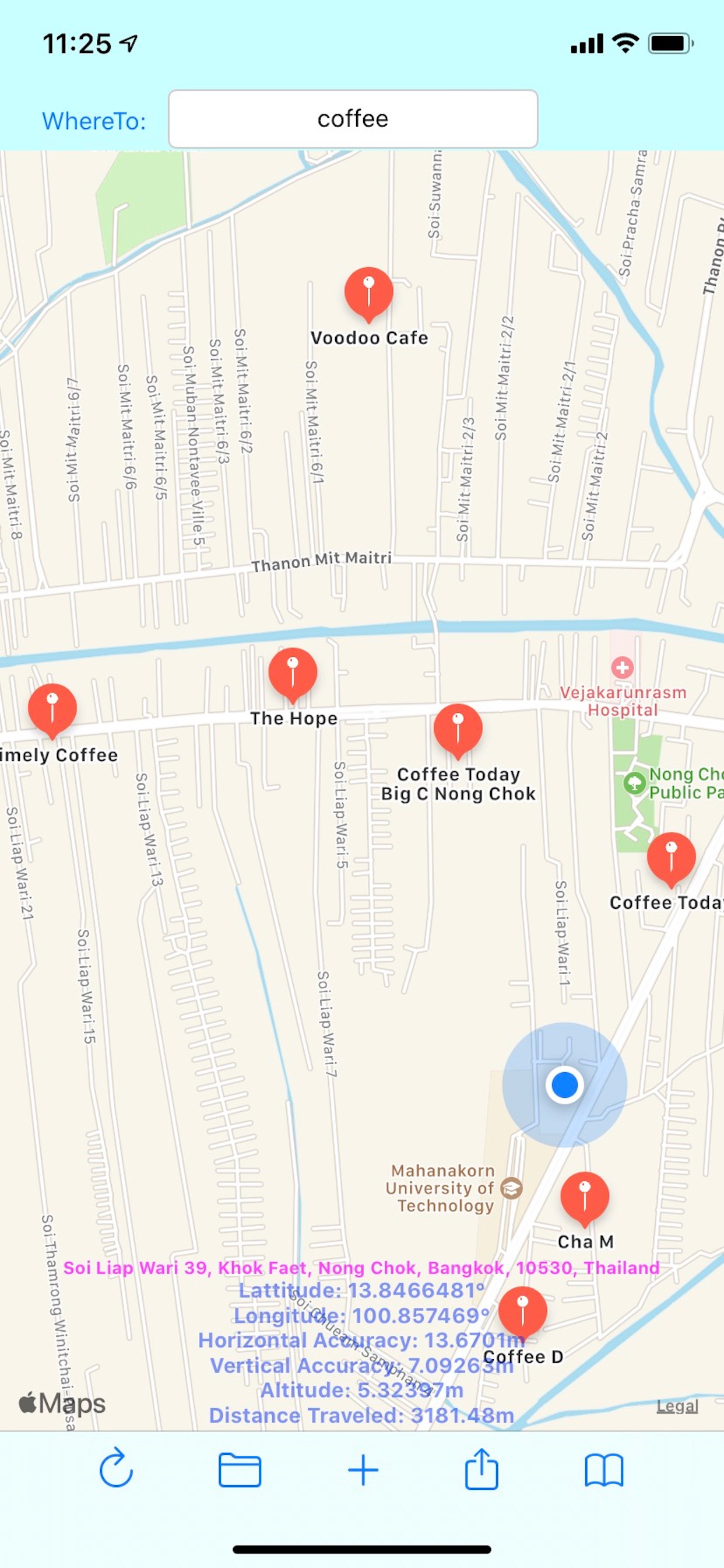
-Display map and your current location, latitude, longitude, accuracy, altitude, Traveled walking distance, current place name and address.
-Local search places near by.
-Display search results annotation in map view.
-Search places on earth or long press on map then tap pin to compute the distance from the current location.
-Choose start and destination point latitude and longitude from the favourite places to compute the distance, ETA, Turn by turn navigation, and displacement.
-Manually input latitude and longitude of the start and destination points to compute the distant.
-Edit or load the starting point latitude and longitude.
-Edit or load the destination point latitude and longitude.
-Compute the new distance and displacement of any start and end point.
-Navigate to destination using Apple map.
How to use
Search View
-Open app, map displays all pins, display current address, latitude, longitude, accuracy, altitude, distance traveled.
-Pan to move map.
-Pinch map to zoom in, zoom out.
-Tap on DistantTraveled label to zero distance and change map region to 100 m.
-Tap on address label to toggle map type.
-Tap on horizontal acc label to change map region to 2,500 km.
-Tap Refresh button to display all pins.
-Enter search key in WhereTo textfield and hit Search to search places and display pins.
-Tap each pin to compute the distance from the current location.
-Tap Folder button to view search result.
-Tap Share button to share current location.
-Tap Bookmark button to show the favourite places.
-Tap + button to return to current location map view.
Search Result
-Tap on destination place name to calculate distance and displacement from current location to destination and ready to navigate.
-Tap Back button to return to map search.
Favorite places
-Places display with coordinate latitude and longitude sorted in alphabetical order along with table index, easier to browse.
-Tap on destination place to calculate distance and displacement from current location to destination and ready to navigate.
-Tap key index to display places at the top of table view
-Swipe left to delete.
Distance View
-Tap Save button to save the current destination point into favourite places.
-Tap Start button to load the start point from favourite places.
-Tap Dest button to load the destination from favourite places.
-Tap Dist button to compute the distance, Estimated Time of Arrival (ETA) and displacement from start to dest point.
-Tap TBT button to see the overview of the turn by turn navigation.
-Edit latitude, longitude and place name to manually change the coordinates and name of the start and dest points. It can manually mark and compute distance or displacement between two end points along with visual route and pin name.
-Tap Dist button to recompute dist, disp, ETA, and pins.
Move around the map using pan, pinch, or double tap.
-Tap Reset button to center map on the start and destination point.
-Tap Place label to toggle map type.
-Tap Go button to navigate using Apple Map.
-Tap magnify glass to return to Search View.
Rang speichern
Der Store-Rang basiert auf mehreren Parametern, die von Google und Apple festgelegt wurden.
Alle Kategorien in
Vereinigte Staaten--
Reisen in
Vereinigte Staaten--
Top-Wettbewerber und alternative Apps
Apps mit hoher Wahrscheinlichkeit, von denselben Benutzer:innen aus demselben Store verwendet zu werden.

EuroBus

MapPath

My GPS Odometer

Light Pollution Map
 Compute Distance Displacement VS.
 Januar 18, 2026