

Round Camera im Vergleich zu Camera1 - Black & White Camera Nutzung und Statistiken
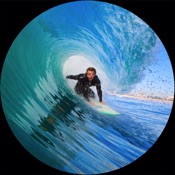
Take round pictures with this camera app and save them immediately in the photo album. The wide-angle or ultra-wide-angle or telephoto or front camera is used to achieve an optimal result. You can now switch between: Normal and Fisheye effect. You can take the photo with the blue button or with the volume buttons. The resolution of the finished photos is 3200x3200 pixels. You can set whether the border should be black or white or without a border. Save the image in color or b/w.
New:
Design switchable: Standard, Warehouse Camera (vintage design from the well-known television series "Warehouse 13").
LED or screen (for selfie) on/off
Volume button improved
Image optimization
Optional: fisheye effect
New: Round images with white, black or transparent round borders
New: Display minimum distance in cm for each camera
New: Resolution increased (4K from sensor)
New: Filter: normal, b/w, sepia, retro, Panavision, old TV, pink
New: Effects: normal, round, fisheye, tilt shift, lens ball | black hole, mirror
New: Detection of whether the image is sharp or blurry and whether it is bright or too dark
New: Animation with sound when LED flash is switched on
New: spirit level, HDR mode
Well suited for the use of additional lenses. Fisheye, macro, filter. The round edge gives you optimal results.
- Camera app with live image
- Camera selection: Wide, UltraWide, Telephoto, Front camera
- Edge: without (square), black round, white round
- Photo is saved immediately
- black or white border
- Image in color or b/w
- Camera shutter sound
- Photo in 3200x3200 pixels, square or round
Preview of some photos: https://pocketkai.net/asp/foto/rundekamera/details.aspx
- Apple App Store
- Bezahlt
- Foto und Video
Rang speichern
- -
Whether you're an experienced photographer or a beginner, Camera1 will help you shoot in Black and White like no other app.
DEVELOP YOUR CREATIVITY
Learn to "see" in Black & White through Camera1 unique simultaneous contrast and exposure adjustments. Explore the infinite black and white image possibilities in real-time, such as high-key/low-key right in the viewfinder, before thaking the shot. Use the Zen mode to focus all your creative attention on the picture, and not the camera or technique.
TAKE CONTROL
Take control of the camera, with manual overrides of exposure and focus. Super easy access to focus lock using the manual focusing slider, for ultra-fast shooting - as the camera won’t need to re-focus between shots.
PROFESSIONAL OUTPUT
Camera1 takes full advantage of your camera hardware and saves in a variety of different file formats, including JPEG, TIFF, RAW & ProRAW / DNG, allowing for maximum editing flexibility in applications like Photoshop and Lightroom later in your workflow. Advanced iOS image processing such as Deep Fusion and Smart HDR is used on supported devices.
Live histograms, flash, grid views and a range of manual controls allow you to get the perfect shot, every time.
Features
• Black & white photography only: commit to Black and White at shooting time.
• High-quality image processing engine. Take full advantage of your device camera hardware.
• Manual focus (with magnification of the center focusing area), focus lock, spot focus, auto-focus
• Manual exposure compensation, or use Auto exposure
• Live histogram, when adjusting exposure, optional over-exposure warning indicator (zebras)
• 6 contrast/color filters for Black & White: red, orange, yellow, green, blue, infrared (simulated)
• Manual contrast control
• High-resolution capture (48MP) (*)
• Support for multi-lens devices - standard, telephoto and ultra wide-angle (*)
• ProRAW, RAW, JPEG, HEIC, TIFF file formats. DNG files contain color information, allowing later editing. A full-resolution JPEG, processed to Black and White by Camera1 is saved along side the DNG file, to the camera roll
• Support for iOS Deep Fusion and Smart HDR (*)
• Tap on the picture to take the shot
• 5 crop formats: 3:2, 4:3 (native), 1:1, 16:9, 2.35:1 (panorama)
• Zen mode: all controls disappear, leaving only the viewfinder on the screen for the ultimate picture-taking experience
• 3 flash modes: On, Off, Torch
• 2 framing grid types: Rule of third and and Golden Triangles
• Live view of all controls above
• iOS Widget - quickly launch the app from your lock or home screen
• Camera Control: use hardware camera control to launch Vistax, or to take shots (iPhone 16 Pro & Pro Max)
• Black and White camera roll, image viewer at full resolution
"The most brilliant Camera App in recent years" -- Keisuke Takahashi
"I like the results-a bit like film (Tri-X) with a slight grain pattern. Lots of latitude" -- Eric Mencher @emencher
Don't forget to tag your pictures with #camera1app !
Privacy-first
• Camera1 does not embed any tracking / third-party SDKs
(*) Compatibility Notes
Camera1 features depends on the support from your ios device. Here are some of those restrictions:
High-resolution (48MP) capture requires compatible hardware: 14/15/16 Pro (& Max)
ProRAW capture requires compatible hardware: 12 Pro (& Max), 13/14/15/16 Pro (& Max)
RAW capture requires compatible hardware: 6S, 7, 8, X, XS, XR, SE, 11, 11 Pro (& Max), 12, 12 Pro (& Max), 13 Pro (& Max), 14, 14 Pro (& Max), 15, 15 Pro (& Max), 16, 16 Pro (&Max) iPad Pro,
The Ultra Wide lens on iPhone 11, 11 Pro (& Max), 12, 12 Pro (& Max), 13, 13 Pro (& Max), 14, 14 Pro (& Max), 15, 15 Pro (& Max), 16, 16 Pro (& Max) and iPad pro may not support RAW or manual focus / exposure modes
Smart HDR and Deep fusion supported on compatible hardware: iPhone 11, 11 Pro, 11 Pro Max, 12, 12 Pro (& Max), 13, 13 Pro (& Max), 14, 14 Pro (& Max), 15, 15 Pro (& Max), 16, 16 Pro (& Max)
- Apple App Store
- Bezahlt
- Foto und Video
Rang speichern
- -
Round Cameravs. Camera1 - Black & White Camera Ranking-Vergleich
Vergleichen Sie Round Camera den Ranking-Trend der letzten 28 Tage mit Camera1 - Black & White Camera
 Camera1 - Black & White Camera#176
Rang
Round Camera im Vergleich zu Camera1 - Black & White Camera Ranking im Ländervergleich
Vergleichen Sie Round Camera den Ranking-Trend der letzten 28 Tage mit Camera1 - Black & White Camera
Alle Kategorien
Foto und Video
Stellen Sie mit unserer kostenlosen Testversion Vergleiche mit jeder Website an
 Round Camera VS. Camera1 - Black & White Camera
Januar 16, 2026