

Mood Log Tracker with Analysis App-Analysen für 23. Dezember

Mood Log Tracker with Analysis
- Excel At Life
- Google Play Store
- Kostenlos
- Gesundheit und Fitness
“What triggers my stress?”
“When am I not as depressed?”
“Do certain foods make my pain worse?”
“Are my headaches associated with certain places or people?”
“Are my moods worse during my menstrual cycle?”
“Is my treatment effective?”
“Is my athletic performance enhanced by certain moods?”
All these questions and more can be answered by the Mood Log.
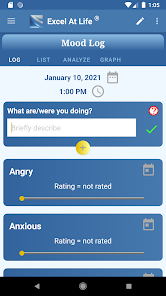
The Mood Log not only gives you a place to record your daily moods and/or symptoms but it will provide an analysis of how different activities or events can impact your moods or symptoms. Not only that, but as the mood logs are fully customizable you can use the logs to track anything you want.
Why is Excel At Life's Mood Log Better than Simply Recording Moods?
Many mood trackers are available. But that is all they do. You can see how your moods fluctuate but unless you are good at finding patterns (without recall bias) it is difficult to know the triggers or associated events.
Excel At Life's Mood Log allows you to record your moods in 15 minute intervals throughout the day. Moods can fluctuate considerably with different activities so a simple once a day mood tracker is not enough to help you understand the changes in your mood.
The Mood Log lets you rate moods or symptoms (or anything that occurs frequently and can be assessed on a 10 point scale). In addition, you can select actions, activities, or events that were occurring at the same time.
The analysis feature of the app will tell you which moods occurred with these actions and the average rating for each mood.
The other feature that is unique about the Mood Log is that it is fully customizable:
1) Choose moods or symptoms to track. Although the Mood Log provides a list of basic moods, you can also add any moods or symptoms you want to track.
2) Create your own high/low labels. The moods or symptoms or assessed on a 10 point scale from low to high. However, if some other label makes more sense for what you are trying to track, you can change the label.
3) Choose actions, activities, or events. The Mood Log comes with a list of actions from which you can select. However, you can include your own.
An Important Note to Most Effectively Use the Analysis Feature
The analysis can only be as accurate as the data. For the most effective use of the mood log, the following is necessary:
1) Lots of ratings. When using averages, the accuracy increases with more data.
2) Consistent ratings. The closer you are to keeping daily ratings the more accurate your analysis will be.
3) Define the ratings clearly. Be sure you have clearly specified what your ratings mean.
Determine What Impacts Your Moods
When you determine that certain actions or events impact your moods, you are then able to do something to change the situation.
Analyze the Contributors to Physical Symptoms
It has been known for a long time that reporting of physical symptoms is affected by what is known as a “recall bias.” As a result, people's reporting of past pain is frequently inaccurate . The Mood Log can help you see associations between your symptoms and certain situations. By keeping a daily log you are less likely to be influenced by recall bias.
Treatment
The Mood Log has unlimited potential as an aid to therapy. You can track different therapeutic interventions and how your moods or symptoms are affected.
Using the Graph Feature
To make the Mood Log even more effective, the graph feature allows you to view different moods and actions together. This allows you to analyze patterns based on multiple actions. For instance, you can see how your mood varies when you are doing something alone or with someone.
How this mood and symptom log can be used to understand patterns is limited only by your inventiveness when customizing. The more you record in it the more it can help you understand yourself so as to make effective changes in your life.
Mood Log Tracker with Analysis-Nutzungsrang
Das Ranking der Nutzung basiert auf dem Algorithmus von Similarweb, der aktuelle Installationen und aktive Benutzer:innen über einen Zeitraum von 28 Tagen berechnet.
Alle Kategorien in
Vereinigte Staaten--
Gesundheit und Fitness in
Vereinigte Staaten--
Benutzerinteressen und Top-Kategorien
Top-Kategorien und -Apps, die von Mood Log Tracker with Analysis Benutzern verwendet werden
Top-Kategorien
Affinität
Top-Apps innerhalb der Kategorie
60%



17%


14%



3%


Top-Wettbewerber und alternative Apps
Apps mit hoher Wahrscheinlichkeit, von denselben Benutzer:innen aus demselben Store verwendet zu werden.

Hardy: smart workout routines

Understood: Support ADHD Kids

BrainFit – Habit Tracker

Morning Routine Builder
 Mood Log Tracker with Analysis VS.
 Dezember 23, 2025