

AirPlayMirror (Demo) App-Analysen für 29. Dezember

AirPlayMirror (Demo)
- NeoYantra
- Google Play Store
- Kostenlos
- Videoplayer und -editoren
AirPlayMirror is Receiver App on Android for AirPlay Mirroring and Casting from Apple devices. An Apple AirPlay device can be an iPhone, an iPad, an iPodTouch, a MacBook, a iMac, or a MacMini. Using AirPlayMirror Receiver, the Android device can mirror screen of an Apple device or can playback audio/video/photos stored on Apple device or can play YouTube video link from Apple device over the local network. This is highly useful for sharing the screen and content of Apple device with family, friends, colleagues, customers or business partners.
***** 15 minutes limited Trial/Demo App*****
Features:
-------------
o Mirroring of Screen of Apple Devices (iOS version 9 to 15).
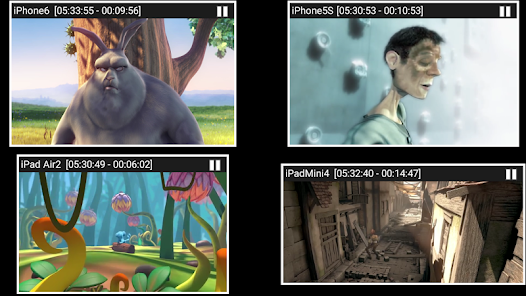
o Mirror/cast from up to 4 Apple devices simultaneously.
o Playback of Apple device’s media content.
o Slideshow of photos, images and videos of Apple device.
o Restrict unauthorized user from sharing his Apple device using passcode feature.
o Playback of YouTube free content from Apple device to AirPlayMirror receiver.
o Resize and move the mirroring/casting window in the App view.
o Share game screen while playing game on Apple device.
o Bluetooth Low Energy based Airplay advertising to mirror devices across different subnets.
Instructions of using AirPlayMirror (Demo) App:
1. Launch AirPlayMirror (Demo) App on Android Device. The App will start advertising Android Device as an AirPlayMirror Receiver. The default name of the Receiver is Android Device’s name.
2. On Apple Device, enable AirPlay and select AirPlayMirror Receiver's name from the list. Enable Mirroring using the slider. The Apple device should be in the same network as the Android Device.
3. On AirPlayMirror App, the list of Apple devices connected to the App are shown in semi transparent control-screen which slides out on touching ">". For unhindered mirroring, slide control -screen to left by swiping it to left or by touching outside the control-screen.
4. One can disconnect Apple device and mute/unmute the mirroring/casting by touching mirroring window in the App for about two seconds, or by going to control screen and perform disconnect and mute/unmute.
5. Touching Settings icon on the control-screen, the user can navigate to Settings, where user can rename AirPlayMirror Receiver's name, enable/disable password for authentication, toggle AirPlay Recever discovery to on/off, change quality of mirroring, set YouTube bandwidth, or reset to default settings.
You may reach us at sales@neoyantra.com.
AirPlayMirror (Demo)-Nutzungsrang
Das Ranking der Nutzung basiert auf dem Algorithmus von Similarweb, der aktuelle Installationen und aktive Benutzer:innen über einen Zeitraum von 28 Tagen berechnet.
Alle Kategorien in
Vereinigte Staaten--
Videoplayer und -editoren in
Vereinigte Staaten--
Top-Wettbewerber und alternative Apps
Apps mit hoher Wahrscheinlichkeit, von denselben Benutzer:innen aus demselben Store verwendet zu werden.

Hue Essentials

spacedesk - USB Display for PC

Philips Air+

Haystack News: Local TV News
 AirPlayMirror (Demo) VS.
 Dezember 29, 2025