

Sie haben Ihr Suchlimit erreicht
Starten Sie Ihren kostenlosen Testzugang, um weiterhin alle Traffic- und Performance-Insights zu erkunden.
Los geht'sSnap Markup: Photo Markup tool App-Analysen für 12. Januar

Snap Markup: Photo Markup tool
- Photo & Video Editors - Instant Solution
- Google Play Store
- Kostenlos
- Produktivität
Snap Markup: Image Highlighter - One Tool to Rule them All! Snap Markup has some of the best image enhancement with editing tools, and it's called Snap Markup: Image Highlighter. This clever Pic Markup: Add Text On Photos app enables you to highlight, alter, and comment over images easily. It doesn't matter if you want to include some text, doodle, or even mark the important points - this Mark Photo Note Tool packs everything you need to stand out.
Add pictures, texts, and comments on them with Pic Markup: Add Text On Photos itching to enhance your pictures. This Draw Photo Notes tool lets you change the picture's visual content for professional and scholarly purposes along with creative projects. Get ready to augment your images with powerful Pic Marker: Write On Photos.
📄 Snap Markup: Image Highlighter Features: 📄
🖍️ Draw Photo Notes: Cropping and rotating into rectangles, stars, circles, etc;
🖍️ Embedding a spotlight so the highlighted part gets a lot of attention;
🖍️ Hide sensitive data by pixelating or blurring the images;
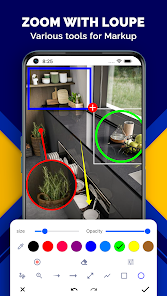
🖍️ Have a closer look at some details by applying a loupe effect on select sections;
🖍️ Mark Photo Note Tool: Make pictures more interesting by embedding emojis, stickers, and numbers;
🖍️ Employ Pic Marker: Write On Photos for customizable texts where you can change font color, font, size, shadow, and stroke;
🖍️ Add arrows, lines, circles, rectangles, and freehand drawings on the images through annotation;
🖍️ Get started on drawings to your liking with our blank image custom drawing option;
🖍️ Utilize the Screenshot Editor to instantly make changes and improvements to your captured images;
🖍️ Effortlessly combine several images in either a horizontal or vertical frame.
Annotate And Edit Your Images Like A Professional! With Mark Picture: Photo Drawing you are able to take, edit, and mark images with ease. No matter if you are a student, designer or a project manager, this Mark Picture: Photo Drawing app is meant for all and provides you with professional marked images quickly and easily. Highlight, add comments or creative edits and remove them effortlessly!
With Draw Photo Notes, You Can Now Improve Your Captured Screens:📝
Now experience hassle-free editing with Screenshot Editor! Whether it requires highlighting, drawing, text blurring or marking, this Screenshot Editor tool brings fantastic modifying experience. Use Mark Photo Note Tool for refining your image markup.
Great To Use For Work, Study And Deep Creativity:✍️
For technique images, demos, and detailed note marking, Pic Markup: Add Text on Photos is great to use. Add notes to projects and images, plan, and tell stories through sketches while ensuring professional looking results.
Maps And Websites Marking:🌍
Clearly mark and describe important elements on maps and webpages. Taking full-page screenshots or partial illustrations is no longer a hassle as it allows users to best capture the ideas along with core details.
Start Using Snap Markup: Image Highlighter Today! Use Snap Markup: Image Highlighter to reposition your image editing work. This Mark Picture: Photo Drawing tool enables you to cover a range of activities like typing, markup annotation, figure editing and many more. Pic Marker: Write On Photos can efficiently convert your visuals into well arranged, easy to understand, and informative images within no time!
Snap Markup: Photo Markup tool-Nutzungsrang
Das Ranking der Nutzung basiert auf dem Algorithmus von Similarweb, der aktuelle Installationen und aktive Benutzer:innen über einen Zeitraum von 28 Tagen berechnet.
Alle Kategorien in
Vereinigte Staaten--
Produktivität in
Vereinigte Staaten--
Benutzerinteressen und Top-Kategorien
Top-Kategorien und -Apps, die von Snap Markup: Photo Markup tool Benutzern verwendet werden
Top-Kategorien
Affinität
Top-Apps innerhalb der Kategorie
26%




23%





10%


10%





Top-Wettbewerber und alternative Apps
Apps mit hoher Wahrscheinlichkeit, von denselben Benutzer:innen aus demselben Store verwendet zu werden.

Geulgram - Text on Photo

Image Toolbox - Edit & Convert

Photo Studio: Edit Photos App

Notes : Color Folders & Lists
 Snap Markup: Photo Markup tool VS.
 Januar 12, 2026