

UsA Peek Digital - USA102 App-Analysen für 24. Dezember

UsA Peek Digital - USA102
- USA Design Watch Face
- Google Play Store
- Bezahlt
- Personalisierung
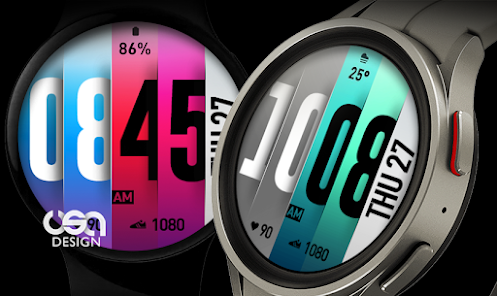
The watch peek in colorful style!
Now available too on Wear OS with more deep customization. You can mix and match 3 parts of the stripe colors (the left, middle, and right area). And now also the hour-digit color!
Supported devices
This watch face requires Wear OS API 33+ (Wear OS 4 or newer). Compatible with Galaxy Watch 4/5/6/7/8 Series and newer, Pixel Watch series and other watch face with Wear OS 4 or newer.
Installation Notes
Installing may take a few minutes, and you can find the watch face on the "add watch face" menu on the watch.
- Tap and hold the current watch face
- Scroll to the far right
- Tap the (+) add watch face button
- Find the newly installed watch face there.
Customizing the style
Tap and hold the watch face and go to the "customize" menu (or settings icon under the watch face) to change the styles and also manage the custom shortcut complication.
Heart Rate
The heart rate is now synced with the built-in heart rate settings including the measurement interval.
12 or 24 Hour Mode
To change between 12 or 24-hour mode, go to your phone date and time settings and there is an option to use 24-hour mode or 12-hour mode. The watch will sync with your new settings after a few moments.
Always On Display
Special designed Always On Display ambient mode. Turn on the Always On Display mode on your watch settings to show a low power display on idle. Please be aware, this feature will use more batteries.
Support
Installation and troubleshooting guide here:
https://developer.samsung.com/sdp/blog/en-us/2022/11/15/install-watch-faces-for-galaxy-watch5-and-one-ui-watch-45
Join our Telegram group for live support and discussion
https://t.me/usadesignwatchface
UsA Peek Digital - USA102-Nutzungsrang
Das Ranking der Nutzung basiert auf dem Algorithmus von Similarweb, der aktuelle Installationen und aktive Benutzer:innen über einen Zeitraum von 28 Tagen berechnet.
Alle Kategorien in
Vereinigte Staaten--
Personalisierung in
Vereinigte Staaten--
Top-Wettbewerber und alternative Apps
Apps mit hoher Wahrscheinlichkeit, von denselben Benutzer:innen aus demselben Store verwendet zu werden.

Papers - Watch Face

Colorful Hide & Seek Face

YamWatch Digital 5

Colorful Artistic Digital EC31
 UsA Peek Digital - USA102 VS.
 Dezember 24, 2025