

You’ve hit your search limit
Start your free trial to keep exploring full traffic and performance insights.
Get StartedAnálisis de la app Videocraft: Video Maker para 6 de octubre

Videocraft: Video Maker
- Mauricio Eastmond
- App Store de Apple
- Pagado
- Foto y vídeo
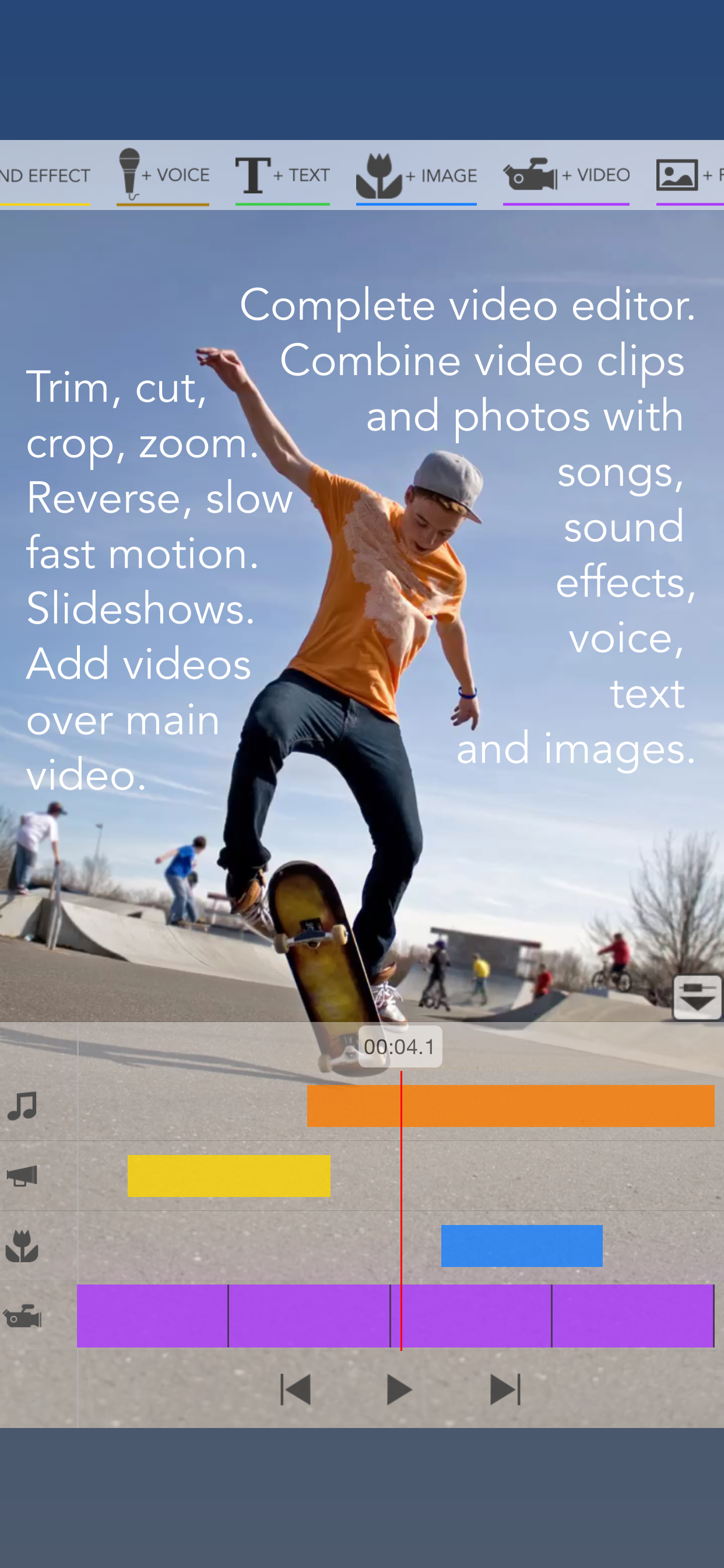
Videocraft is a complete multi-track video editor, photo slideshow maker, and movie maker app. Combine video clips and photos with music, sound effects, voice-over, images, GIFs, and text in one powerful timeline. With a beautiful and simple design, anyone can create and share amazing videos in minutes.
All features are available with no subscription and no watermarks.
Feature Highlights
Files Integration
• Use videos, photos, images, GIFs, and music stored in iCloud Files.
Project Aspect Ratio, Resolution, and Frame Rate
• Create square (1:1), standard (4:3), wide (16:9), or extra-wide (2:1) projects.
• Choose landscape or portrait orientation.
• Export in 4K, 1080p, or 720p.
• Choose 30fps or 60fps.
Add Multiple Video Clips and Photos
• Add videos and photos from Photos or Files.
• Trim video clips to use only the segment you need.
• Crop, pan, and zoom video clips and photos to fill or fit your project aspect ratio.
• Mute video clip audio or adjust its volume.
• Add fade in, fade out, and crossfade transitions.
• Set the duration of each photo.
• Change the video background color.
Ken Burns Effect
• Create beautiful photo stories with smooth pan and zoom motion.
Reverse Video
Slow / Fast Motion
Stop Motion
• Convert long videos into stop motion videos.
• Import multiple photos and play them in sequence to create stop motion movies.
Video Over Video (PIP, B-Roll)
• Add multiple videos over the main video track.
• Resize and position them however you like.
• Play them side by side.
Create Audio Tracks from Video Clips
• Extract audio from videos to use in your project.
• Play the audio of a video before the video appears for more creative transitions.
Blur Effect
• Apply blur to censored parts of your video.
Add Music Tracks
• Add songs from Music or Files.
• Trim songs to use only the segment you want.
• Auto-Sync music with the main video track.
• Adjust volume levels.
• Mute the main video audio track while the song plays.
• Add fade in and fade out for smooth transitions.
Add Sound Effects
• Add sound effects from the included sound effects library.
• Includes 120 sound effects such as beeps, human noises, animals, ambiences, cartoon sounds, comical effects, vehicles, weapons, explosions, and more.
Add Voice-Over
• Easily record narration for your video.
• Adjust the volume level.
• Mute the main video audio track while the recording plays.
Add Images Over Video
• Add images, GIFs, and animated stickers from Photos or Files on top of the video.
• Add your own watermarks, borders, and overlays.
• Combine text with included images to create callouts.
• Includes transitions such as wipe, move, scale, and fade.
Add Text Over Video
• Add text with any font, color, size, and position.
• Includes all fonts installed on the device.
• Change text color, shadow color, and background color.
• Includes transitions such as wipe, move, scale, and fade.
Easy-to-Use Video Editing Tools
• Add tracks using the toolbar buttons.
• Each track is represented by a bar in the timeline.
• Access track options by tapping its icon on the left.
• Drag the bar to change its position.
• Drag the bar handles to change its duration.
• Duplicate bars for easy reuse.
• Pinch the timeline to zoom in or out.
• Reorder video clips by dragging their purple bar.
• Includes undo and redo.
Gallery
• Projects are saved in the gallery so you can continue your work at any time.
• Rename projects and make copies to try different ideas.
Export Your Creation
• Export your project as a new video in Photos.
• Export the current frame as a new photo in your Photo Library.
• Perfect for creating memes, combining photos and text, or extracting a frame from your video.
For questions, feedback, and support:
Gamelarious: https://gamelarious.com
Support: support@gamelarious.com
X: @gamelarious
Clasificación de tiendas
El Store Rank se basa en múltiples parámetros establecidos por Google y Apple.
Todas las categorías en
Estados Unidos--
Foto y vídeo en
Estados Unidos--
Principales competidores & aplicaciones alternativas
Aplicaciones con una alta probabilidad de ser utilizadas por los mismos usuarios, desde la misma tienda.

imgPixel : Pixel Art Generator

Mask Video Recorder

Photo Albums and Widget

CueFrame: Video Teleprompter
 Videocraft: Video Maker VS.
 octubre 6, 2026