

You’ve hit your search limit
Start your free trial to keep exploring full traffic and performance insights.
Get StartedAnalyse de l'application Screenshot Quick pour le 7 juin
Screenshot Quick
- DM_Tech
- Google Play Store
- Gratuit
- Outils
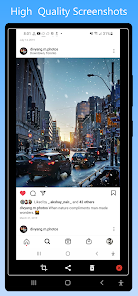
Screenshot Quick Free is the most simple , smallest and fastest screenshot taking app. Very small size. It is optimized for high performance especially to take screenshots while playing games or watching videos. Works without internet.
Both Phones and Tablets are supported.
Fundamental features:
• Screenshots using overlay button. (Single/Double Tap)
(Click on 'Gear' icon in Notification OR open 'Capture Settings' in app's menu to turn on "Double tap overlay")
• Screenshots using the key shortcut.
• Screenshots using notification button.
• Screenshot / Shakeshot by just shaking your device.
• Crop instantly in easiest way possible.
• View your taken screenshot instantly in the preview. (Pinch or Double-tap to Zoom-in/Zoom-out) You can also turn it off in app settings.
• Exclude Status-bar and Navigation-Bar from Screenshot.
• Share the screenshot instantly after taking it.
• Change screenshots saving location(Folder). (Click on 'Gear' icon in Notification OR open 'Capture Settings' in app's menu to change Folder)
• 18:9 Displays supported.
• Emulator supported.
Special features:
• Take the rapid burst of screenshots when screenshot preview is off. You can turn the preview on whenever you want.
• Customize overlay button however you like it from the settings.
• Lock the position of Overlay Button
Dynamic features:
• Screenshot Quick Free has its own gallery of taken screenshots for you: view, crop, share and delete wherever and whenever you like.
• Choose JPEG or PNG format.
• Choose the screenshot quality to your desire from six different levels in both JPEG and PNG formats.
Powerful features:
• Optimized for minimum/least battery usage.
• No annoying full-screen ads for better user experience.
• Tap once on notification to view and share the previously taken screenshots.
• Change settings (Screenshot preview, Overlay button and it's size, Double tap, Shake shot sensitivity, Screenshot folder, Haptic feedback) from notification without even opening an app.
Important:
• Screenshot Quick Free works in both Rooted and Non-Rooted devices.
• App will need access to screen-capture and storage permissions to capture screenshot and save screenshots respectively.
• Some apps such as banking or payment apps will not allow to capture screen, in that case app will display blank screenshot.
Details on the Utilization of the Accessibility Services API:
• Android 11 and later versions also support screenshot capture using the Accessibility Services API, simplifying the process for this app users. It’s important to note that this application is not designed as an accessibility tool. It provides only basic features, primarily the screenshot capture functionality. Also, note that this application utilizes the Media Projection API for taking screenshots on Android 13 and below, accessibility service will be used only for Android 14 and above.
Rang d'utilisation de Screenshot Quick
Le classement d'utilisation est basé sur l'algorithme de Similarweb qui calcule les installations actuelles et les utilisateurs actifs sur une période de 28 jours.
Toutes les catégories dans
États-Unis#3,536
Outils dans
États-Unis#457
Intérêts des utilisateurs & catégories principales
Principales catégories et applications utilisées par les utilisateurs de Screenshot Quick
Top des catégories
Affinité
Top des applications pour cette catégorie
Plus d'applis
16%





16%




12%





10%





Principaux concurrents & apps alternatives
Applications ayant une forte probabilité d'être utilisées par les mêmes utilisateurs, à partir du même store.

VicoHome: Smart Home Camera

Cool S20 Camera Galaxy S20 cam
Automatic Scroll

Teleprompter for Video
Screenshot Quick VS. juin 7, 2026