

You’ve hit your search limit
Start your free trial to keep exploring full traffic and performance insights.
Get StartedAR Art Projector: Da Vinci Eye analisi dell'app per 20 gennaio

AR Art Projector: Da Vinci Eye
- Da Vinci Eye LLC
- Google Play Store
- A pagamento
- Arte e Design
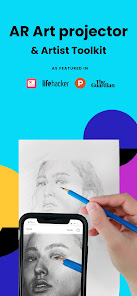
Master the art of drawing and sketching with Da Vinci Eye’s AR art projector & tracing tool!
Featured in Artist's Magazine, Watercolor Magazine, LifeHacker, Apple News, The Guardian, AR / VR journey, and more!
Trace, sketch and draw with the #1 essential digital tool - one of the top Graphics & Design apps in over 100 countries and used by thousands of creatives to make incredible artwork!
The app is not just for tracing, it offers a wide range of sketching and drawing tools, lessons, and a supportive community to share your artwork!
IMPORTANT!: Please read how this app works below and the device requirements for AR Mode BEFORE purchasing.
Da Vinci Eye: AR Drawing App highlights
• Create incredible drawings and sketches of your photos
• Make hyper-realistic drawings with our strobe feature
• Record time-lapse videos of your drawings and sketches
• Separate images into layers by color value, then view those areas on your canvas
• Breakdown any image into step-by-step instructions
• Video tutorials to learn how to sketch and draw
• Use filters to make drawing even easier
• Zoom in to capture micro details in your drawings
• Connect with our community to share your artwork
• Insanely fast customer support!
PERFECT FOR ANY ARTIST
• Bakers
• Cartoonists
• Tattoo Artists
• Illustrators
• Fiverr Designers
• Hobbyists
• Makeup artists
• Nail Technicians
• Animators
No matter what skill level you’re at — Da Vinci Eye: AR Art Projector is here for you!
OVERVIEW
Ever spent hours sketching a portrait, only to discover that the nose or eye is misplaced? Use our AR art projector and tracing tool to layout artwork before you begin or check your work as you progress.
Struggling with light and shadow placement? Divide your image into color value layers and overlay them virtually to pinpoint the right spots for darks, mid-tones, and highlights.
LEARNING HOW TO DRAWING?
We have drawing tutorials and lessons using our unique patent-pending learning method. You can also turn ANY photo into a step by step shading drawing lesson with our AR tracing tool.
HOW DOES IT WORK?
Based on a tool that has been used by artists for centuries, this app is a digital version of a Camera Lucida.
You suspend your device above or in front of your canvas with a stand, tall glass, or other objects easily found around your house.
When using your phone, you can view both the image and the canvas simultaneously, offering functionality akin to an art projector or light box, but with expanded capabilities.
You can sketch or draw on any surface, zoom in to draw micro details in your drawing, and you don't have to draw in the dark.
WILL THIS HELP ME LEARN HOW TO SKETCH & DRAW?
You'll be training your eye to recognize proportions, sketch and draw with shading, and refine your hand for precise lines and strokes on paper. Our proven techniques ensure quicker and more efficient learning compared to any other sketch and draw app.
AR TRACING MODE REQUIREMENTS
AR mode works best on new and high end devices. Your device must have a high quality camera, fast processor, and a fast enough GPU to handle rendering and updates.
AR & CLASSIC DRAWING MODE
AR tracing mode anchors your image to an object in the real world. This lets you move your canvas or phone, and the drawing and projected image will move back into place.
Classic mode is like a normal art projector, where if you move your phone or canvas, your sketch or drawing will no longer be aligned.
AR tracing mode is especially useful for sketching, drawing or painting on an easel. However, in most cases, Classic mode will achieve the same result.
TAKE YOUR DRAWING TO THE NEXT LEVEL
Da Vinci Eye is waiting to help you to improve your drawing skills. Trace, sketch and draw using AR technology.
Ranking di utilizzo di AR Art Projector: Da Vinci Eye
Il ranking di utilizzo si basa sull'algoritmo di Similarweb che calcola le installazioni correnti e gli utenti attivi su un periodo di 28 giorni.
Tutte le categorie in
Stati Uniti#575
Arte e Design in
Stati Uniti#9
Interessi degli utenti e categorie principali
Le categorie principali e le app utilizzate dagli utenti di AR Art Projector: Da Vinci Eye
Categorie principali
Affinità
Le migliori app all'interno della categoria
Altri applicazioni
28%






20%


12%

10%

Principali concorrenti e app alternative
App con un'alta probabilità di essere utilizzate dagli stessi utenti, provenienti dallo stesso store.

AR Drawing - Paint and Sketch

Sketchar AR Drawing Sketchpad

ArtFlow: Paint Draw Sketchbook
Handy Art Reference Tool
AR Art Projector: Da Vinci Eye VS. gennaio 20, 2026