

Sign PDF Documents SIGNply analisi dell'app per 24 dicembre

Sign PDF Documents SIGNply
- Firma digital - eSignature - firmar documentos PDF
- Google Play Store
- Gratis
- Produttività
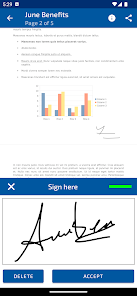
SIGNply allows you to sign electronic documents with all the guarantees, signing on your screen by hand or with a pencil. The electronic signature is legally binding and has evidentiary guarantee.
Sign PDF documents from your smartphone or tablet with a handwritten digital signature!
SIGNply is the perfect solution for: Contracts, GDPR, purchase orders, delivery notes, inspection records, HR documents, authorizations, medical consents, etc...
With the FREE version you can sign up to 100 PDF documents forever.
You can self-sign (sign your own documents) and in-person signature (ask someone else to sign for you). No ads. From wherever you want.
SIMPLE and COMPLETE
Digitally sign and send any document:
1.- Select the document from your eMail mailbox, drop-box, stored on your device, evernote, google drive...
2.- Signature with SIGNply
3.- Save it or send it to whoever you want.
LEGAL SECURITY the digital signature is legally binding according to the eIDAS directive
- Advanced electronic signature, complies with the guarantees required by the European Regulations and the Electronic Signature Law: Guarantees of authenticity and integrity.
- SIGNply collects the biometric data on each trace that guarantees the authenticity of the biometric signature.
- Biometric data is encrypted using AES256 asymmetric cryptography.
- All connections between the different servers or clients are made through HTTPS connections.
- The document is signed electronically to guarantee its integrity. The conventional digital signature protects the handwritten signature. SIGNply uses the SHA512 algorithm
- PAdES-LTV long-term signature: allows activating the TSP time stamp and the validation of the revocation status of the certificate at the time of the OCSP signature, thus obtaining a PAdES-XL long-term signature.
These elements constitute the evidence that guarantees success in any expert process.
Free SIGNply:
- Sign up to 100 PDF documents for free. No ads. From wherever you want.
- Autosignature: Sign your PDF documents, with your finger or with a pencil
- Sign in person: ask another person to sign you on your screen. Collect the signature of your customers on site
- Advanced electronic signature, with technical security and legally binding.
- Allows you to sign a document several times while preserving the validity of all signatures.
- All documents are stored on your device, they are not available to us or third parties. You can easily share them with the menu option.
- No signature made is stored. The signatures are generated in each transaction, for the signing of a certain document by a certain person.
- Guarantees the integrity of the signed document
- Scan documents with AI (Artificial Intelligence)
SIGNply Premium:
- Sign and upload documents directly from Google Drive.
- Sign any type of document: doc, txt, images... SIGNply converts any document into PDF before applying the digital signature
- Unlimited signatures: you can sign all the documents you want from your device.
- Validate your documents. Allows you to check valid digital signatures and generate a signature quality report.
- Priority support. Enjoy the priority support channel to resolve doubts and/or incidents.
- Free trial 30 days
- Cancel your subscription whenever you want. Without permanence.
- Support our team: with your subscription we can better help all the people who need to sign their documents without paper and maintain the environment
Thanks for your support!
SIGNply
More information, access here https://signply.com/
Ranking di utilizzo di Sign PDF Documents SIGNply
Il ranking di utilizzo si basa sull'algoritmo di Similarweb che calcola le installazioni correnti e gli utenti attivi su un periodo di 28 giorni.
Tutte le categorie in
Brasile--
Produttività in
Brasile--
Interessi degli utenti e categorie principali
Le categorie principali e le app utilizzate dagli utenti di Sign PDF Documents SIGNply
Categorie principali
Affinità
Le migliori app all'interno della categoria
Altri applicazioni
25%





16%



13%


11%





Principali concorrenti e app alternative
App con un'alta probabilità di essere utilizzate dagli stessi utenti, provenienti dallo stesso store.

SignNow: Sign & Fill PDF Docs

PDFEsign.com PDF E-Sign

PDF Editor – Edit Everything!

Smallpdf: Scanner & PDF Editor
Sign PDF Documents SIGNply VS. 24icembre d, 2025