

You’ve hit your search limit
Start your free trial to keep exploring full traffic and performance insights.
Get StartedGallery KK analisi dell'app per 9 febbraio
Gallery KK
- Moblynx
- Google Play Store
- Gratis
- Fotografia
★ NEW VERSION 2.0 ★
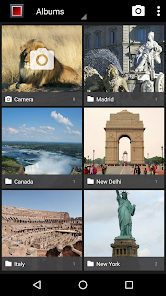
Gallery KK is an improved version of the Gallery & Photo editor app included on KitKat (Android 4.4)
Our goal is to allow any Android phone or tablet can enjoy this great gallery!
This app is also perfect for Nexus or Android One devices that have lost the classic gallery app with the last upgrade to Lollipop (Android 5.0). We are working on improving the compatibility to support more devices.
--- FEATURES ---
● GALLERY:
- Ultra fast photo & video viewer
- Configurable thumbnail size/colors
- Photo tag viewer & editor
- Grid view/Filmstrip view
- Custom action buttons (edit, delete, tags,...) in photo view
- Scroll: Horizontal/Vertical
- Animated GIF support
- Hide unwanted folders (customizable)
- Configurable screen orientation
- Show/hide status bar
- Slideshow animations: Fade, zoom, slide & flip
- Photo sphere support (Settings→General→Photo sphere support)
- Trim & mute videos
- More cool features soon ...
● PHOTO EDITOR:
- High quality photo editing
- New exclusive filters (thermal & mosaic)
- Crop, Straighten, Rotate, Mirror, Draw & more cool effects
If you prefer the old gallery (Android 4.0), you can download "Gallery ICS (classic version)" for free:
https://www.google.com/url?q=https://play.google.com/store/apps/details?id=com.moblynx.galleryicsold
--- FAQ ---
● What are tags? What is its used for?
Tags are keywords that you can attach to your photos to categorize and organize them. A built-in tag editor will help you to manage them quickly.
Use the Tags view to see all photos classified by tags. You can even import tags from the photos that you have in the gallery.
Tags are stored in the metadata of the photos and are not lost if you uninstall the app.
● What are the Action Buttons? How can I customize them?
Action buttons are two buttons that appear on the bottom of the full picture view.
You can customize these buttons from "Settings→Pictures→Action Button(left/right)" to assign your favorites quick actions (edit, delete, crop, rotate, ...). If you prefer you can disable them to better fit your needs!
● How can I move or copy files between albums?
Unfortunately we have not yet integrated this functionality into the current version.
Anyway, you can use apps from other devs that are compatible with Gallery KK, like “Gallery Folder Plugin” from "Tatuas Apps" dev: https://www.google.com/url?q=https://play.google.com/store/apps/details?id=com.tatuas.android.gfp
● Why do you show ad banners within the app?
Ads help us to make money and keep working on improving and adding new features to the app. If you prefer you can remove the ads with an in-app purchase (“Remove ads”).
We use device identifiers to personalise content and ads, to provide social media features and to analyse our traffic. We also share such identifiers and other information from your device with our advertiser (Google Admob) and analytics platform (Google Analytics). If you use this app is understood that that you accept these policies.
The in-app purchase (“Remove ads”) also disables the share of info with our analytics partner.
● Why is requested the approximate location (network-based) permission?
On the Locations view the photos (if geotagged) are sorted based on your proximity to them.
--- THANKS ---
● Thanks to everyone who uses our applications. Your support helps us to keep working hard on this project. Please contact us at moblynx.us@gmail.com if you have any issue. We are delighted to receive any feedback.
● Thanks to Google for releasing the Android open source project. Without their great contribution to the developer community our work would not be possible.
--- NOTES ---
● Android is a trademark of Google Inc.
● This app is not affiliated or endorsed by Google Inc.
Ranking di utilizzo di Gallery KK
Il ranking di utilizzo si basa sull'algoritmo di Similarweb che calcola le installazioni correnti e gli utenti attivi su un periodo di 28 giorni.
Tutte le categorie in
Stati Uniti--
Fotografia in
Stati Uniti#698
Principali concorrenti e app alternative
App con un'alta probabilità di essere utilizzate dagli stessi utenti, provenienti dallo stesso store.

Simple Gallery Pro

Gallery

Gallery – Photos & Videos

Duplifix: Duplicate Photos
 Gallery KK VS.
 febbraio 9, 2026