

You’ve hit your search limit
Start your free trial to keep exploring full traffic and performance insights.
Get StartedPhoto Retouch- Object Removal analisi dell'app per 14 gennaio

Photo Retouch- Object Removal
- Shenzhen Leyuan Shentu Technology Co., Ltd
- Google Play Store
- Gratis
- Fotografia
Effortlessly Retouch Your Photos with Photo Retouch - Object Removal
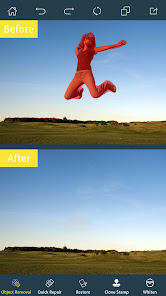
Looking for the perfect photo retouch tool? Remove unwanted objects, blemishes, and even video watermarks with ease using Photo Retouch - Object Removal. This powerful yet simple photo editor gives you complete control over your images, allowing you to achieve professional-looking results in seconds.
Imagine seamlessly erasing distracting elements from your favorite photos: power lines, unwanted people, or even skin blemishes. Photo Retouch makes it possible with its intuitive object removal tools. Simply select the area you want to remove, and let the app work its magic!
Key Features for Perfect Photo Retouching:
* Object Removal: Easily erase unwanted objects, people, or blemishes with a simple touch.
* Video Watermark Removal: Clean up your videos by removing distracting watermarks.
* Blemish Remover & Pimple Eraser: Achieve flawless skin with our retouching tools.
* Clone Stamp Tool: Duplicate or remove objects with precision using the clone stamp.
* Eraser Control: Adjust size, hardness, and opacity for perfect retouching results.
* Text & Graphics: Add text, adjust color and size, and personalize your photos.
* Easy Sharing: Quickly share your retouched photos and videos on social media.
How to Retouch Your Photos:
1. Select a photo or video from your gallery.
2. Highlight the object you want to remove.
3. Tap "Process" and watch the magic happen!
4. Save and share your flawless image.
Download Photo Retouch - Object Removal today and experience the power of effortless photo retouching!
Privacy Statement:
https://privacy.biggerlens.cn/app/privacy?name=photoretouch-google&os=android&language=en
Classifica degli store
La classifica del store si basa su diversi parametri stabiliti da Google e Apple.
Tutte le categorie in
Germania--
Fotografia in
Germania#170
Interessi degli utenti e categorie principali
Le categorie principali e le app utilizzate dagli utenti di Photo Retouch- Object Removal
Categorie principali
Affinità
Le migliori app all'interno della categoria
Altri applicazioni
53%


19%




5%

5%


Principali concorrenti e app alternative
App con un'alta probabilità di essere utilizzate dagli stessi utenti, provenienti dallo stesso store.

Remove Objects - Photo Editor

FaceLab: Future Face Aging App

ToonMe photo cartoon maker

Background Eraser Photo Editor
Photo Retouch- Object Removal VS. gennaio 14, 2026