

PhotoSync NAS Add-On analisi dell'app per 4 dicembre
PhotoSync NAS Add-On
- touchbyte
- Google Play Store
- A pagamento
- Fotografia
This product is the ‘PhotoSync NAS Add-On’ Activation License of PhotoSync. Once purchased, you can add PhotoSync NAS Add-On capabilities to the free PhotoSync version and remove ads.
★ Over 10,000 positive reviews, thousands of happy users and millions of photo transfers
★ Number one cross-platform solution with native apps for Android, iOS, Windows & Mac
★ Reliable and secure software – operating 10 years in the market and continuously updated
★ Total user control and fully customisable
ABOUT PHOTOSYNC 'NAS' ADD-ON VERSION
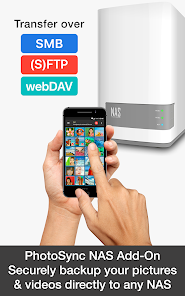
• Securely backup photos & videos to any NAS, mobile storage device or personal cloud over SMB, (S)FTP or WebDav
• Download and view photos & videos on SMB, (S)FTP and WebDAV devices / servers
• PhotoSync supports all storage devices with SMB, (S)FTP and WebDAV capabilities from Synology, QNAP & Buffalo NAS, ownCloud, Nextcloud, WD MyCloud, FreeNAS, Western Digital, Seagate, Toshiba, HyperDrive, SanDisk and many more…
• Transfer photos & videos stored on USB or SD devices connected with a USB On-The-Go (OTG) adapter
• No ads
HOW IT WORKS
1. Download and Install PhotoSync at https://play.google.com/store/apps/details?id=com.touchbyte.photosync
2. Download and install PhotoSync NAS Add-On License
3. PhotoSync will automatically upgrade to PhotoSync NAS Add-On version upon the installation of PhotoSync NAS Add-On License
PHOTOSYNC NAS HIGHLIGHTS
Securely and safely transfer and backup your pictures and videos directly from your mobile device to any NAS, mobile storage device, remote server or personal cloud – no computer needed!
Transfer to and from NAS devices
• Backup photos & videos to your NAS, remote server or personal cloud over SMB, (S)FTP or WebDav
• Download and view pictures & videos stored on SMB, (S)FTP and WebDAV servers
• PhotoSync works flawlessly with NAS storage devices, servers and personal cloud services from:
- Synology
- QNAP & Buffalo NAS
- ownCloud
- Nextcloud
- WD MyCloud
- FreeNAS
- OpenMediaVault
- Seagate Personal Cloud
- NETGEAR ReadyNAS
- And many more…
Transfer to and from wireless portable hard drives
• Quickly and easily upload photos & videos whilst on-the-go to your wireless portable hard drive over SMB, (S)FTP and WebDav
• Download, share and view photos & videos over SMB, (S)FTP and WebDAV servers
• PhotoSync works seamlessly with all major mobile storage solutions (wireless USB sticks, portable hard drives, cable adapters) from:
- Western Digital
- Seagate
- Toshiba (http://www.canvio.jp/apps/en/)
- HyperDrive
- SanDisk
- And many more…
Transfer to mobile devices from WiFi SD Cards
• Take pictures, videos & RAWs on your camera equipped with a wireless SD card and download the full resolution files directly to your phone / tablet
• Browse and view photos stored on your Wi-Fi SD Card
• Toshiba FlashAir & Transcend Wi-Fi SD Cards are supported
Full OwnCloud Support
• PhotoSync works seamlessly with OwnCloud photos & videos
• Use OwnCloud’s data protection to achieve maximum security and privacy
Organize like a Pro
• Organize photos & videos automatically by date (recording date & transfer date), media type, album/folder and device name
• Set custom file names (recording date & transfer date)
• Browse, select or create target folder before transfer
• Delete or overwrite files after transfer to free space on device (optional)
• Choose separate transfer quality options for WiFi & cellular connections
ABOUT 'FREE' PHOTOSYNC VERSION
• Backup photos & videos from Android devices to computer (PC & Mac) over WiFi
• Send photos & videos from computer to Android phone / tablet over WiFi
• Transfer photos & videos between Android phone and tablet over your local network (WiFi or Portable WiFi Hotspot)
• Copy and move photos & videos between Android devices and iPhone / iPad over WiFi
• Transfer photos & videos stored on USB or SD devices connected with a USB On-The-Go (OTG) adapter
• Ad-supported
Ranking di utilizzo di PhotoSync NAS Add-On
Il ranking di utilizzo si basa sull'algoritmo di Similarweb che calcola le installazioni correnti e gli utenti attivi su un periodo di 28 giorni.
Tutte le categorie in
Stati Uniti--
Fotografia in
Stati Uniti--
Principali concorrenti e app alternative
App con un'alta probabilità di essere utilizzate dagli stessi utenti, provenienti dallo stesso store.

Plume Home

Ply

Kumo: Secure File Sync Tool

Data Transfer
 PhotoSync NAS Add-On VS.
 4icembre d, 2025