

You’ve hit your search limit
Start your free trial to keep exploring full traffic and performance insights.
Get StartedPhoto Tools: compress, resize analisi dell'app per 4 febbraio

Photo Tools: compress, resize
- jApp
- Google Play Store
- Gratis
- Strumenti
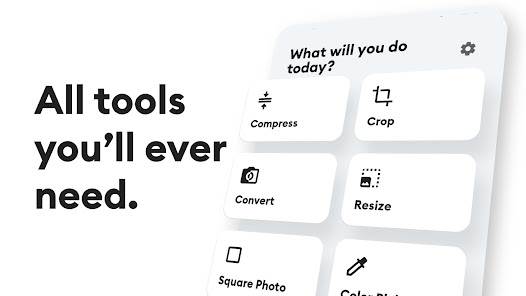
Photo Tools contains all the image tools you'll ever need. It has all the features such as compress images to reduce the file size, resize an image to reduce the resolution of the image, crop image to your required aspect ratio and rotate your photos, convert your images to JPG, PNG, or WEBP, square photo for insta, color picker, extract colors from an image, super zoom into your image, and much more.
All edited images are saved in a separate folder under storage/Pictures/Photo Tools in your phone's gallery. You can easily share and view the converted images on the result screen.
Tools that are included in Photo Tools app:
• Compress tool:
This tool helps to compress images to reduce their size in KB or MB. Then, the images can easily attach it to an email or share with your friends. Images can be compressed by percentage or by file size option. All compressed images are saved under the storage/Pictures/Photo Tools/Compress folder for easy access.
• Crop tool:
This tool helps to crop the image to remove unwanted areas of the image. Choose between the many aspect ratios like 1:1, 3:4, 16:9, etc. to better adjust your images. You can also rotate the images 90° clockwise or anticlockwise.
• Resize tool:
This tool helps to resize the image to any dimensions or to reduce the resolution of the image. There is an option to maintain the original aspect ratio so that images are not stretched. Images can be resized by percentage or by dimensions.
• Convert tool:
This tool helps to convert the image to any other format like JPG, PNG, WEBP, etc. This can be used to convert images to PNG so that they can be used as stickers in chatting apps. Convert multiple images together and save time.
• Square photo tool:
This tool helps make your image square to upload on insta or any other social media sites. There are options to choose the background style like blur, white or black background.
• Color picker tool:
This tool helps pick a color from an image. This can be used by graphic designers to extract color from the image and use it in their art. The user can get to know about the color name along with the color hex code.
• Extract colors tool:
This tool helps to extract the majority of colors from the image. Colors can be easily copied to the clipboard by tapping on it. You then use that color to draw or paint in other apps.
• Super zoom tool:
This tool helps to zoom in on the images. View the close-up details of an image that are not visible normally.
Photo Tools Features:
• Beautiful dark and light theme
• All tools in one place
• Original photos are not affected
• Batch save (Edit multiple photos at once)
• Compress without reducing quality
• Resize to a specific dimension
• Crop and rotate images
• All images are saved in storage/Pictures/Photo Tools under a separate folder
• Share images with your friends via email or social network
If you have any feedback or suggestions, please feel free to email us at support@japp.io
Ranking di utilizzo di Photo Tools: compress, resize
Il ranking di utilizzo si basa sull'algoritmo di Similarweb che calcola le installazioni correnti e gli utenti attivi su un periodo di 28 giorni.
Tutte le categorie in
Stati Uniti--
Strumenti in
Stati Uniti--
Interessi degli utenti e categorie principali
Le categorie principali e le app utilizzate dagli utenti di Photo Tools: compress, resize
Categorie principali
Affinità
Le migliori app all'interno della categoria
Altri applicazioni
38%





20%




10%

8%

Principali concorrenti e app alternative
App con un'alta probabilità di essere utilizzate dagli stessi utenti, provenienti dallo stesso store.

Passport Photo Easy - SG

Calculator Hide Files

TimeMark Alarm: Time & Loc Cam

PhotoSpot: For Travel Planning
Photo Tools: compress, resize VS. febbraio 4, 2026