

You’ve hit your search limit
Start your free trial to keep exploring full traffic and performance insights.
Get StartedmBankaCo - Komercijalna banka analisi dell'app per 31 gennaio

mBankaCo - Komercijalna banka
- Komercijalna banka AD Skopje
- Google Play Store
- Gratis
- Finanza
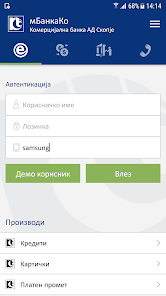
mBankaCo Free Application - The first true Mobile Banking for legal entities that has advantages that are currently unique in our country.
Features of mBankaCo - A mobile application that allows the services for legal entities that you perform daily on Internet Bank to be available through your phone or tablet using a software token for payment. The mobile application unites the services that are available on the Bank's portal for legal entities, the Internet Bank for denar, foreign currency payment operations and business cards:
• insight into the status, changes and statement of accounts (denar and foreign currency account)
• transfer of funds from a Denar transaction account to other accounts in the payment system in the country (input, signing and sending for realization)
• sale of foreign means of payment for denars
• access to business card account information
• administration of daily and periodic business card limits
• Geolocation services to find the nearest business unit or ATM
• Exchange rates
• Calculators
• Information and Notices
We have transferred the privileges of the Internet Bank for you along with the complex signing policy. We have made it possible to download statements and payment orders in PDF format.
Flexible solution - a payment order entered through Internet Bank can be signed through mBankaCo and vice versa. A limit per account order (for PP30) and a daily limit per account have been introduced. As an authorized person and user of the Internet Bank, you will be able to set the limits per payment order by applying two-factor authentication.
Open access – you can use the application even if you are not a user of the Internet Bank. Before you decide to register and activate it, you can use publicly available services for our products and services, geolocation services, etc. Use the demo user to try the access to the services for checking account balances and making transfers.
Notifications – Through the application, you will receive notifications for every inflow to or outflow from the account or a notification if you have to sign any order form.
Solution adapted for tablets – the application offers a specially adapted interface for working on tablets, which makes navigation and access to services simpler. This enables you to have clear overview when performing transfers.
Secure and simple – by entering a PIN or biometric authentication, you can access account balances and transactions without entering a username and password or carrying payments security token with you.
Please follow the security recommendations and do not use the application on a jailbroken, rooted or in any other way security-compromised mobile device where the original factory software has been replaced with third-party software.
Registration and activation
To use the private part, you can activate the application in 7 steps:
• The manager for each authorized person should submit a signed form to the Bank applying for permission to work with mBankaCo with defined limits per order and daily limit per account
• The Bank processes the request
• With the first login to mBankaCo, you, as an authorized person, identify yourself with your existing name and password you use for the services of the Web application of the Internet Bank
• After successful login, you will be shown the digital camera embedded in your mobile device you have to scan the QR code with
• Log in to the Web application of the Internet Bank and in “My Devices” section highlight your mobile device and click on the Activate Device button
• Scan the displayed QR code using the digital camera built into your device
• Choose your PIN for logging to mBanka and confirm it.
In case of any technical problems or ambiguities, please contact our Internet Bank Support Center:
tel: 02 3296-800
(08:00 - 19:00 mon - fri, 08:00 - 14:00 sat)
E-mail: support@kb.com.mk
Ranking di utilizzo di mBankaCo - Komercijalna banka
Il ranking di utilizzo si basa sull'algoritmo di Similarweb che calcola le installazioni correnti e gli utenti attivi su un periodo di 28 giorni.
Tutte le categorie in
Stati Uniti--
Finanza in
Stati Uniti--
Principali concorrenti e app alternative
App con un'alta probabilità di essere utilizzate dagli stessi utenti, provenienti dallo stesso store.

APAC LAW
INTESA SANPAOLO BANK MOBILE
 mBankaCo - Komercijalna banka VS.
 gennaio 31, 2026