

Pop Art vs PopArt FX使用状況と統計
'Pop Art' transforms live video from the built-in cameras, photo library or AI photos generated from text input into Pop Art posters utilizing four different available 'Pop Art Themes': Warhol, HOPE, Posterize or Negged Out!. All four filters utilize automatic background removal if enabled. The intelligent Warhol filter detects facial features, hair, skin and clothing for a colored bottom layer and overlays a screen layer on top via eight different 'blend modes.' Eight different 'Photo FX' modes can also be applied to the screen layer. The colors that are applied to the different regions are determined via one of 13 available 'Color Presets' corresponding to famous Pop Art artists and artwork. For each frame in the frame layout different sets of colors are used. So for the first frame the hair detected region will have a different color applied to it than the second frame for example. In live video the filter is applied directly as well as the frame layout from a single frame to 2X1, 1X2, 2X2, 3X2, 2X3 and up to 3X3 which can be dynamically changed on-the-fly and the change updates in real-time. When you are satisfied with your Pop Art creation simply tap the red button to capture it and delete, print or share it from the gallery detail view. You can create surprisingly authentic Warholesque artwork using this filter. The HOPE filter creates a Shepard Fairey-inspired HOPE poster with editable text and maps luminance values to the corresponding HOPE colors. Sliders enable you to alter the prevalence of darker tones and brighter tones. Solid colors or interpolated colors can be used and histogram equalization can be enabled to balance the colors more evenly. Like the HOPE filter the Posterize filter maps luminance values to poster colors using the currently selected Color Preset and also has interpolation and histogram equalization. The Posterize filter also uses the same frame layouts as the Warhol filter. The Negged Out! filter applies a negative filter and a poster filter with different levels that are set via a poster levels slider. It also applies a photo effect for intriguing images.
'Pop Art' is a similar app to 'Pop Art Lite' but has three additional Pop Art themes added to it that are currently in development: 'Pollock', 'Lichtenstein' and 'Mondrian' and once these themes become available new releases will be submitted for review and made available once they have passed muster with the review team. So while 'Pop Art Lite' only includes the four themes new themes will be continuously added to 'Pop Art' and available to app subscribers.
- Warhol and Posterize filters transform live video and AI generated and library photos into pop art posters with color presets and dynamic frame layouts of either single frame, 2X1, 1X2, 2X2, 2X3, 3X2 all the way up to 3X3.
- Use the 'AI Image Generator' to create crazy AI images from custom text input. Then crop the AI images and use in any of the four filters.
- HOPE filter creates Shepard Fairey-inspired poster with editable text.
- Posterize and HOPE filters include interpolate mode which interpolates from darker to brighter tones if enabled vs. solid colors otherwise.
- Posterize and HOPE filters also have histogram equalization feature which can be enabled to more evenly distribute the colors.
- For Warhol and Posterize filters choose from 13 different presets based on famous works and artists for five different colors per frame for each frame in the frame layout.
Join the facebook group https://www.facebook.com/groups/PopArtApp to check out other's work and share your creations (either from the app or otherwise) with others.
Privacy policy: https://pop-art-lite.flycricket.io/privacy.html
Terms of Service: https://pop-art-lite.flycricket.io/terms.html
Data Deletion: https://doc-hosting.flycricket.io/data-deletion/e152471e-e6d3-48da-a023-02bf5b2c44ea/other
- Apple App ストア
- 無料
- 写真 & ビデオ
ストアランキング
- -
Apply color effects on your photos and pictures and make your own Pop Art gallery !
PopArt FX is a Pop Art app that lets you create color patterns, save them, and apply them whenever you want on your pictures, photos, and photo camera !
Define your own patterns by changing the colors for the different gray levels of your photo. Try different patterns and find the perfect match for your photo. Create your patterns from scratch or modify one of the predefined patterns.
Save your patterns and apply them later on on other photos.
Save your new photos in your photo album, send them by email, or publish them on social networks !
Create Artistic mosaic using your photos and pictures, and your color patterns.
Share your masterpieces with your friends and family on social networks or by email.
Special features:
- create your very own PopArt color patterns
- save all your patterns
- apply your patterns on any kind of picture and photo
- 40 different color patterns included
- create artistic mosaic using your patterns and photos
- save your PopArt photo as a square image or at full resolution
- share your PopArt masterpieces on social networks, by email, or save them in your photo album
Check out other great iPhone apps at SEB-AppStore.com
- Apple App ストア
- 有料
- 写真 & ビデオ
ストアランキング
- -
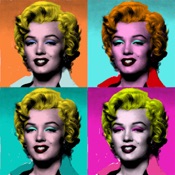 Pop Art VS.
 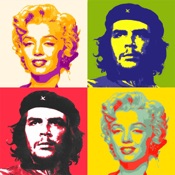 PopArt FX
1月 9, 2026