

Wake Up Well のアプリ分析 12月22日
Wake Up Well
- AppDevs
- Google Play ストア
- 無料
- ヘルス & フィットネス
Transform your Wear OS watch into a smart alarm clock that lets you wake up well.
Wake up alert and in the right mood!
Can’t remember the last time you woke up fresh and energised? Are you stuck in an endless cycle of sleeping through or ignoring your alarm clock?
Based on maximising the science of sleep, Wake Up Well has been designed to wake you up at the optimal time. Unlike the traditional alarm clock, which works to wake you up at a specific time, Wake Up Well wakes you up gently with vibrations at the optimal time – when you’re rested, relaxed and in REM or Rapid Eye Movement sleep.
What is REM?
REM Sleep was identified by sleep researchers as a phase in sleep in which a person sleeps lightly. It occurs throughout various times during sleep; one of the last instances it occurs is close to morning. It is said that during REM, the brain activity behaves similar to the brain activity during hours you are awake.
How it works
Wake Up Well detects the optimal time to wake you up. When using alarm clocks, most people’s bodies are not yet prepared or still in deep sleep. Notice that when you wake via your alarm clock’s command you’re often groggy, have a cloudy mind and lacking in energy? That’s because your body is still in deep sleep. With Wake Up Well, you’re gently awoken during REM – when your brain is more active and your body is naturally ‘waking up’.
Wake Up Well detects your slight movements during REM and in the ‘wake up window’ you set. It is during this time Wake Up Well monitors when to wake you up.
Start the day with more energy with Wake Up Well.
Features:
- improves your sleep
- assists in improving your mood
- lets you wake up fresh, animated and more energised
- uses vibrations to wake you so your partner isn’t disturbed
- especially designed for Wear OS watches
- operational on the watch only, no Smartphone needed
- detect best wakeup time
- repeating alarms (Premium only)
- wakes up at the almost awake moments
- supports all Wear OS watches
- set wake up time directly on the watch
- set a wake up window in which it wakes up at the best time regarding sleep phase (Premium only)
- configurable snooze time
- configurable alarm set reminder
In-app Products:
- Premium: Unlock repeated alarms and adjust the wake up window
- Donation
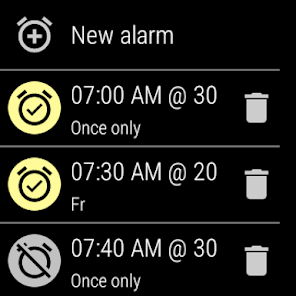
To set an alarm first open Wake Up Well on your watch. Touch "New alarm", then scroll to the time you need to wake up. This is the latest time the alarm will go off.
Swipe to the right for options. The wake up window will determine the earliest time the alarm will wake you up - based on your sleep pattern. After setting your wake up window swipe to the right again and touch the days you want the same alarm to repeat. If you want just a single use alarm do not touch any days. Once you have finished setting your alarm, swipe left to return to the original screen and swipe again to receive a confirmation window.
Use the ‘Wake Up Well’ Complication on new Watch Faces to show the next alarm time.
Please see the FAQ if you have questions.
https://www.wakeupwell.app/faq/
Wake Up Well使用ランク
使用ランクは、28日間の現在のインストール数とアクティブユーザー数を計算するSimilarwebのアルゴリズムに基づいています。
業界別 ウェブサイトカテゴリーで
米国--
ヘルス & フィットネスで
米国--








 Wake Up Well VS.
 12月 22, 2025