

BeadStudio: Fuse bead designer のアプリ分析 12月5日
BeadStudio: Fuse bead designer
- datscharf
- Google Play ストア
- 無料
- エンターテイメント
Who doesn't love the fun and creative hobby of making fuse or melty bead designs and art. From kids to grownups, from toddlers to professional artists.
BeadStudio enables you to craft creative and beautiful designs and patterns before transferring them to real pegboards making them permanent by ironing the fuse beads.
Explore new ideas and designs in the comfort of your sofa, backseat of the car or in the bus - not easily done with real melty beads.
Many different people are already using BeadStudio - from kids to artists - using it as a tool for their own designs, photorealistic artworks or pixel arts or just for recreation and meditation.
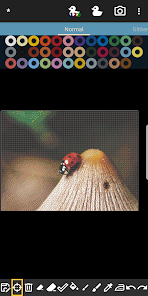
Use the built-in photo to bead conversion tool and transform your family photos, cat or landscape into designs using exactly the brand and colors of beads you have available.
BeadStudio supports all the major brands of fuse beads such as Hama Beads, Perler Beads, Artkal Beads, Nabbi Beads or Pyssla Beads in freehand artworks, figures like unicorns, bunnies, dinosaurs etc. and when making photorealistic designs.
BeadStudio supports mixing different types of beads in one single custom palette. You need that special green from brand A in your otherwise perfect brand B set of melty beads? No problem just make a custom palette!
Try out the new entertaining, meditative and calming feature: Bead By Numbers which is very similar to Paint By Numbers. Chose a variety of readily available figures, shapes and animals such as bunny, unicorn, butterfly, dinosaur, dog and many more. Each peg is numbered, select the matching fuse bead from the palette and start filling out the pattern.
Bead by numbers helps kids improve their motor skills and stimulates them to try out other similar designs using the basic design as inspiration, just with different colors. Zooming in makes the beads big enough for even the smallest fingers - BeadStudio is easy to use for kids and adults alike.
Fuse beads can be used for many different designs and projects - inspiration is all around the internet with fun and beautiful ideas like Christmas ornaments, alphabets, jewelry, necklaces, keychains, fridge magnets and even bowls baked in the oven. All perfect gifts for parents and grand-parents.
Fuse beads has been around for a long time and will continue to be a creative and entertaining pastime for all ages where in the later years melty beads has become a cool, hip and trendy thing where dedicated groups of grown-ups around the world are cultivating this hobby celebrating a nostalgic trip back to their childhood.
Using BeadStudio is as simple as finger painting. Create a new standard rectangular board or chose from many of the readymade templates, shapes and figures. If you want to change the design into real beads afterwards you should chose the brand of beads you have available such as Hama Beads, Perler Beads, Artkal Beads, Nabbi Beads or Pyssla Beads. If you don’t have all the colors then just make your own palette with the colors you have, where mixing beads from different brands is possible. Use the different tools available for placing single beads at a time or drawing/painting with the brush tool. Making mistakes is part of it; this is where undo/redo and the eraser tool comes in handy.
Generating boards from photos can make some marvelous designs, and you can control many aspects of the image before conversion such as dithering, coloring and lighting. Use the crop tool to select which area of the photo you want to convert, just set the size of the board you want to make first (such as 58x58 beads) and then the aspect ratio of the cropping area is fixed. You can now select the area and zoom in and out to your liking; it’s really simple and easy to use!
Any questions or suggestions don’t hesitate to contact me at datscharf@gmail.com
BeadStudio needs internet and external storage permissions to convert images from web storage and loading and saving designs to internal flash.
BeadStudio: Fuse bead designer使用ランク
使用ランクは、28日間の現在のインストール数とアクティブユーザー数を計算するSimilarwebのアルゴリズムに基づいています。
業界別 ウェブサイトカテゴリーで
米国--
エンターテイメントで
米国#2,671
ユーザーの興味・関心とトップカテゴリー
BeadStudio: Fuse bead designerユーザーが使用するトップカテゴリーとアプリ
















 BeadStudio: Fuse bead designer VS.
 12月 5, 2025