

Librera PRO - Book reader のアプリ分析 12月2日

Librera PRO - Book reader
- Librera
- Google Play ストア
- 有料
- 書籍 & 参考文献
Librera Reader PRO is an easy-to-use and highly configurable reading app that supports most popular document formats, including: PDF, EPUB, EPUB3, MOBI, DjVu, FB2, FB2.zip, DOC, DOCX, TXT, RTF, AZW, AZW3, CBR, CBZ, HTML, XPS, MHT, and more.
With its simple, yet powerful interface, Librera makes reading a veritable pleasure. It even features RSVP reading and a unique hands-free Musician's mode that supports auto-scrolling at a configurable pace.
Librera Reader's main features include:
✓ Easy document discovery, with option-rich and configurable lists:
● Auto-scan user-specified folders
● Browse catalogs, disks, and folders with an in-app file explorer
● Recent and Favorites folders (with a progress percentage bar and access to useful commands and menus)
✓ Support for bookmarks (fixed and movable) and annotations
✓ Individually configurable Day and Night modes
✓ Support for many popular online translators
✓ Integration of all major offline dictionaries
✓ Vertical-scroll lock
✓ Auto-centering and manual centering of zoomed pages
✓ Single-page view of dual-paged documents
✓ Musician's mode with configurable scrolling speed
✓ Read-aloud capability via a TTS engine of your choosing, with highly sophisticated (and configurable) reading rules
✓ Fast and easy document search
✓ Word search in multiple documents (and multiple-word search)
✓ Online document format conversion
✓ Support for archived books (.zip)
✓ Support for right-to-left languages (Persian/Farsi, Hebrew, Arabic, etc.)
✓ Last-read page application start
✓ Support for Online Catalogs (OPDS), book search and download
✓ RSVP reading (à la Spritz reading)
✓ Support for custom CSS code for a better reading experience
✓ Support for custom tags and grouping by them
✓ Syncing of reading progress and setup across multiple devices
✓ And many, many more...
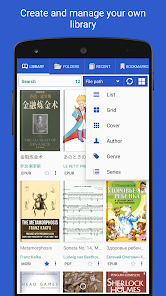
With Librera Reader, one can easily create self-maintaining libraries of all your documents by specifying which formats to include and which folders to scan.
Display your library in a list or grid layout and sort you books applying filters by path, name, size, date, etc.; and there is even a filter to help locate specific documents or document groups (e.g., Recent)
All documents are easily identified by thumbnail covers and detailed descriptions.
Documents that you read can be locked into a vertical-only scrolling mode and set to be flipped page- or screen-wise.
Librera Reader supports text reflow and annotations in PDF documents.
Configurable functionality of the volume keys, customizable fore- and background (textured or solid-color).
Excerpts (or entire pages) can be translated, shared, copied, and searched on the Internet. Shares from other apps can be read out loud, using installed TTS engines.
The list of features goes on and on and on!
This means that the only way to truly appreciate Librera Reader is to try it out.
Start with a free, ad-supported version and decide for yourself. You won't be disappointed!
Once you're convinced, please consider turning your free version into Librera PRO (by purchasing a PRO license) to help us further develop this amazing App.
Former names: Lirbi Reader, PDF Reader PRO
Librera PRO - Book reader使用ランク
使用ランクは、28日間の現在のインストール数とアクティブユーザー数を計算するSimilarwebのアルゴリズムに基づいています。
業界別 ウェブサイトカテゴリーで
ドイツ#32
書籍 & 参考文献で
ドイツ#3













 Librera PRO - Book reader VS.
 12月 2, 2025