

Update All Apps Phone Software のアプリ分析 12月3日

Update All Apps Phone Software
- TechroidApps
- Google Play ストア
- 無料
- ツール
Software Update for my phone / update software latest allows the user to update all apps in my mobile / phone. Using this app, you can determine the necessary latest updates of installed as well as system apps. Software update 2023 lets the user improve the performance of overall applications installed in the device as they can enjoy a responsive and fast system.
If a person is using an older version of the software update app 2024, then it can be said that he/she may face any error in specific app. The software update app for android / software update for my phone is helpful for the user since it provides more efficient and faster new features to the user. The update all my apps now has six main features including; scan apps, installed apps, system apps, phone update, phone information, and uninstall apps. The UI of the update apps is easy to navigate and it requires no any professional guide updates. By using update software latest app / software updater you will be — updated , 流量更新 and have upgrade version / バージョンアップ.
Features of Update All Apps Phone Software:
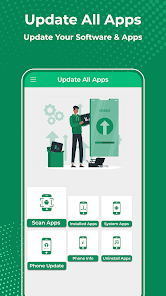
The latest update / software installation app allows the user to update new latest device software using their device. The update app includes six main features:
The scan apps feature of the phone update software app authorizes the user to scan all the apps collectively. This feature takes some time in scanning and provides the user with information regarding updates. Users can select the apps they want to updates for today.
The installed apps feature of the updater app permits the user to check updates of all the apps installed on the device. The user can easily check updates real-time of installed apps by simply clicking on check update. Moreover, the user can also search for any particular app by simply clicking on the search bar at the top.
The system apps feature of updating app lets the user check app updates of all the system apps. The user can easily find updates of system apps by simply clicking on check update. Moreover, the user can also search for any particular app by simply clicking on the search bar at the top.
The phone info feature of the up-date app allows the user to determine information regarding the device they are using, such as OS version, API level, device, model, product, version, etc.
The phone update feature of the ready all apps lets the user look for the available system updates.
The uninstall apps feature of update new permits the user to delete or uninstall the apps directly from the app. In addition, the user can also search for any particular app by simply clicking on the search bar at the top.
How to Use Update All Apps Phone Software:
By clicking the scan apps tab, the user can scan the apps on phone all at once. If there are any updates to the app available, the screen will generate a check update text on button.
The interface of recent updates / تحديث includes six main tabs; scan apps, installed apps, system apps, phone update, phone information, and uninstall apps.
If the user wants to check updates of the installed or system apps, they are required to click on the installed and system apps tab on the home screen. A list of apps will appear and the user can check updates by simply clicking on the check update tab.
By clicking on the phone updates tab of up gradation user can easily determine if there are any updates available for the system.
By clicking on uninstall apps tab of updated data app / update software latest, users can easily uninstall apps installed on the device. They simply need to click on the uninstall app tab to make it happen.
Update All Apps Phone Software使用ランク
使用ランクは、28日間の現在のインストール数とアクティブユーザー数を計算するSimilarwebのアルゴリズムに基づいています。
業界別 ウェブサイトカテゴリーで
米国--
ツールで
米国--











 Update All Apps Phone Software VS.
 12月 3, 2025