

Video locker - Photo locker のアプリ分析 1月12日

Video locker - Photo locker
- SmallCat Media
- Google Play ストア
- 無料
- ツール
Photo and Video Locker is your personal gallery where you can keep your most memorable private photos and private videos. Image locker moves your secret photos and secret videos to secret location on your phone.
This photo locker and video locker is only accessible via a secret PIN, Pattern or Finger print.
Keep Secret your gallery and No need to worry when giving your smart phone to friends and family when Image and video locker installed in your phone.
Photo and Video Locker works as image hider and video hider to hide your images and videos from others.
Just set your preferred lock type and save your photos in a private place easily. You can restore the items and share them as-well.
App is absolutely free for all users, In-App purchase is only for removing ads.
Features:
- Lock photos / videos directly from your default gallery
- Works with your device’s memory / SD card to import and export photos and videos.
- Build in Image viewer
- Build in Video player
- Password protected app access with a PIN / Pattern / Finger print.
- Recycle pin for recover deleted images, videos
- For added privacy, you can choose an alternate launcher icon (like Calculator or Notes). Your content stays secure, and the change is fully optional.
- Intruder capture - The app will take a photo of the intruder trying to open your locker with the wrong PIN or pattern
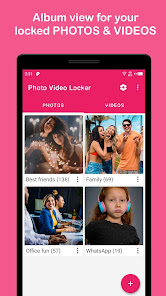
- Album View to manage your photos/videos faster.
- Sort album for easy access
- Private camera to take private photos and private videos
- No storage limitations with unlimited photos/videos.
- Does not show in ‘recent apps’ list.
- Automatically quits in device's sleep mode.
- Share locked photos/locked videos directly on social media and other Apps
- Slideshow photos
- PIN Recovery - If you forget your PIN, we will send your PIN to your registered email ID.
Note : Those who have lost their IMAGES/ VIDEOS/ DATA. Please follow the following instructions to restore (recovery) them.
1. Open App
2. Go to settings
3. and Click "File recovery"
The above instructions works only if you have not formatted the phone memory / memory card. The app only locks your files to your device, no cloud or online syncing.
Any kind of suggestion are welcome,
Contact us at smallcatmedia@gmail.com
Video locker - Photo locker使用ランク
使用ランクは、28日間の現在のインストール数とアクティブユーザー数を計算するSimilarwebのアルゴリズムに基づいています。
業界別 ウェブサイトカテゴリーで
米国--
ツールで
米国--














 Video locker - Photo locker VS.
 1月 12, 2026