

Button - Assistive Touch Tool のアプリ分析 12月3日

Button - Assistive Touch Tool
- FLUX
- Google Play ストア
- 無料
- ツール
You can launch frequently used system features, settings, and apps more easily with floating button.
*Why do I need this app?
- When it is inconvenient to use the mobile phone with both hands or when you want to use it simply with one hand.(Driving, disability, etc)
- When you want to launch features, settings, and apps while keeping app screen you are using.
- Hardware button on the phone is broken, or to prevent it.
- To make the phone screen(Home) more neat.
*How do I use it?
(1) Please allow 'Display over other apps' permission to use the button.
: This permission allows 'Button' to be used anywhere by placing it over other apps.
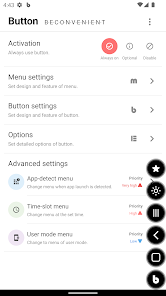
(2) 'Button' can be used all the time or can be selectively used only when the app launch is detected or at a set time.
(3) If you tap 'Button' once, the available menu appears, and if you tap it again, you can close the menu.
(4) Use it by setting menu and button with the features and designs you need.
*System
- Keep screen on, screen touch lock, screen rotation and more than 20 features.
*App
- Launch your apps and split screen is available.
*Life & Convenience
- Screenshot, screen recorder, flashlight, vibrator, magnifier, QR-code scanner, favorites
*Media
- Features for media playback and volume control
*Others
- 'Button' features and icons
*Permissions
- Display over other apps(*Mandatory)
: Enable button.
- Accessibility(AccessibilityService API)
Accessibility services must be enabled to use the following features.
: Power, Back, Previous app, Next app, Recent apps, All apps, Notifications, Quick settings, Screen off, Split screen, Automatically change menu when app launch is detected
- Exclude from battery optimization
: Prevent abnormal termination by registering as a whitelist
- Device admin
: Enable screen Off
'Button' never collects personal information, and does not use the allowed permissions for any other purpose other than the specified feature.
Thank you!
Button - Assistive Touch Tool使用ランク
使用ランクは、28日間の現在のインストール数とアクティブユーザー数を計算するSimilarwebのアルゴリズムに基づいています。
業界別 ウェブサイトカテゴリーで
米国--
ツールで
米国--





 Button - Assistive Touch Tool VS.
 12月 3, 2025