

PW55 Digital Flower Watch Face のアプリ分析 2月6日

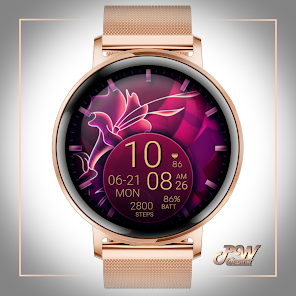
PW55 Digital Flower Watch Face
- PW Watchfaces by PAPY WATCH DESIGN
- Google Play ストア
- 有料
- パーソナライズ
I am in social media - Here you will find many more watch faces and many coupons.
TELEGRAM:
https://t.me/PW_Papy_Watch_Faces_Tizen_WearOS
INSTAGRAM:
https://www.instagram.com/papy_watch_gears3watchface/
FACEBOOK
https://www.facebook.com/samsung.watch.faces.galaxy.watch.gear.s3.s2.sport
SAMSUNG GALAXY STORE:
http://apps.samsung.com/gear/brandPage.as?sellerId=ev9qg93xra&brandId=0000001574
GOOGLE PLAY STORE:
https://play.google.com/store/apps/dev?id=8628007268369111939
PWW55 - Digi Flowers is stylish Watch Face for Wear OS
I would like to introduce you to a stylish watch face with a premium look and many setting options.
Contains information:
- 12/24hr Digital Time based on phone settings
- Date
- Day
- Steps
- Battery %
- 4 App Shortcuts - You can set any application you want
- Always ON Display
- BPM Heart Rate
HEARTRATE NOTES:
The watch face does not automatically measure and does not automatically display the HR result.
To view your current heart rate data you'll need to
take a manual measurement.
To do this, tap on the heart rate display area.
Wait a few seconds. The watch face will take a
measurement and displaythe current result.
Customization:
Possibility to change the color of the background
Possibility to change the color of the text
Possibility to select any application you want 4x
Open Galaxy Wearable on your phone → watch faces → customize and set the watch face to your preference.
or
- 1. Touch and hold display
- 2. Tap on customize option
Instalation:
PLEASE NOTE:
This app is made only for Wear OS devices.
Please select "download on your watch device" from the "INSTALL" drop-down menu.
If you can't find the app on your watch after downloading it, please use the Play Store app on your watch, use search or find it under "Apps on your phone" and install it from there. If in the store on your watch it again requires payment - please wait for a while until the synchronization takes place, soon the "set" button will appear instead of the price.
Alternatively, try installing the watch face from a web browser on your PC. Attention!!! You must have the same account!!!
Please consider that any issues on this side are NOT developer dependent. The developer has no control over the Play Store from this side. Thank you.
This watch face supports all Wear OS devices with API Level 28+
✉ If you have any questions, please contact us by e-mail papy.hodinky@gmail.com
We will be happy to assist you!
https://sites.google.com/view/papywatchprivacypolicy
PW55 Digital Flower Watch Face使用ランク
使用ランクは、28日間の現在のインストール数とアクティブユーザー数を計算するSimilarwebのアルゴリズムに基づいています。
業界別 ウェブサイトカテゴリーで
米国--
パーソナライズで
米国--


 PW55 Digital Flower Watch Face VS.
 2月 6, 2026