

SCS signer application のアプリ分析 2月1日

SCS signer application
- Digi- ja väestötietovirasto
- Google Play ストア
- 無料
- ツール
In order to be able to use the SCS signer application with a service, the service needs to support SCS interface.
SCS signer application works currently with following services:
• Kelain*: issuing electronic prescriptions (doctor, dentist)
* SCS signer application works with Kelain service, but Kela does not officially offer end user support for its usage.
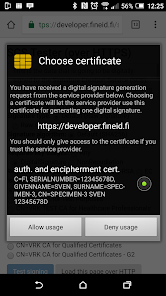
SCS signer application enables your device to authenticate and generate digital signatures in services that support the SCS interface. All you need is the SCS signer application, and an NFC enabled smart card issued by Digital and Population Data Services Agency. If you do not wish to or cannot use NFC, then you need a smart card reader. Currently, readers from ACS or SCM/Identive that can be connected to the device (either with USB-C or with Bluetooth) are supported. You can use an adapter to connect a normal USB based smart card to the device. SCS signer application works with a standard web browser (without additional extensions). Currently there is no limit on who (web site) can request SCS to sign data.
Tested card readers:
• ACS ACR39U--NF PocketMate II (USB Type-C): https://www.acs.com.hk/en/products/425/acr39u-nf-pocketmate-ii-smart-card-reader-usb-type-c/
• ACS ACR3901U-S1 Bluetooth Contact Card Reader: https://www.acs.com.hk/en/products/392/acr3901u-s1-bluetooth-contact-card-reader/
• functionality of other card readers is not guaranteed
Notes:
• SCS signer application is not allowed to run in rooted devices due to security reasons.
• During first startup SCS signer application will install a local SCS certificate (for enabling https access to SCS from browser) to your device. As a consequence to the certificate installation, your device will from time to time show you a notification stating "Network my be monitored by an unknown third party". This is an automatic notification by the Android platform to let you know that an application has installed certificates to your system.
• SCS signer application requires that your device has a secure screen lock in use. If you don't have yet, it will be setup during the setup phase.
More about Digital and Population Data Services Agency: https://dvv.fi/en/certificates
Testing site: https://dvv.fineid.fi/en/signing
SCS signer application使用ランク
使用ランクは、28日間の現在のインストール数とアクティブユーザー数を計算するSimilarwebのアルゴリズムに基づいています。
業界別 ウェブサイトカテゴリーで
米国--
ツールで
米国--
ユーザーの興味・関心とトップカテゴリー
SCS signer applicationユーザーが使用するトップカテゴリーとアプリ









 SCS signer application VS.
 2月 1, 2026