

NAV Authenticator のアプリ分析 1月21日

NAV Authenticator
- Nemzeti Adó- és Vámhivatal
- Google Play ストア
- 無料
- コミュニケーション
NTCA Identifier: Identification application of the National Tax and Customs Administration (NTCA)
The NTCA Identification application is a free program created by the NTCA, which can also be downloaded to mobile devices with Android operating system and can be used for two-factor identification.
Role of the application
For the even safer electronic administration of tax cases, the NTCA has introduced for second users a two-factor identification on the web interface of Online Invoice System. Besides user name and password, the code generated by the NTCA Identification application on the mobile device or approval of a login notification will be needed.
Conditions needed for using the application
For using the application, a secondary user account is needed in the Online Invoice System and the following technical requirements must be met:
• Android 7.0 or a higher version of operating system;
• Active internet connection;
• A camera (QR code scanner) because the user can be added by scanning a QR code.
Operations that can be executed in the application, for instance:
• Generating control codes, without having a data connection;
• Adding and deleting more users;
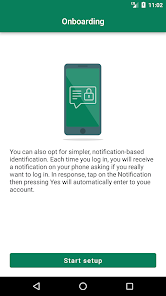
• Setting notification-based identification with data connection;
• Entering data manually if scanning QR codes is not operational.
After having downloaded the application, having provided user name and password at login, you have to make a connection between the application and Online Invoice System on the web interface. In order to make the connection between the application and the Online Invoice System, the QR code generated by the Online Invoice System must be scanned into the application with the camera of mobile phone or, if the scanning function is not operational, the 16-digit code must be entered manually. Making connection is only needed to be carried out in the course of the first use.
When switching the two-factor identification on, you, on the web interface of the Online Invoice System, have to enter the control code displayed in the application downloaded onto the mobile device. Those authentication keys, which make the login possible even in the cases when the two-factor identification is unsuccessful, will be displayed on the Successful authentication interface.
Following that, you will already be able to login to the web interface of the Online Invoice System, either by entering the code generated by the application or by approving the login notification.
The language of application can be switched to English or German, under the Settings menu item.
NAV Authenticator使用ランク
使用ランクは、28日間の現在のインストール数とアクティブユーザー数を計算するSimilarwebのアルゴリズムに基づいています。
業界別 ウェブサイトカテゴリーで
米国--
コミュニケーションで
米国--




 NAV Authenticator VS.
 1月 21, 2026