

Hello Zeblaze Watch App のアプリ分析 12月2日

Hello Zeblaze Watch App
- Tibor Borsos
- Google Play ストア
- 無料
- ヘルス & フィットネス
Unlock the full potential of your Zeblaze smartwatch!
Tired of limited smartwatch features?
This app is your perfect companion, designed to seamlessly integrate with your Zeblaze watch.
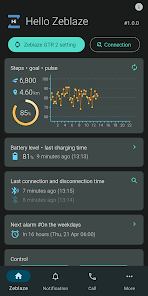
Take full control of your smartwatch's functions. Track your activities and health data with precision, create and upload custom watch faces and personalize your watch down to the smallest detail – all through a clean, modern, and user-friendly interface that puts you in control.
Supported devices
• Zeblaze Ares 3 Pro
• Zeblaze Ares 3 Plus
• Zeblaze Btalk 3 Pro
• Zeblaze Btalk 3 Plus
• Zeblaze GTS 3 Pro
• Zeblaze GTS 3 Plus
• Zeblaze GTR 3 Pro
• Zeblaze GTR 3
• Zeblaze Ares 3
• Zeblaze Vibe 7 Pro/Lite
• Zeblaze Btalk
• Zeblaze GTR 2
• Zeblaze GTS Pro
• Zeblaze Ares
• Zeblaze Lily
This app offers full standalone functionality, but it can also seamlessly work with the official Zeblaze apps (FitCloudPro, Glory Fit) if you prefer.
Please note: We are an independent developer and are not affiliated with Zeblaze.
Key features
- Works with the official Zeblaze apps or in fully standalone mode.
- Personalize your watch down to the smallest detail through a modern, intuitive interface.
- Incoming call alerts (standard and internet calls) with caller display.
- Missed call notifications with caller display.
Notification management
- Display texts from any app notifications.
- Shows commonly used emojis.
- Option to convert text to uppercase.
- Customizable character and emoji replacement.
- Notification filtering options.
Battery management
- Display smartwatch battery status.
- Low battery alert.
- Battery level chart with charging/discharging time tracking.
Watch faces
- Upload official watch faces.
- Upload custom watch faces.
- Create fully customizable watch faces using the built-in editor.
Weather forecast
- Weather providers: OpenWeather, AccuWeather.
- Location selection via map view.
Activity tracking
- Daily, weekly, monthly, and yearly charts.
- Track your steps, calories, and distance.
Heart rate monitoring
- Daily, weekly, monthly, and yearly charts.
- View data by exact measurement time, or in 15/30/60-minute intervals.
Sleep tracking
- Track your sleep with daily, weekly, monthly, and yearly charts.
Touch controls
- Reject, mute, or answer incoming calls.
- Find my phone feature.
- Music control and volume adjustment.
- Toggle phone mute.
- Toggle flashlight.
Alarm settings
- Set custom alarm times.
Do not disturb mode
- Toggle Bluetooth on/off.
- Toggle call and notification alerts on/off.
Export
- Export data in CSV format.
Troubleshooting connection issues
- On the recent apps screen, lock the app to prevent the system from closing it.
- In your phone's settings (usually under "Battery optimization" or "Power management"), disable optimization for this app.
- Restart your phone.
- Contact us by email for further assistance.
This product and its features are not designed for medical purposes, and are not intended to predict, diagnose, prevent, or cure any diseases. All data and measurements are for personal reference only and shall not be used as a basis for diagnosis and treatment.
Hello Zeblaze Watch App使用ランク
使用ランクは、28日間の現在のインストール数とアクティブユーザー数を計算するSimilarwebのアルゴリズムに基づいています。
業界別 ウェブサイトカテゴリーで
米国--
ヘルス & フィットネスで
米国--










 Hello Zeblaze Watch App VS.
 12月 2, 2025