

ZArchiver Donate のアプリ分析 12月2日

ZArchiver Donate
- ZDevs
- Google Play ストア
- 有料
- ツール
ZArchiver Donate - a special version of ZArchiver for donating to project.
Warning! Unfortunately, Google has stopped processing payments for developers from Russia for an indefinite period of time. It is impossible to purchase this application. You can find out about other ways to support the project on the website: zdevs.ru
Advantages of Pro version:
- Light and dark theme;
- Password storage;
- Image preview in archive;
- Editing the files in the archive (see notes);
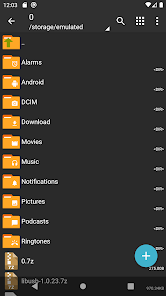
ZArchiver - is a program for archive management (including managing backup applications in archives). It has a simple and functional interface. The app doesn't have permission to acces the internet, so cannot transmit any information to other services or persons.
ZArchiver lets you:
- Create the following archive types: 7z (7zip), zip, bzip2 (bz2), gzip (gz), XZ, lz4, tar, zst (zstd);
- Decompress the following archive types: 7z (7zip), zip, rar, rar5, bzip2, gzip, XZ, iso, tar, arj, cab, lzh, lha, lzma, xar, tgz, tbz, Z, deb, rpm, zipx, mtz, chm, dmg, cpio, cramfs, img (fat, ntfs, ubf), wim, ecm, lzip, zst (zstd), egg, alz;
- View archive contents: 7z (7zip), zip, rar, rar5, bzip2, gzip, XZ, iso, tar, arj, cab, lzh, lha, lzma, xar, tgz, tbz, Z, deb, rpm, zipx, mtz, chm, dmg, cpio, cramfs, img (fat, ntfs, ubf), wim, ecm, lzip, zst (zstd), egg, alz;
- Create and decompress password-protected archives;
- Edit archives: add/remove files to/from the archive (zip, 7zip, tar, apk, mtz);
- Create and decompress multi-part archives: 7z, rar(decompress only);
- Install APK and OBB file from backup (archive);
- Partial archive decompression;
- Open compressed files;
- Open an archive file from mail applications;
- Extract split archives: 7z, zip and rar (7z.001, zip.001, part1.rar, z01);
Particular properties:
- Start with Android 9 for small files (<10MB). If possible, use direct opening without extracting to a temporary folder;
- Multithreading support (useful for multicore processors);
- UTF-8/UTF-16 support for filenames allows you to use national symbols in filenames.
ATTENTION! Any useful ideas or wishes are welcome. You can send them by email or just leave a comment here.
Notes:
File modification in the archive it is the ability to update the file in the archive after changing it in an external program. To do this: open the file from the archive, select the application (if required), edit the file, save the changes, return to ZArchiver. You will be prompted to update the file in the archive when you return to ZArchiver. If for some reason you are not prompted to update the file, the modified file can be found on the memory card in the folder Android/ru.zdevs.zarchiver.pro/temp/.
Mini FAQ:
Q: What password?
A: The contents of some archives may be encrypted and the archive can only be opened with the password (don't use the phone password!).
Q: The program is not working correctly?
A: Send me an email with detailed description of the problem.
Q: How to compress files?
A: Select all the files you want to compress by clicking on icons (from the left of filenames). Click on the first of selected files and choose "Compress" from menu. Set desired options and press the OK button.
Q: How to extract files?
A: Click on the archive name and select suitable options ("Extract Here" or other).
ZArchiver Donate使用ランク
使用ランクは、28日間の現在のインストール数とアクティブユーザー数を計算するSimilarwebのアルゴリズムに基づいています。
業界別 ウェブサイトカテゴリーで
米国#57
ツールで
米国#9
ユーザーの興味・関心とトップカテゴリー
ZArchiver Donateユーザーが使用するトップカテゴリーとアプリ
上位カテゴリー
親和性
カテゴリー内の上位アプリ
個のアプリの詳細
32%





12%





8%





7%






 ZArchiver Donate VS.
 12月 2, 2025