

Kit Analog Clock-7 のアプリ分析 1月12日

Kit Analog Clock-7
- StyleSeven.com
- Google Play ストア
- 無料
- ツール
You can use the analog clock as:
* Live Wallpaper;
* App widget;
* Topmost clock or floating clock (above all device windows);
* Fullscreen clock;
* Use the analog clock as screensaver while a device is charging;
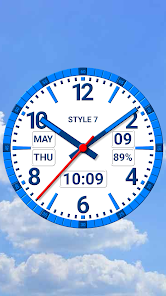
* Standard app window for view the current time, date, day of the week, month, battery charge.
The clock can hint the current time by voice by double tap and periodically, for example every one hour. And of course, much attention is paid to appearance settings.
🕒 Use analog clocks as “Night Clock” — a calm mode with economy style (black background and dark‑gray hands) that saves battery.
Random position change every minute protects the screen from burn‑in.
All options work in Fullscreen mode, Live Wallpaper, and Screensaver.
🌙 Use analog clocks as “Always on Screen” — the clock remains visible even when the screen is turned off. ⚠ Important: the function does not start automatically, you need to launch it manually in Fullscreen mode.
“Always on Screen” emulation works through additional options: 🔆 brightness control and Auto‑lock on exit.
So choose from:
* Seven kinds of dials;
* Seven kinds of hands. You can set markers and tails for them;
* Seven kinds of color themes, including as light as dark. But you can choose your colors and create your own unique style.
You can control the kind of information on the dial:
* Hide or move the date, month, day of the week, battery charge;
* Display a digital clock;
* Type your text on the dial ring, such as your name or the current year;
* Use a special serif font.
You can choose any solid color or any image from your device for the background.
There is option for select a color for the second hand or hide it.
Learn more about application modes.
* You can select the size of the analog clock and its position on the Home screen for Live Wallpaper;
* The analog clock app widget can be moved and resized on the Home screen. For Android 12 or high, the second hand is shown. You can install multiple widgets. Use tap on the app widget for open this application;
* You can set size for the topmost clock. Use "drag and drop" method for change clock position on the screen without entering the settings. Use long touch for open this application;
* You can add an additional icon on the desktop for quick launch the app in full screen mode. The screen will remain on. Use swipe for close the window.
Technical restrictions for the app widget:
* Battery charge is not shown;
* Shadows and 3D effects for hands are not shown;
* Double tap and periodic talk of the current time do not work.
* Additional restrictions for Android 11 and below: only seven standard color themes are available and the second hand is not shown.
Kit Analog Clock-7使用ランク
使用ランクは、28日間の現在のインストール数とアクティブユーザー数を計算するSimilarwebのアルゴリズムに基づいています。
業界別 ウェブサイトカテゴリーで
ドイツ--
ツールで
ドイツ--
ユーザーの興味・関心とトップカテゴリー
Kit Analog Clock-7ユーザーが使用するトップカテゴリーとアプリ








 Kit Analog Clock-7 VS.
 1月 12, 2026