

ANALOG MASTER Watch face のアプリ分析 1月9日

ANALOG MASTER Watch face
- WatchBase
- Google Play ストア
- 有料
- パーソナライズ
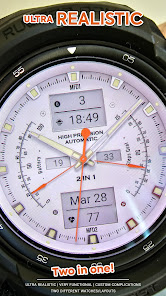
This is our new ULTRA REALISTIC watch face for Wear OS and it's here now!
Enjoy this classic look with sporty accents and four "Basketball teams" inspired screens! Easily customizable, 2 in 1 (Two different layouts of the watch), very unique and distinguished design!!
NOTE: Please read the how to section and installation section !!!
ⓘ Features:
- Ultra Realistic design.
- Classic / Sporty design.
- 2 MFD (custom complications).
- Auto 12h/24h mode.
- Four "Basketball teams" inspired themes.
- Time and date.
- Battery indicator.
- Steps goal indicator.
- Heart rate display.
- Alway On Display.
ⓘ How to:
- Long press (touch and hold) on the screen to customize.
Want another SUPER REALISTIC watch faces? Here you go:
Illuminator Digital: https://play.google.com/store/apps/details?id=wb.illuminator.digital
Luna Benedicta: https://play.google.com/store/apps/details?id=wb.luna.benedicta
WatchBase. Illuminator: https://play.google.com/store/apps/details?id=wb.illuminator.hybrid
ⓘ Heart rate info
In order for the HR to work, you must first allow health sensors.
When you apply the watch face if you see "-" or "E" heart rate was not measured,
just tap on it to measure it.
1. If you see "M" for HR value, then heart rate is being measured.
2. If you see "E" for HR value, then the heart measurement was not successful (dirty sensor or any kind of reason). Just tap to try again.
** Heart rate is not always automatically available. If not, then read the above.
ⓘ Installation
How to install: https://watchbase.store/static/ai/
After installation: https://watchbase.store/static/ai/ai.html
If you have any issues installing the watch face, please note that we have no control over the installation process or any other Google Play / Watch processes. The most common issue that people face is after they buy the watch face and install it, they can't see/find it.
In order to apply the watch face after you install it, touch and hold on the main screen (your current watch face) the swipe left to look for it. If you can't see it, tap on the " + " sign at the end (add a watch face) and find our watch face there.
We use a companion app for the phone to make the installation process easier. If you buy our watch face, tap on the install button (on the phone app) you must check your watch.. a screen will appear with the watch face.. tap install again and wait for the installation to finish. If you already bought the watch face and it still asks you to buy it again on the watch, don't worry you will not be charged twice. This is a common synchronization issue, just wait a little or try to restart your watch.
Another solution for installing the watch face is to try to install it from a browser, logged with your account (google play account that you use on the watch).
JOIN WatchBase.
Facebook page:
https://www.facebook.com/WatchBase
Facebook group (General watch faces group):
https://www.facebook.com/groups/1170256566402887/
Instagram:
https://www.instagram.com/watch.base/
YouTube:
https://www.youtube.com/@WATCHBASE/videos
Google Play page:
https://play.google.com/store/apps/developer?id=WatchBase
SUBSCRIBE to our YouTube channel:
https://www.youtube.com/c/WATCHBASE?sub_confirmation=1
https://www.youtube.com/c/WATCHBASE
ANALOG MASTER Watch face使用ランク
使用ランクは、28日間の現在のインストール数とアクティブユーザー数を計算するSimilarwebのアルゴリズムに基づいています。
業界別 ウェブサイトカテゴリーで
米国--
パーソナライズで
米国--



















![[69D] MINIMAL H](https://play-lh.googleusercontent.com/TvYcIgjTCnELe0EfWdsBiDkubEgfenNS8q5gmWF8szvTm-gF4bMV5OOOWbrl34vzBzA=s180)
 ANALOG MASTER Watch face VS.
 1月 9, 2026