

iGadget vs SF Destinations - Arrive Uso e estatísticas
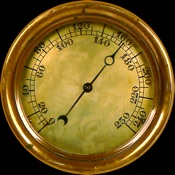
Think of it as your “Electronic Toolbox”. The iGadget App for iPhone and Apple Watch features a variety of useful and entertaining gadgets, each with a delightfully “retro” analog appearance.
Currently, the iGadget App supports the following Gadgets:
• Altimeter
• Barometer
• Compass*
• Hygrometer
• Magnifying Glass*
• Metronome*
• Rain Gauge*
• Ruler*
• Speedometer
• Spirit Level*
• Sundial
• Telescope*
• Thermometer
• Vertical Speed Indicator
• VU Meter
• Weather Vane
* Indicates Gadgets supported by iPhone only.
Altimeter - The Altimeter Gadget displays your altitude as either a standard aviation Altimeter, or as a ‘digital’ gauge, both of which are calibrated in either meters or feet.
Barometer - Displays the atmospheric pressure at your current location, with readout in hPa, mmHg and inHg.
Compass - We all want to know where we’re going, don’t we? Now your iPhone can show you at a glance your current compass heading. Just like a ship’s compass, the entire dial of the Compass Gadget rotates, so the North arrow always points to magnetic North.
Hygrometer - Displays the humidity level (%) at your current location.
Magnifying Glass - Use the iPhone's camera to view small objects and text at 10x magnification.
Metronome - Select a frequency between "Grave" (42 beats per minute) and "Prestissimo" (208 beats per minute).
Rain Gauge - View the cumulative rainfall in your current location for the last hour, last day or last week.
Ruler - Have you ever needed to measure something, but couldn’t lay your hands on a ruler? Just use your iPhone! This Gadget displays a ruler, precisely calibrated to the size of your iPhone’s screen. Yet another reason to love the larger screen-size of your iPhone 6/6s/7 Plus!
Speedometer - View your current speed using one of several classic automobile or motorcycle speedometers.
Spirit Level - Use your iPhone as a (relatively inaccurate!) Spirit Level, to measure the level of your desk, for example.
Sundial - An electronic sundial which automatically rotates the Sundial’s face so that it is orientated to the equator, whether you are in the Northern or Southern hemisphere. During daylight hours, the Sundial Gadget displays the shadow cast by the electronic ‘gnomon’ (that’s the name for the pointy thing on a Sundial). So you can use the sun’s shadow to read the time of day at your current location, even if it’s cloudy/raining. Just don’t expect it to tell you the time after sunset!
Telescope - Displays the camera image magnified 2x, 5x or 10x.
Thermometer - Displays the ambient temperature for your current location, based on local weather reports. Calibrated in degrees Centigrade and Fahrenheit.
Vertical Speed Indicator - Displays your vertical speed, as per a standard aviation VSI gauge. Calibrated in thousands of feet per minute or thousands of meters per minute.
VU Meter - Displays the ambient noise level, as detected by the microphone of your iPhone or Apple Watch.
Weather Vane - Displays the wind speed and direction at your current location. The vane's needle points into the wind, while the wind's strength is indicated by the speed at which the anemometer spins.
Configurability
On the iPhone, use the Gadget Gallery to select a specific Gadget. Alternatively, swipe right or left to step through the list of supported Gadgets.
You can also select your preferred language, units, source of weather data (currently only OpenWeatherMap), Altimeter (analog or 'digital') and Speedometer.
The 'Favourites' button allows you to register your Favourite Gadgets and step between them instantly.
On Apple Watch, the main menu allows you to select which of the supported Gadgets you wish to view.
All relevant Settings (e.g. language, units) are automatically transferred from your iPhone to your Apple Watch.
- Apple App Store
- Pagos
- Navegação
Ranking da Loja
- -
Never worry about missing your train station with SF Destinations. Receive timely alerts as you approach your station, allowing you to sit back and relax. Stay informed with all the information you need while traveling, whether you're a frequent commuter or just on a quick day trip – Destinations has something for everyone.
— STATION ALERTS —
Bid farewell to the days of worrying about missing your stop. Simply choose your station, and get notified when you're almost there. Enjoy a peaceful sleep after a long day, kick back and watch a movie, or receive an alert during your adventure to a new place!
— BE IN THE KNOW —
Trying to figure out where you are? Or how much time you have until your train station? Wonder no more!
Destinations provides real-time information on your current location, arrival time, remaining travel time, distance to your destination, and even your speed! View your location on a map and track your journey.
— CUSTOMIZABLE —
Tailor your trip to your preferences. Decide how close to your station you want to be alerted and even choose the notification sound that plays when you're almost there.
— SUPER SIMPLE —
Destinations is designed to be both beautiful and incredibly user-friendly. Whether you want to follow your trip as you travel or quickly set a destination and take a nap, Destinations can do it all and more.
New features and fixes are always on the way! If you have a feature you would like to see in the app or even a quirky bug that you found, feel free to reach out. We’re always excited to hear from our users!
We read all emails and reviews, so please leave a review below or reach out to us at support@kleincodes.com
Happy travels!
SF Destinations is not affiliated with the any rail companies.
From time to time, Destinations may briefly access your GPS in order to have higher confidence in your location. Battery life is very important to us and we do many things to ensure we use it sparingly. Please be aware that continued use of GPS services running in the background can dramatically decrease battery life.
- Apple App Store
- Gratuitos
- Turismo
Ranking da Loja
- -
iGadget versus SF Destinations - Arrive comparação de classificação
Compare a tendência de classificação de iGadget nos últimos 28 dias versus SF Destinations - Arrive
Classificação
Comparação da classificação de iGadget vs. SF Destinations - Arrive por país
Compare a tendência de classificação de iGadget nos últimos 28 dias versus SF Destinations - Arrive
Todas as categorias
Navegação
Faça comparações com qualquer site com o nosso teste grátis
 iGadget VS.
  SF Destinations - Arrive
janeiro 11, 2026