

You’ve hit your search limit
Start your free trial to keep exploring full traffic and performance insights.
Get StartedCAD Drawing | 3D Tool análises de aplicativos para 13 de janeiro

CAD Drawing | 3D Tool
- Sebastian Kemper
- Google Play Store
- Gratuitos
- Produtividade
What is a CAD drawing?
A CAD drawing is a 2D or 3D representation of the components of an engineering or construction project. CAD ("Computer Aided Design") uses software to create drawings for the entire process of a design project, from conceptual design through construction or assembly.
CAD drawing APP
Do you need an app with which you can design products in 3D quickly and easily? Would you like to create drawings yourself and have a component list created automatically so that you can easily order all the necessary components from a hardware store or online? Do you love developing DIY products yourself? Then CAD Drawing will help you, with CAD Drawing you can easily draw your product using drag & drop.
It doesn't matter whether you design your own furniture, want to construct buildings or want to try your hand at automotive or aviation. With CAD Drawing you have the right tool at hand. CAD Drawing has numerous libraries, each of which is specially designed for wooden constructions, metal constructions or in construction, i.e. architecture. But even small projects can be realized without any problems, such as drawing a tree house for the children or a new carport. Take your projects into your own hands and install CAD Drawing.
Put simply, you have an app for all your needs. Regardless of whether you are a draftsman, designer, technical draftsman, model maker, architect, carpenter or hobbyist (DIY). You benefit from the intuitive user interface and draw your product quickly and easily.
Advantages
• Use numerous 3D objects and simply drag and drop them into your drawing
• Choose between wooden, metal, stone or concrete components
• Numerous materials are used to make your project as realistic as possible
• With the integrated CAD import you can import and use various 3D data (FBX, OBJ, GLTF2, STL, PLY, 3MF, DAE).
• With the photo function you can create high-resolution images of your project
• Export a BOM as PDF from your design
CAD Drawing is used to create digital construction models including the provision of information about the material from which the desired product is made. The aim is to make drawing processes as easy as possible for the user, such as dimensioning, assembling components or adjusting scaling. By using CAD tools, repetitive work processes can be simplified, in advanced phases of the design process it is easy to make changes, so that information loss and errors do not arise in the first place.
characteristics
• 3D design view
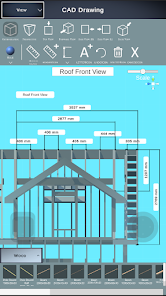
• 2D view including dimensions
• Create, edit and dimension 3D drawings
• Modification of materials
• Insertion of 3D objects by drag & drop
• Photo function
• Creation of parts lists
• Import of 3D CAD data
• Tools for drawing and editing geometry
• Annotation and dimensioning tools
Who works with CAD software?
CAD drafting software is used in all industries from design to finished product.
architecture
Architects design, construct and model buildings and landscapes using CAD tools. They develop their ideas from the concept phase to the finished building.
contractor
Contractors also use 3D CAD drawings to view construction plans in three dimensions and implement their projects. The drawings contain information about the floor plans, materials and dimensions.
hobbyist
CAD drawing tools are also being used more and more by private individuals in order to be able to better plan their ideas, especially in the DIY sector. Every idea starts with a draft, which eventually grows into the finished product.
engineer
The engineer and the technical draftsman use 3D tools every day to carry out their projects. 3D models also help with communication with colleagues or customers.
Install the CAD Drawing App today and test all functions!!!
Additional Information:
Website: https://cad-floor-plan.com
CAD Drawing | 3D Tool classificação de uso
A classificação de uso é baseada no algoritmo da Similarweb que calcula as instalações atuais e os usuários ativos ao longo de um período de 28 dias.
Todas as categorias em
Estados Unidos--
Produtividade em
Estados Unidos--
Interesses dos Usuários e Principais Categorias
Principais categorias e aplicativos usados pelos usuários do CAD Drawing | 3D Tool
Principais Categorias
Afinidade
Principais Aplicativos Dentro da Categoria
56%




12%

12%

11%

Principais concorrentes e aplicativos alternativos
Aplicativos com alta probabilidade de serem usados pelos mesmos usuários, da mesma loja.

ArcSite

magicplan

ZWCAD Mobile - DWG Viewer

KIRI Engine: 3D Scanner App
 CAD Drawing | 3D Tool VS.
 janeiro 13, 2026